
You select a folder full of small files and press Delete. Windows counts, then crawls, and the time left keeps growing. Photos from a camera, a node_modules folder, an old backup: the more files, the slower it goes, however small they are.
I timed five ways of deleting 20,000 small files on this laptop before writing any advice.
Super User has the classic version, asked in September 2019 and viewed 93,708 times. On Microsoft Q&A, a Windows 10 owner whose deletes took hours drew 30+ on Same question.
Why a folder of tiny files is so slow
Each file is its own small job. So 20,000 files means 20,000 jobs.
File Explorer adds work on top. It counts everything first, and by default it moves your files to the Recycle Bin instead of deleting them.
Other programs add a cost per file. An owner who profiled it on Super User wrote that "the AV stupidly scans files that are being deleted". Another found TortoiseGit updating its icon overlays for the files being deleted.
Status: timed on our own laptop with 20,000 test files, using Microsoft's documented commands, with owners confirming the speedup. Measured 9 October 2026.
Ours: the test laptop has an Intel NVMe SSD, Windows 11 Home 25H2 and Microsoft Defender real-time protection on, and each method got a fresh folder of 20,000 files of 20 KB, twice.
What I measured
| Method | Round 1 | Round 2 |
|---|---|---|
| rd /s /q | 4.56 s | 4.65 s |
| del /f /s /q, then rd | 4.64 s | 4.77 s |
| PowerShell Remove-Item | 6.36 s | 3.99 s |
| Windows shell delete, permanent | 8.27 s | 6.56 s |
| robocopy from an empty folder | 8.21 s | 7.85 s |
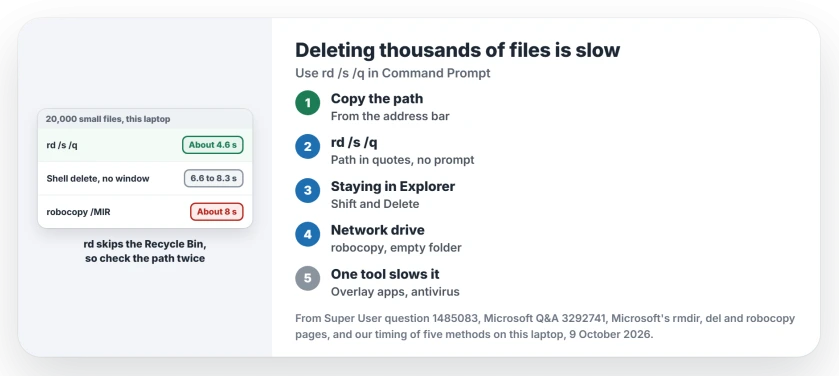
rd was the steadiest, at about 4.6 seconds both times. PowerShell swung the most, from 6.36 seconds down to 3.99.
The shell delete is Windows' own file operation code, the kind File Explorer calls, run here with no window and no Recycle Bin. The real Explorer adds its counting and progress window on top.
I did not time a delete to the Recycle Bin. That would mean emptying it afterwards.
1. Delete the folder with rd
Open Command Prompt and run rd with the folder's full path in quotes. Copy the path from File Explorer's address bar so you get it exactly right, and paste it between the quotes.
rd /s /q "D:\Photos\Old batch"Microsoft's rmdir page explains both switches. /s "Deletes a directory tree", files included. /q is quiet mode, which "Does not prompt for confirmation".
So no Recycle Bin, and no second chance. Microsoft's own caution reads "the entire directory tree is deleted without confirmation". Check your path twice before you press Enter.
The speedup is confirmed by an owner. One Super User commenter used rd on a node_modules folder and wrote that it "was shockingly fast (about 6 seconds) compared to what Explorer estimated remained (6 minutes)".
rd itself stops with Access is denied when the folder holds a file named nul, a name Windows saves for a device. Adding a path prefix gets past it.
2. Staying in File Explorer? Skip the Recycle Bin
Press Shift and Delete instead of Delete. The accepted Super User answer gives the reason: that way the deleted files "are not moved to the Recycle Bin (no recovery possible)".
It still runs through Explorer's counting and progress window, so it will not match rd. On this laptop the same Windows routine, run without any window at all, took 6.6 to 8.3 seconds, against about 4.6 seconds for rd.
If your Recycle Bin itself throws an error when you empty it, our page on a corrupted Recycle Bin covers that.
Robocopy is not the fastest everywhere
You may have read the popular trick, which is to mirror an empty folder over the full one. Microsoft says on its robocopy page that /mir "Mirrors a directory tree", the same as /e plus /purge.
/purge removes whatever is missing from the source. With an empty source, that is everything.
One Super User owner called it "BY FAR the fastest way to do it in Windows". On our local SSD it was the slowest of the command-line methods, at about 8 seconds each round.
That owner's own reason shows where it shines: network drives, and folder trees "where the path gets too long for explorer". If your path is too long, our page on paths that are too long shows robocopy at work.
On a USB drive or hard disk, everything is slower
Our seconds come from a fast internal SSD. Your drive may be far slower.
The Super User asker was on a spinning hard drive, as two answers note. The Q&A owner was deleting backups on an external drive, and each one took hours.
I could not test a hard disk here, so treat our seconds as a best case.
If a whole drive or partition holds nothing but your old files, a quick format clears it in seconds, as two Super User answers point out. It also wipes everything else on it.
Did it get slow only with one tool installed?
Then suspect that tool. TortoiseGit is one example. Its owner found TGitCache.exe busy while files were being deleted, and deleting from Git Bash or pausing its status cache sidestepped it.
Your antivirus is the other suspect, and our numbers were taken with Defender running. I would not switch real-time protection off for a delete, since rd alone took that commenter from an estimated six minutes to about six seconds.
Does File Explorer freeze when you delete even one file? That is another fault, and our page on File Explorer not responding is the place to start.
The Short Version
- Use rd /s /q with the folder path in quotes. It skips the Recycle Bin, so check the path.
- Staying in Explorer, Shift and Delete skips the Recycle Bin too.
- On our SSD, rd deleted 20,000 small files in about 4.6 seconds; robocopy took about 8.
- Keep robocopy for network drives and for paths that are too long for Explorer.
- Hard disks and USB drives are far slower; overlay tools and antivirus add a cost per file.
Where to Next
How many files were you deleting, and how long did rd take on your drive? Post your numbers in the comments.

Isaac Smith is the founder and editor of PC Glance, a website that covers computers, laptops, and technology. He is a tech enthusiast and a computer geek who loves to share his insights and help his readers make smart choices when buying tech gadgets or laptops. He is always curious and updated about the latest tech trends.