
You run ssh, git pull or scp, and a box of @ signs fills your screen: WARNING: REMOTE HOST IDENTIFICATION HAS CHANGED! Then the connection stops.
I would check the new key first, then remove the one stale line with ssh-keygen -R. That single command works on Windows, Mac and Linux.
People have asked how to clear a stale key out of known_hosts since August 2009, and that Super User thread sits at 1,106,043 views.
Why ssh stops instead of asking
Your computer keeps a fingerprint for every server it has reached, in a file called known_hosts. Microsoft documents the first visit on Windows: "Entering yes adds that server to the list of known SSH hosts on your Windows client".
When the server later sends a different key, ssh cannot tell an honest change from an attacker in the middle. So it stops, and it names the line it no longer trusts.
Honest changes are common. A rebuilt server makes new host keys, and Microsoft says a Windows server stores them under C:\ProgramData\ssh. A virtual machine can also come back on an address another machine used.
Providers rotate keys too. GitHub replaced its RSA host key at about 05:00 UTC on 24 March 2023, "out of an abundance of caution", and its notice showed this exact warning.
Ours: we reproduced it with this laptop's built-in OpenSSH 9.5. A throwaway known_hosts held a made-up key for one of our servers. ssh stopped cold with "Host key verification failed".
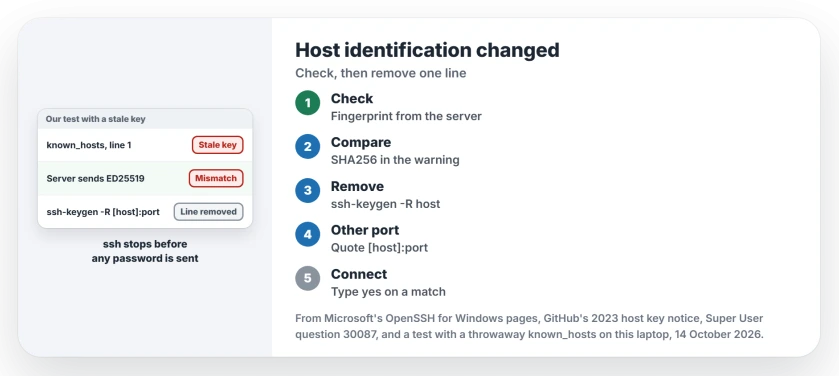
Status: reproduced 14 October 2026 with Windows' own OpenSSH 9.5p2. ssh-keygen -R removed the stale line, and the real key matched the warning's fingerprint.
1. Check the new fingerprint against one you trust
The warning prints the fingerprint the server just sent, the long string after SHA256. Compare it with a copy you get some other way.
Services like GitHub publish their fingerprints, but for your own server, read it on the server itself. The first line works on Linux, the second on a Windows server running OpenSSH:
ssh-keygen -lf /etc/ssh/ssh_host_ed25519_key.pub
ssh-keygen -lf C:\ProgramData\ssh\ssh_host_ed25519_key.pub
Do they match? Then the change was honest. If they differ, stop and ask whoever runs the server, because that mismatch is the case the warning exists for.
Ours: Git Bash's ssh-keyscan listed our server's three keys, and the ED25519 one matched the warning. Windows' own ssh-keyscan failed against that OpenSSH 9.9 server with "choose_kex: unsupported KEX method".
2. Remove the old line with ssh-keygen -R
Remove the stale entry by host name. The command finds every line for that host, even hashed ones, and keeps a backup copy.
ssh-keygen -R server.example.comIs your server on a port other than 22? Then known_hosts saved it with square brackets and the port. Use that same form, in quotes, so your shell keeps the brackets:
ssh-keygen -R "[server.example.com]:2222"Ours: our test server uses another port. The plain address came back not found. The bracket form found line 1, removed it, and saved the old file with .old on the end.
An owner on Super User, the asker, edited the file by hand instead. They deleted the line number the warning gave. "Removed line 48 and it worked!" was their comment.
I trust ssh-keygen -R more. It cannot delete the wrong line.
3. Connect again and accept the new key
Connect the way you normally do. ssh now treats the server as new. It shows the fingerprint once more and asks you to trust it.
Type yes only if it matches the fingerprint you checked in step 1, not before. Git, scp and VS Code's Remote SSH read the same file, so they start working again too.
Ours: after the removal, strict checking reported "No ED25519 host key is known for" our server. That is how a server you have never met looks.
Two warnings, one about DNS spoofing?
Sometimes your screen shows a second box first, warning about possible DNS spoofing. ssh saved the server twice, once by name and once by IP address. Only one of them changed.
One answer on the thread shows the clue, a line like "Offending key for IP in /home/user/.ssh/known_hosts:6". Run ssh-keygen -R twice, once with the name and once with the IP address.
Two shortcuts I would skip
You could delete the whole known_hosts file, which clears the warning along with every other server's fingerprint. A comment calls it a "terrible, terrible, terrible thing to propose".
You could also turn off StrictHostKeyChecking. Or point UserKnownHostsFile at a null file. Either one silences the warning for good, including the one time it is real.
Newer Macs show a different message about post-quantum key exchange, and your fix for that one is per server. And if the key is accepted but your login fails, a Windows server often wants another account type.
The Short Version
- The warning means the server's key no longer matches your known_hosts line.
- Check the new fingerprint on the server itself or with its provider.
- Run ssh-keygen -R with the host name.
- Not port 22? Use the bracket form with the port.
- Connect again and type yes only on a match.
- Never delete the whole file or switch checking off.
Where to Next
Rebuilt server, reused address or a provider's new key: which one caught you? Leave a comment with the system you connect from, and I will look at your case.

Isaac Smith is the founder and editor of PC Glance, a website that covers computers, laptops, and technology. He is a tech enthusiast and a computer geek who loves to share his insights and help his readers make smart choices when buying tech gadgets or laptops. He is always curious and updated about the latest tech trends.