

You type sudo in a Windows terminal and get an error instead of the admin prompt. Your exact error text matters more than any fix you try first.
I would read the message twice. Windows has four different sudo errors, and every one of them has its own cause.
Asked in September 2009, Super User's question on whether Windows has any sudo command now has 919,387 views. Microsoft's own answer only came with Windows 11 24H2.
Four messages, four causes
Sudo is disabled on this machine means the command is installed but switched off. Step 1 turns it on.
Not recognized as a command means Windows cannot find sudo.exe. Step 2 checks your version and your Path.
You are not allowed to run sudo is about your account, not the switch. Step 3 covers it.
Command not found after sudo mkdir or sudo dir means a PowerShell built-in. Step 4 shows the wrapper.
Ours: on this Windows 11 Home laptop at 25H2, sudo.exe version 1.0.1 sits in System32. Typed alone, it prints "Sudo is disabled on this machine. To enable it, go to the Developer Settings page in the Settings app".
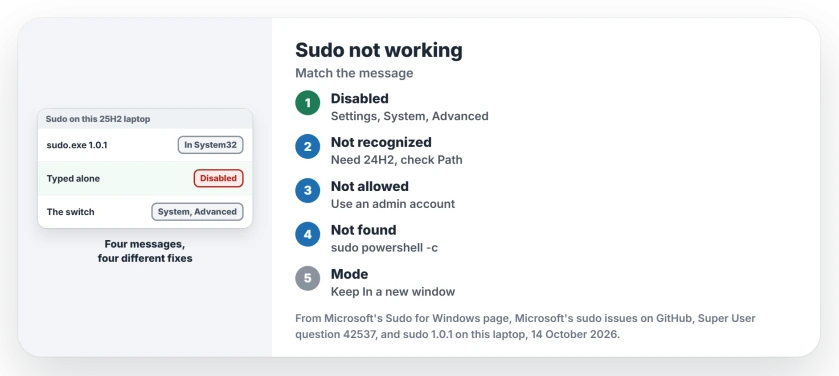
Status: sudo 1.0.1 found switched off on this Windows 11 Home PC, 14 October 2026. Microsoft now keeps its switch under System, Advanced.
1. Sudo is disabled on this machine? Switch it on
Microsoft says to open System, then Advanced, in Settings and set Enable sudo to On, and its Sudo for Windows page walks through the same steps.
The message itself still sends you to a Developer Settings page, using that older name. Ignore that. On 25H2 the switch lives under Advanced, so you can skip hunting for a Developer Mode switch first.
You will see an admin prompt when you flip it. The switch carries its own warning, too: "Running the sudo command could expose your device and personal data to security risks or harm your device."
Switch flips back by itself? On Microsoft's sudo issue tracker, one owner watched it revert a few seconds after each click, on three PCs in February 2024.
A command in a Terminal opened as administrator turned it on for them. They reported "it is now working".
sudo config --enable forceNewWindowThat is the default mode, a new window. Microsoft recommends it "unless you are familiar and comfortable with the risks associated with the other sudo configurations".
2. Not recognized? Check your version, then your Path
Microsoft states that sudo "is available in Windows 11, version 24H2 or higher". Press Win+R, type winver and press Enter to see yours. The box shows a line such as Version 25H2, with the build number after it.
On Windows 10 or an older Windows 11, there is no sudo.exe to find, so the error is simply telling you the truth. Use Run as administrator instead. Right-click Command Prompt or Terminal to get it.
The runas command from the accepted 2009 answer works too, though it asks for the other account's password. For a sudo-style tool, Microsoft's page names gsudo by Gerardo Grignoli, who posted it on that same question in 2019.
Already on 24H2 or later? Then your Path, the list of folders Windows searches for commands, may have lost System32.
An owner on build 26200 hit exactly that in November 2025, in a PowerShell window. Findstr failed the same way. They traced both to a Windows update that had dropped entries from their environment variables.
Type where sudo in Command Prompt. Ours: on this laptop it prints C:\Windows\System32\sudo.exe, the copy Windows ships.
If yours prints nothing, check the Path. Search Start for environment variables and open the result; under Environment Variables, Path should still hold %SystemRoot%\system32.
A 32-bit PowerShell does not break sudo. Windows keeps a second copy in SysWOW64, and a 32-bit PowerShell here found it at once. That trap belongs to ssh, when it is not recognized, since its OpenSSH folder exists only in System32.
3. You are not allowed to run sudo? Check your account
A member of the sudo project explained on the tracker that your message "is specific to when the user is not a member of the admins group".
Owners report the same pattern. One saw it in September 2026, right after turning their everyday account into a Standard User.
Sudo will not ask for another account's password the way your User Account Control box can. Microsoft's page says sudo "does not support running programs as other users".
So on a work PC with a separate admin account, right-click your app and use Run as administrator, which does ask for that password.
Is your account an admin already? Then check User Account Control. An owner on Windows Server 2022 hit the message on the built-in Administrator account, with it set to Never notify.
The project member replied, "I'm betting that's what it is." Put User Account Control back to its default level.
I would do that anyway. Never notify switches off the very prompts that stop programs from changing your PC behind your back.
4. Command not found after sudo mkdir?
In PowerShell, mkdir and dir are built into PowerShell itself rather than being programs on disk. Sudo starts programs, so it cannot find them.
A project member gave the fix on the tracker: start PowerShell through sudo and hand it your command as text.
sudo powershell -c 'mkdir test'In Command Prompt, the short form works. The same member wrote that sudo handles cmd's own commands as a shortcut "to help cmd users".
Which sudo mode should you pick?
Settings offers three under Configure how sudo runs applications: In a new window, With input disabled, and Inline.
Microsoft describes Inline as "most similar to how sudo behaves on other operating systems". It is also the riskiest.
I would keep the new window. Microsoft warns that in the other two, "It is possible for malicious processes to attempt to drive the elevated process".
One of Microsoft's own examples on that page edits the hosts file with sudo notepad. If your edit seems to change nothing, test the hosts file with ping before blaming sudo.
The Short Version
- Sudo is disabled on this machine: Settings, System, Advanced, Enable sudo.
- Switch will not stay on: run sudo config --enable forceNewWindow as administrator.
- Not recognized: check winver for 24H2, then run where sudo.
- You are not allowed to run sudo: use an admin account, with UAC prompts on.
- Command not found: wrap PowerShell commands in sudo powershell -c.
Where to Next
Did sudo answer you with a fifth message? Copy it exactly into the comments, along with your Windows version, and I will find the step it belongs to.

Isaac Smith is the founder and editor of PC Glance, a website that covers computers, laptops, and technology. He is a tech enthusiast and a computer geek who loves to share his insights and help his readers make smart choices when buying tech gadgets or laptops. He is always curious and updated about the latest tech trends.