

You copy a logo with a see-through background and paste it into PowerPoint, Word or Photoshop. The clear parts come out solid black.
The picture itself is fine, so I would blame the copy. Windows hands a picture over in several forms, and only some of them keep transparency.
Its Super User question, from January 2011, has 279,304 views. A PowerPoint version on Microsoft Q&A shows 300+ on its Same question button.
Where the black comes from
Windows' oldest picture format for copying, the plain bitmap, has no room for transparency at all. For a 32-bit picture stored that way, Microsoft's bitmap header page says "The high byte in each DWORD is not used".
That unused byte is where opacity would go. A clear pixel is saved as black with zero opacity. An app that ignores opacity paints it black.
Ours: we put a test picture with clear corners on the clipboard and read back the plain bitmap Windows offered. Its corner pixel held four zero bytes. Nothing marked it as clear.
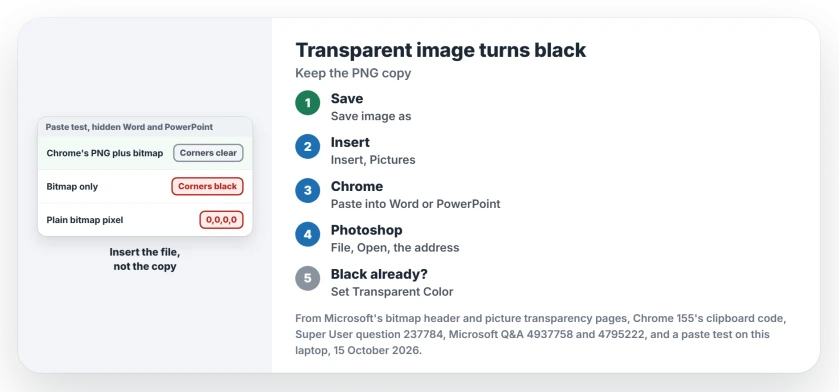
Status: tested 15 October 2026 by pasting one test picture into a hidden Word and PowerPoint on this laptop, with Chrome 155's clipboard code and Microsoft's bitmap pages.
1. Save the picture, then insert the file
A saved file keeps its transparency. Right-click the image in your browser, choose Save image as, then use Insert, Pictures in Word or PowerPoint, or File, Open in Photoshop.
An MVP gave that answer on the 300+ PowerPoint thread: "use the browser's command to save the image to your computer". The asker replied "I had also managed to figure this one out".
On Super User, the accepted answer is blunt: "Copy-Paste doesn't maintain transparency". Saving the file was the asker's habit too.
2. Copying from Chrome or Edge? Paste where PNG is read
Chrome now puts two copies on the clipboard. One is a PNG, the other a newer bitmap that can carry opacity. Edge runs on the same Chromium code.
A comment in Chrome's own clipboard code explains why: "Some programs only support one or the other".
Ours: with Chrome's pair on the clipboard, Word and PowerPoint both took the PNG and kept the corners clear. With only a bitmap, both stored black corners.
So when a picture from Chrome still turns black, the app you pasted into is reading the bitmap. An owner found Paint.NET kept transparency "when copied from IE, FF, or Chrome".
Copying from a PDF reader or an older app hands over only the bitmap. The black is set before you paste. A 2011 Q&A thread with 80+ on its Same question button hit exactly that with a picture copied out of a PDF.
Paint can also shrink a pasted screenshot, for a different reason.
3. In Photoshop, open the picture's address
Photoshop on Windows accepts a web address in the file name field of its File, Open box. Copy the image address in your browser, paste it into that field and press Enter.
An owner described it in 2014. In their words, "Photoshop/Windows will download the URL to a temporary file and open it". A commenter had "no idea Photoshop could open straight from a URL".
Mac users are out of luck, since that Open box has no field for an address.
Already pasted in black? Clear one color in Office
In Word or PowerPoint, select the picture, then Picture Format, Color, Set Transparent Color, and click the black. Microsoft's transparency page for Word says this "works best with simple, solid-color pictures, such as clip art".
There is a trade. Every black pixel goes clear, black lettering included. Microsoft states that "You can't make more than one color in a picture transparent". I keep it for logos with no black of their own.
The several-copies idea also explains quote marks that appear when you copy from Excel.
The Short Version
- Windows' plain bitmap copy has no transparency, so clear pixels arrive as black.
- Save the picture and insert the file: it always keeps transparency.
- Chrome and Edge also copy a PNG, which Word and PowerPoint keep clear in our test.
- In Photoshop on Windows, paste the image address into File, Open.
- Already black in Office: Set Transparent Color, if the logo has no black of its own.
Where to Next
Which app turned your picture black, and where did you copy it from? Put both in a comment. I will test the pair if it is not on this page yet.

Isaac Smith is the founder and editor of PC Glance, a website that covers computers, laptops, and technology. He is a tech enthusiast and a computer geek who loves to share his insights and help his readers make smart choices when buying tech gadgets or laptops. He is always curious and updated about the latest tech trends.