
A notification from Encrypting File System asks you to back up your file encryption key, and you never encrypted anything. It can look like malware.
It is a real Windows prompt. I would find out what made the key before you answer it, because one of its buttons can cost you files later.
On Microsoft Q&A, one thread about this pop-up shows 200+ on its Same question button and another 100+. A Super User question from 2010 adds 48,704 views.
What made a key you never asked for
The prompt belongs to EFS, the Encrypting File System, which encrypts single files on an NTFS drive. It is not BitLocker, though owners whose drives use BitLocker get it too.
Windows shows it once your account holds an EFS key, whoever or whatever made it. Its own text says a backup "helps you avoid permanently losing access to your encrypted files".
Something made that key, and owners traced theirs to Office 2010 saving to SkyDrive, to the 1Password 4 password manager, and once to a Trojan.
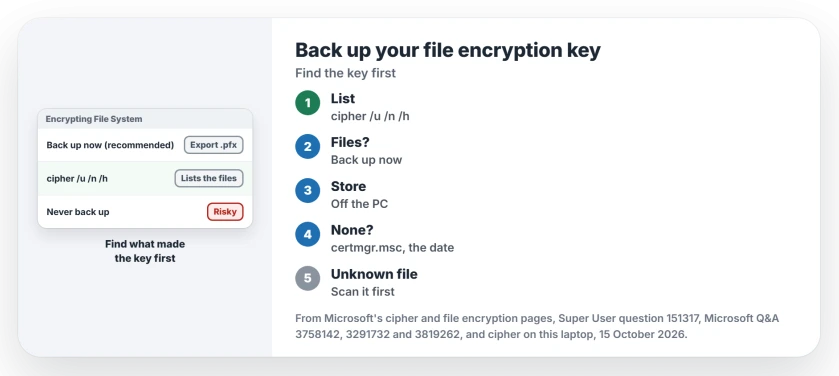
Status: on 15 October 2026, cipher /u /n /h scanned every drive of this Home laptop in 11 minutes and found nothing. Microsoft's cipher and file encryption pages checked too.
1. List every encrypted file first
Run this in Command Prompt. It takes a while. Here, the scan of every drive ran for about 11 minutes:
cipher /u /n /hMicrosoft's cipher reference says /u "Finds all encrypted files on the local drive(s)". With /n, "no updates are made", and /h adds hidden and system files.
Keep the /n. Without it, Microsoft says, /u compares your keys and updates them if they have changed.
The list names your culprit. An owner found that "my password manager 1Password was the cause of this message" this way. Another found a Trojan in their Startup folder.
Ours: on this Home laptop the scan listed no encrypted files at all.
2. Files you need? Back up the key now
Need those files? Take the backup. The pop-up's own button reads "Back up now (recommended)".
An asker on the 100+ thread found where it leads: "it opens Certificate Export Wizard". Set a password for the file there, and store that password apart from the backup.
Missed the pop-up? An owner found the same tool in Control Panel, User Accounts, User Accounts, under "Manage your file encryption certificates".
Keep the .pfx file off the PC. Windows' own prompt says "You should back up the certificate and key to removable media".
From Command Prompt, cipher /x makes the same backup without the wizard. Microsoft says it "Backs up the EFS certificate and keys to the specified file name".
3. Nothing listed? Check the certificate's date
Press Windows+R, type certmgr.msc and press Enter, then open Personal and its Certificates folder. Look for one whose Intended Purposes column says Encrypting File System.
Its date points at whatever made it. The Super User asker matched theirs to the day they saved a document to SkyDrive from Office 2010, then deleted it: "I don't get the popup anymore".
I would export that certificate before deleting anything. A file encrypted with it, found later, would not open again without the key.
A Q&A asker on a BitLocker work PC saw the same pattern: cipher found nothing, and one certificate carried the date the prompt began.
An empty Personal folder can also mean you opened the wrong scope; compare the user and computer consoles before assuming the key is absent.
Ours: this laptop holds 14 personal certificates, and none has the Encrypting File System purpose.
A file you do not recognize?
Scan it before you back anything up. The owner who found the Trojan cleaned it off with a removal tool, and Windows Security can scan a single file from its right-click menu.
If Windows Security shows a red X instead of a scan, reset it first.
Is Never back up safe?
I would only pick it when cipher listed nothing and you use no EFS at all. Windows' own text for that choice warns "You could lose access to your encrypted files".
Back up later is gentler. In Windows' words, "Windows will remind you the next time you log on".
On Windows 11 Home you should rarely meet it, since Microsoft states "File encryption is not available in the Home edition of Windows". BitLocker has its own half-finished state, waiting for activation, which this prompt is not.
The Short Version
- The pop-up means your account holds an EFS key, often made by an app.
- Run cipher /u /n /h and keep the /n, so nothing is changed.
- Files you need: choose Back up now and keep the .pfx off the PC.
- Nothing listed: check the EFS certificate's date in certmgr.msc, and export it before deleting.
- Never back up is safe only when cipher lists nothing.
Where to Next
What did cipher list on your PC, and which app made the key? Tell me in a comment. Every new cause goes into step 1.

Isaac Smith is the founder and editor of PC Glance, a website that covers computers, laptops, and technology. He is a tech enthusiast and a computer geek who loves to share his insights and help his readers make smart choices when buying tech gadgets or laptops. He is always curious and updated about the latest tech trends.