
You start your old Mac while holding T. The Thunderbolt and USB symbols fill its screen, yet the other Mac shows nothing. No disk icon, nothing in Finder. The cable must work, because one Mac is charging the other.
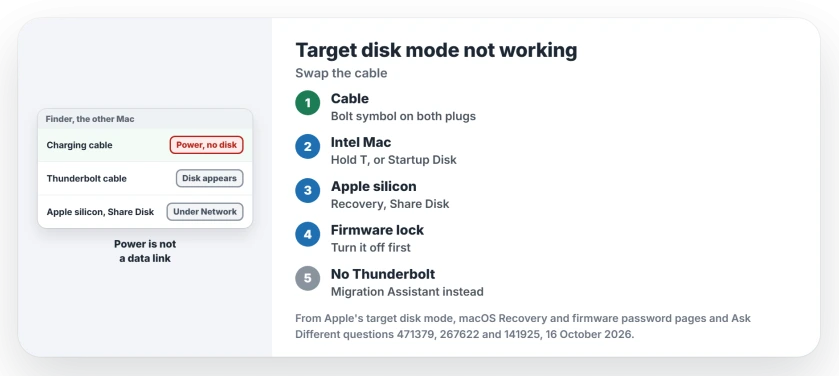
That charging is the clue I would chase first. A cable that carries power does not always carry the link target disk mode needs.
Ask Different's question about moving files between two USB-C Macs has 83,332 views, and its question on target disk mode for a MacBook Air has 44,561.
Why a charging cable fools you
Apple's target disk mode steps open with one line: "Connect the two computers with a Thunderbolt cable". When it works, "a disk icon appears on the desktop of the other computer".
A 2024 asker followed those steps with no luck. Their MacBook was even drawing power from the iMac. An answerer asked whether this was the charging cable from the box, because "that will not be enough". It was.
With a Thunderbolt 3 cable bought for 33 dollars, the asker reported that "it did the job perfectly".
Owners said the same in 2017: the USB-C cable that came with the 2016 MacBook Pro "does not work" for this, so suspect the one that came with your Mac.
Ours: none. No two Macs were cabled together here; the cable result is the asker's own.
Status: Apple's target disk mode and Share Disk steps for macOS 27, held up on 16 October 2026 against Ask Different threads dated 2014, 2017 and 2024.
Look for the bolt on both plugs
Check your cable's plugs. A Thunderbolt cable carries a lightning-bolt symbol on each connector, a detail one reader used to tell them apart. Swap one in. Then start the old Mac in target disk mode again.
Hold T while it starts up. Already running? Apple's other route is System Settings, then General, then Startup Disk, where a Restart in Target Disk Mode button waits.
On the other Mac, open a Finder window. The target Mac shows in the sidebar, and you drag files to and from it.
Apple silicon shows up under Network
Target disk mode belongs to Intel Macs. Apple describes it as the moment "the Intel-based Mac appears as an external hard disk". A Mac with Apple silicon has no T key for it.
Instead you start that Mac in macOS Recovery, holding the power button, and choose Utilities, then Share Disk. Apple says any of three cables will do here: "a USB, USB-C, or Thunderbolt cable".
Do not wait for a disk icon on your desktop. Apple's steps say to click Network in the Finder sidebar, open the Mac, then choose Connect As and Guest.
One answerer summed it up: these Macs "act as SMB file servers when in target mode, not external drives".
Mixing the two kinds is fine. One answer in that 2024 thread said otherwise. Then the asker's Intel iMac, in target disk mode, opened on an M1 MacBook Air once the right cable went in.
A firmware password can block the T key
On an Intel Mac with a firmware password, holding T may do nothing. A long-time answerer wrote that "The T key works for all my cases where the Firmware Lock isn't engaged". Another owner found that was their problem.
Apple's firmware password page describes the lock: without the password, you "can't start up from macOS Recovery or any disk other than the designated startup disk". If you know it, turn it off from Recovery and try T again.
No Thunderbolt port at all?
Older MacBook Air models with a Mini DisplayPort cannot do this. The port looks the part. But it "is purely a video out port, and cannot be used for data transfer, despite the identical connector".
The same answer points those owners to Migration Assistant over a wired network connection. If that crawls, the size check on our Migration Assistant page comes first.
And if the target disk appears but refuses to open, the checks for a drive that refuses to mount apply to it as well.
Why does the other Mac charge but show no disk?
Because a USB-C cable can carry power without carrying a Thunderbolt link. The charging cable passes power. So the connection looks alive, yet Apple's steps for target disk mode call for a Thunderbolt cable. The 2024 asker's new Thunderbolt 3 cable fixed it.
Does FileVault stop target disk mode?
Not in one owner's experience. They wrote that "Target Mode does work when FileVault 2 enabled", with the same warning about Apple's USB-C cable from the box. I would still keep the target Mac's password handy before you start.
The Short Version
- Charging is not proof of a data link; target disk mode wants a Thunderbolt cable.
- Look for the lightning-bolt symbol on both plugs.
- Start the Intel Mac holding T, or use Restart in Target Disk Mode in Startup Disk settings.
- A Mac with Apple silicon uses Share Disk in Recovery and appears under Network, not on the desktop.
- A firmware password can stop the T key, and a Mini DisplayPort Air cannot do this at all.
Where to Next
Which pair of Macs did you finally get talking, and over which cable? Name both models in a comment; I will add working pairs to this page.

Isaac Smith is the founder and editor of PC Glance, a website that covers computers, laptops, and technology. He is a tech enthusiast and a computer geek who loves to share his insights and help his readers make smart choices when buying tech gadgets or laptops. He is always curious and updated about the latest tech trends.