
Unblocking a phone number on Android starts in the Phone app's blocked-number list. Phone by Google uses Clear followed by Unblock, while Samsung Phone uses a red Minus beside the entry.
Check which phone app is installed before following the route.
Remove the number in Phone by Google
Open Phone, tap More, then choose Settings > Blocked numbers. Find the exact number, tap Clear beside it, and select Unblock to confirm.
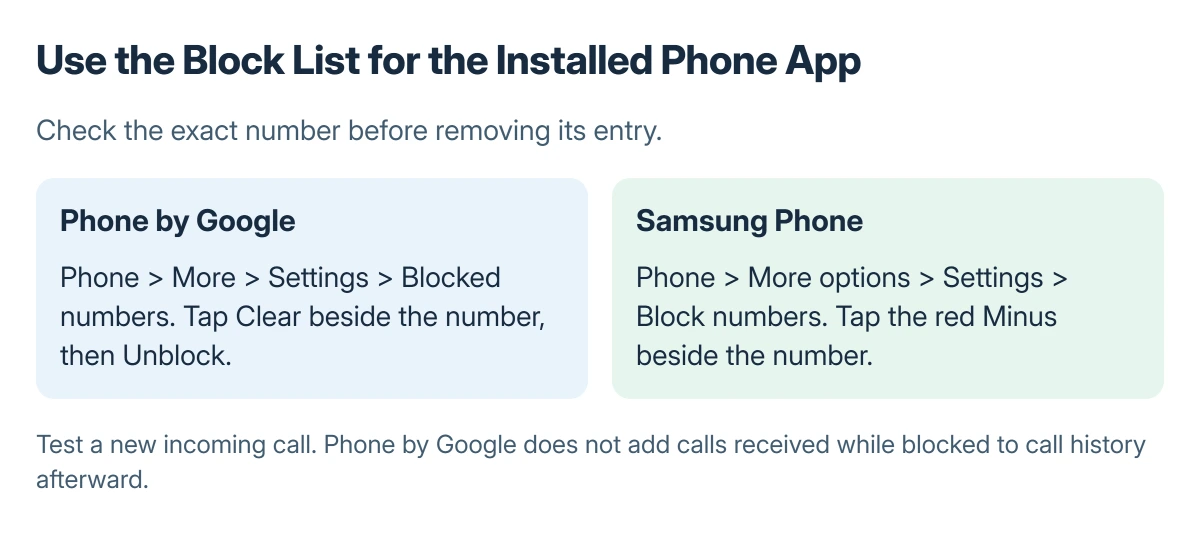
Status: Google and Samsung's documented Phone app controls. The picture compares routes, not real app screens. No number or call setting was changed here.
The procedure is documented by Google in its block and unblock instructions. Check the entry carefully when several numbers belong to the same person. Removing one number does not remove another blocked entry automatically.
Google says calls received while the number was blocked will not appear in call history. Unblocking it therefore does not produce a missing record of those earlier attempts. Test with a new call after the list has changed.
Use the Samsung Phone blocked list on Galaxy
Open Samsung Phone, tap More options (the three dots), then Settings > Block numbers. Remove the intended entry using the red Minus icon. Samsung documents this separate control rather than Google's Clear and Unblock confirmation.
For a saved contact, Samsung also provides Contacts > the contact > More > Unblock contact. Check the blocked list afterward if the person has more than one number.
Phone app labels and available call features can vary by model, software and carrier. If the menu does not match either route, check the phone manufacturer's instructions for the actual calling app.
Check unknown-caller rules if the call still fails
Google states that Unknown in Phone by Google blocks private or unidentified numbers. It does not block every number missing from Contacts. Turn it off only when those unidentified calls should be allowed.
Samsung's unknown-caller and Smart Call controls differ, so read the label on that phone rather than assuming Google's definition applies to Samsung's setting. Removing a named number can leave a separate filtering rule active.
Ask the caller to make a new call from the number just unblocked. If it reaches voicemail, check the Android voicemail setup separately; the greeting itself does not establish whether the number remains blocked.
Follow the wider call problem when needed
If Phone closes before the list can be opened, use the Android app crashing checks for that app failure. Ask the carrier about service or carrier filtering when the device block list is clear.
A block in another messaging or calling app is also separate. Change that service's own setting when the problem occurs there rather than removing unrelated contacts from the phone.
The Short Version
Use Phone's blocked-number list and remove the exact entry. Google uses Clear and Unblock; Samsung uses the red Minus. Check unknown-caller rules separately, then test a fresh incoming call.

Isaac Smith is the founder and editor of PC Glance, a website that covers computers, laptops, and technology. He is a tech enthusiast and a computer geek who loves to share his insights and help his readers make smart choices when buying tech gadgets or laptops. He is always curious and updated about the latest tech trends.