
A Spectrum router can look like a tall black tower with a rounded or sloping top. Its WiFi 6, 6E and 7 models look similar. Read the equipment label before unplugging or resetting anything; the shape alone will not identify the model.
The useful checks are the model code, the labeled ports and the matching manual. These distinguish similar-looking routers and help locate the box that supplies your phone or laptop's Wi-Fi.
Compare the tower, then read its label
Spectrum's equipment-manual list includes several generations. Its WiFi 6 and 6E manuals show tall, tapered towers with angled, rounded tops. The WiFi 7 illustration has a more rounded top and a broad lower vent area.
The diagram compares those general shapes. It is a guide to recognition, not an exact-size picture. Check the printed model code to settle which manual applies.
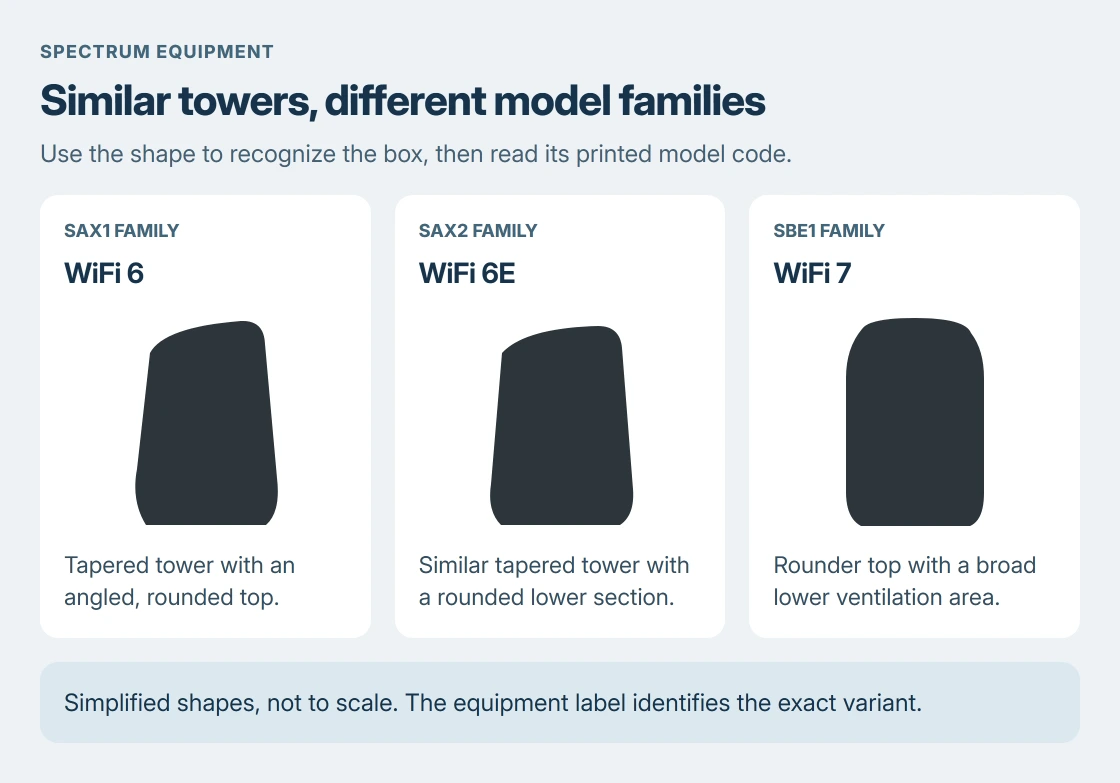
Status: Spectrum's WiFi 6, 6E and 7 manuals checked 24 October 2026. Shapes follow their illustrations; no router was inspected in person.
| Model shown on the label | Spectrum's equipment family |
|---|---|
| SAX1 family (SAX1V1X in the manual's example) | WiFi 6 router |
| SAX2V1S or SAX2V1R | WiFi 6E router |
| SBE1 family (SBE1V1X in the manual's example) | WiFi 7 router |
The WiFi 6E manual uses SAX2V1X as a placeholder for its S and R variants. The WiFi 7 manual also uses an X placeholder. Match the code actually printed on the device, including its final letter.
An older model or a customer-owned router can look different. A shape missing from this comparison does not prove the equipment is wrong. Search Spectrum's list using the label, or ask support to identify it.
Check the Internet port without moving the cables
On the documented separate routers, Internet or WAN labels the Ethernet connection toward the modem. Ethernet or LAN labels the connections for local devices such as a PC.
The WiFi 6 and 6E manuals show three local Ethernet ports. The WiFi 7 guide distinguishes a 10G Internet port from 2.5G and 1G Ethernet ports. Use the wording on the equipment instead of relying on socket color.
The modem and router comparison explains the two jobs. A Spectrum router connected to a separate modem is the Wi-Fi box; the modem provides the incoming service connection.
If the cables disappear behind furniture, read the labels before disconnecting them. Avoid pulling a device from a tight space merely to compare its silhouette. A model code from the app or account can be a better starting point.
Find the Wi-Fi details after identifying the box
On the WiFi 6E label, fields documented by the vendor include default Wi-Fi details, a serial number and a MAC address.
The label's QR code opens the My Spectrum app download. It is not a network-join code in these manuals. Check what the phone's camera offers to open before following it.
The printed network details are defaults. If the household changed them, use the current details in the account or My Spectrum app. The network-name and password guide covers that distinction.
Google says to choose a network through Settings > Network & internet > Internet in its Android Wi-Fi instructions. Enter its current password when prompted.
A Galaxy phone may place Wi-Fi under Connections instead. Use the Wi-Fi page for the phone being connected; identifying the router does not change the phone's menu layout.
For a Windows 11 laptop, Microsoft documents Manage Wi-Fi connections in the taskbar's quick settings. Its network-joining instructions cover selecting the name and entering the password.
Read lights and reset instructions for that exact model
A status light tells you what the identified router is doing. It is a poor way to identify the router itself because colors and patterns differ between generations.
For example, the WiFi 6E manual describes red pulsing as a connectivity issue with no internet. The WiFi 7 manual distinguishes red easing for connectivity without management access and solid red for router trouble.
Do not hold Reset to identify a box. Spectrum's manuals distinguish a restart from a longer factory-reset hold, and warn that a factory reset removes customized settings. Use the matching manual for any repair.
If the label is unreadable or the unit does not match the listed manual, contact Spectrum with its serial number through a private support channel. Ask them to confirm the model and which device needs attention.
The Short Version
Spectrum's black towers look similar. Read the label's model code and the port names. Use that model's manual for lights and controls, and the current network details when joining Wi-Fi.

Isaac Smith is the founder and editor of PC Glance, a website that covers computers, laptops, and technology. He is a tech enthusiast and a computer geek who loves to share his insights and help his readers make smart choices when buying tech gadgets or laptops. He is always curious and updated about the latest tech trends.