
Earbuds turn an electrical audio signal into sound with tiny moving drivers. Wireless earbuds receive that audio over Bluetooth and use their own batteries.
To start listening, charge them, pair them with the phone or computer, then select them as the sound output.
The charging case, Bluetooth connection and speakers have different jobs. Understanding those jobs explains why a charged case can sit beside silent earbuds, or why paired earbuds still play nothing.
Follow the sound from the phone to your ears
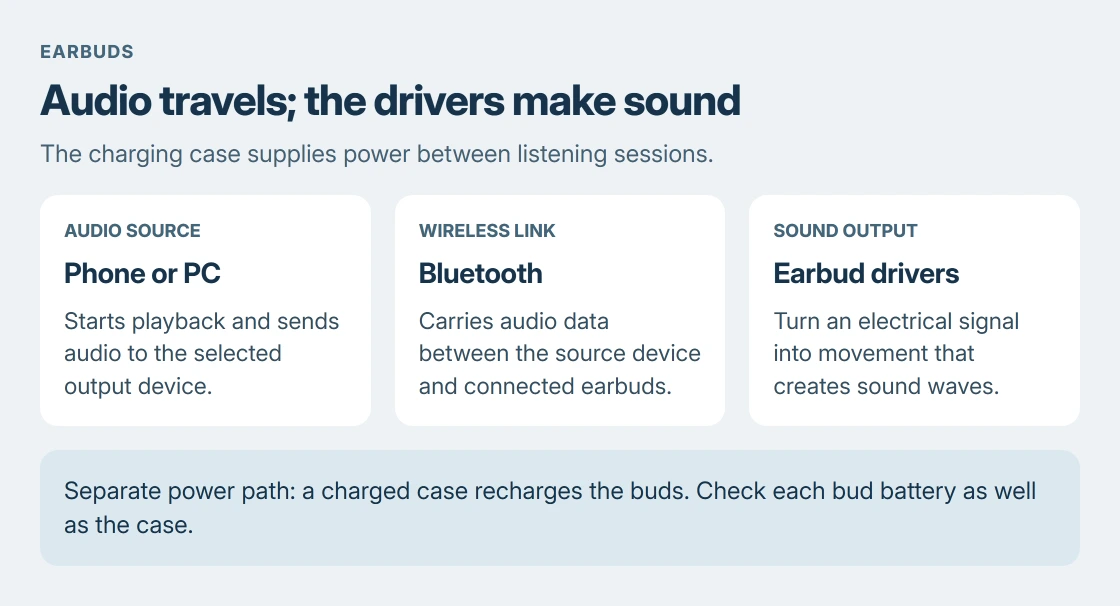
With Bluetooth earbuds, the phone or computer sends audio data over a radio connection. Electronics inside the earbuds process that data and drive the speakers. The radio carries the signal; the speakers create the sound.
Bose describes the driver in its headphone-driver explanation as a system that turns electrical input into movement of a diaphragm. That movement produces the sound waves reaching your ears.
Status: Google's Pixel Buds setup and charging instructions and Bose's driver explanation checked 24 October 2026. No earbuds were connected or tested.
Wired earbuds receive audio through a cable instead. Their connector must match the device: a headphone jack, USB-C or another supported connection. An adapter's shape alone does not establish audio compatibility.
Pairing remembers a device; connecting makes it usable
Pairing introduces the earbuds to a phone or computer so the devices can recognize each other later. A saved entry in Bluetooth settings does not mean the earbuds are connected right now.
For a documented example, Google's Pixel Buds setup instructions use an open charging case with the earbuds inside. Hold its pairing button until the earbuds status light pulses.
Then open the other device's Bluetooth menu and select the Pixel Buds. On Android, Pair new device opens the list. Wait for the connected status before starting playback. Other brands have their own pairing controls and light patterns.
For an already paired set, Google says removing the earbuds from their case starts reconnection. When they were last used with another device, select them in the intended device's Bluetooth menu to reconnect there.
That is why the phone and laptop can both remember the same earbuds while only one plays through them. Some models support connections to multiple sources; that capability needs checking for the particular model.
The case recharges the earbuds instead of playing the music
True wireless earbuds have batteries inside the buds. Their case stores additional power and supplies it through the charging contacts when the buds are seated correctly. The case also needs recharging.
Google states in its charging guide that Pixel Buds can charge inside a charged case even when the case is unplugged. Match the left and right buds to their respective wells.
Check each earbud's battery reading, rather than judging both from the case percentage. Google provides individual bud levels in the Pixel Buds settings. A full case reading does not establish that both buds charged.
The advertised total listening time with a case includes recharging stops. It is different from the time the earbuds can play continuously between charges. Features such as noise cancellation also affect battery life.
Wireless charging support belongs to the specific case. A USB-C charging socket does not establish that the case can charge on a wireless pad. Check the model's manual before buying a charger for it.
Controls and microphones depend on the model
An earbud can include microphones for calls, voice commands and noise control. Taps, squeezes or buttons send commands to its electronics or the connected device. The available actions vary between models.
Noise cancellation is an extra processing function, separate from receiving music. The ANC guide explains why steady noise and nearby speech behave differently.
Touch controls also need their model's instructions. A hold that changes noise control on one pair can start pairing or change volume on another. Start with a comfortable playback volume before trying unfamiliar controls.
When the earbuds connect but stay silent
Check the playback device's output selector and choose the earbuds. Confirm that playback is running and its media volume is audible. A remembered Bluetooth entry, a connected radio and the selected sound output are separate checks.
If the connection itself keeps failing, the two-sided Bluetooth reset procedure covers removing the old pairing before following the headset's own reset instructions.
For a bud that still will not charge or play, give the maker's support team its model, each bud's battery reading and whether another source works. Those details distinguish a charging fault from a connection problem.
The Short Version
Drivers make the sound. Bluetooth carries wireless audio, and the buds' batteries power playback. Pair the correct device, select its audio output and check both bud batteries. The case supplies recharge power between listening sessions.

Isaac Smith is the founder and editor of PC Glance, a website that covers computers, laptops, and technology. He is a tech enthusiast and a computer geek who loves to share his insights and help his readers make smart choices when buying tech gadgets or laptops. He is always curious and updated about the latest tech trends.