
ESET Online Scanner runs a downloaded Windows program to check for malware. It does not scan the PC inside a browser. Get it from ESET, choose a scan scope, and keep the result log before removing the tool.
Download the scanner rather than the security-suite trial
Open ESET's Online Scanner page and use the download for the free Windows scanner. The same page promotes ESET HOME Security Premium, which is a different product with a trial.
The distinction is documented by the vendor: Online Scanner performs an on-demand check, while the security suite supplies ongoing protection. A scan does not require replacing the antivirus already protecting the computer.
Status: ESET's scanner, quarantine and monthly-scan instructions checked 24 October 2026. No scanner was downloaded or run on this laptop, and no detection result is claimed.
Run the downloaded executable, choose a language, and select Get started. Approve the Windows permission prompt only for the ESET program you deliberately obtained. Read the terms and choose the feedback options before continuing.
On a managed computer, ask IT to approve the tool first. For a routine built-in check instead, the Windows scan options cover Microsoft's scanner without another download.
Match the scan to the files that need checking
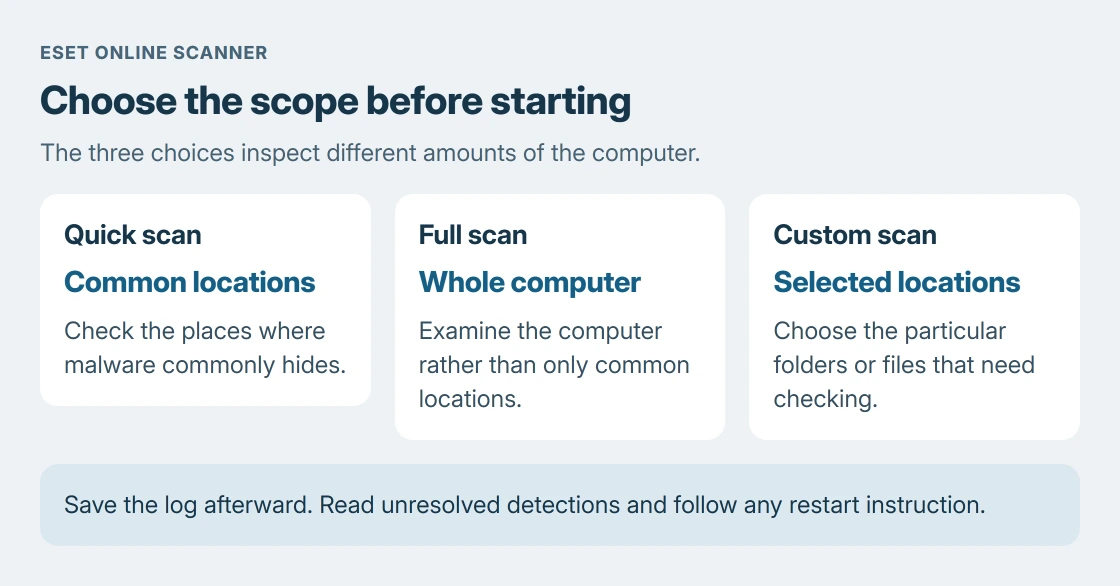
Choose the scope before pressing Start scan:
- Quick scan checks locations where malware tends to hide. It leaves other files outside that scope.
- Full scan checks the whole computer and can take several hours, depending on the stored data.
- Custom scan lets you select particular locations, such as the folder holding a suspicious download.
Choose whether to detect potentially unwanted applications. That category can include bundled software rather than a virus, so read the eventual detection name and affected file instead of treating every category as identical.
The scanner downloads detection-module updates before beginning. Keep an internet connection available for that stage. Its progress display shows the current file; the time taken depends on the selected scope and data.
Save the log and distinguish resolved from unresolved items
At completion, select Save scan log. Open View detailed results when detections appear. ESET's quarantine instructions separate Resolved detections from Unresolved detections.
Resolved items were cleaned; unresolved items still require attention. ESET says a restart is necessary to clean the unresolved group. Save other work, follow the restart instruction, then check the reported outcome.
Quarantine holds detected files safely. To inspect it later, reopen Online Scanner and choose the Quarantine tile. Restoring a file returns it to use, so do not restore a detection merely because an application stopped working.
The recommendation to retain the log is ours: it preserves the detection name, path and action for support. If cleanup fails or a threat returns, give ESET Support those details rather than repeatedly restoring the file.
Choose a one-time check or a monthly schedule
ESET offers optional Periodic scanning after the initial run. Its monthly-scan page explains choosing a day and time. Leave that feature disabled when only a single check is wanted.
Save the report and settle any quarantine questions before selecting Delete application data on closing. ESET documents that option as removing the scanner; its quarantine page says uninstalling removes all quarantined files.
Microsoft says Windows Security provides ongoing antivirus protection. Confirm an active provider remains after this check. A monthly scan does not inspect each new file as it arrives.
The Defender buying decision explains when the included protection can be sufficient. A clean ESET report describes that completed scan, rather than proving every account or future download is safe.
The Short Version
Download Online Scanner from ESET, choose Quick, Full or Custom, then save its log. Read unresolved detections and restart when requested. Decide separately about monthly scans, quarantine and removal of the tool.

Isaac Smith is the founder and editor of PC Glance, a website that covers computers, laptops, and technology. He is a tech enthusiast and a computer geek who loves to share his insights and help his readers make smart choices when buying tech gadgets or laptops. He is always curious and updated about the latest tech trends.