
Emails not sending from Outlook often stay in the Outbox because the app is offline or one message has an attachment the provider will not accept. Check the oldest unsent item, then try a short email without an attachment.
Next, send the same kind of test through your provider's website.
That separates an Outlook app problem from a mailbox restriction. New Outlook, classic Outlook and Outlook.com have different controls, so use the instructions for the one open on your PC.
Check where the message stopped
Open the Outbox for the account used to send. Check the oldest waiting message first. An item in Drafts may still need its Send button pressed; a delivery-failure email needs its own error read.
Microsoft says a large outgoing message can prevent later messages from sending in its Outlook sending guidance. Use a brief message with no attached file as the comparison.
Status: Microsoft's current Windows Outlook and Outlook.com sending instructions checked October 27, 2026. No mailbox was accessed or message sent for this article.
Sign in to the same account on the provider's own website and try the short message there. Gmail accounts need Gmail's website, for example; Outlook is the app, not necessarily the account provider.
If web sending succeeds, concentrate on the app sections. If it fails there too, go to the mailbox section. Our comparison uses the same account so a working second mailbox does not hide the original failure.
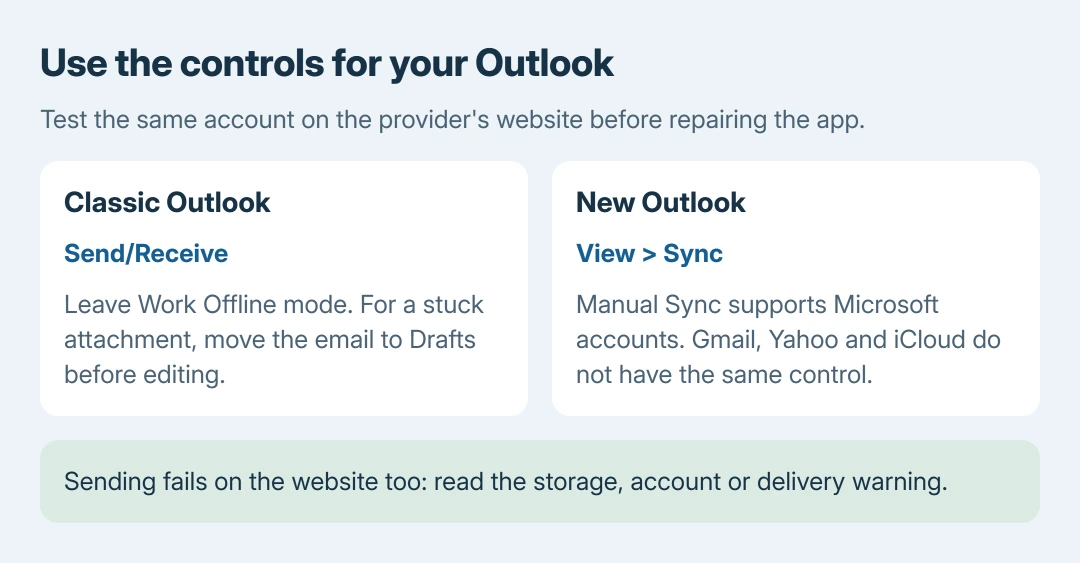
Classic Outlook: leave offline mode
Look at the bottom status bar. Working Offline, Disconnected or Trying to connect means Outlook is not communicating normally with the server. Check that a webpage loads on that PC too.
For Working Offline, open Send/Receive and click Work Offline to turn offline mode off. Then choose Send/Receive All Folders. The status should leave Working Offline and the test should move out of the Outbox.
If it remains disconnected with working internet, complete any account sign-in request. A recent password change can require authentication again. The Outlook password procedure explains the account-specific choices.
If mail sends only after a manual Send/Receive, check File > Options > Advanced > Send and receive > Send immediately when connected. Microsoft's stuck-email instructions explain that control.
Enable it, select OK, then try a new short message. A grayed-out control can be managed by an administrator. This setting belongs to classic Outlook, which has the File menu.
Release a message with a large attachment
Keep the original file safely stored before editing the queued email. An attachment-free test that sends while the original waits points toward that message's contents or size.
In classic Outlook, select Send/Receive > Work Offline temporarily. Move the stuck email from Outbox into Drafts, open it and remove the oversized attachment. Close and reopen Outlook if it says the message is already being transmitted.
Turn Work Offline off again when finished. Use a smaller file or a sharing link, checking who can open the link before sending. Microsoft's procedure uses offline mode to release the message for editing, not as the final state.
In new Outlook, open the unsent message in the Outbox and remove the attachment if editing is available. If the app will not release it, preserve the text before deleting or recreating anything. Avoid repeatedly submitting the same email.
Provider limits differ. Microsoft's general troubleshooting page flags attachments over 20 MB for checking, while its Outlook.com page describes a 25 MB attachment restriction.
Neither number is a universal limit for every account in Outlook.
New Outlook: refresh and complete account sign-in
For a Microsoft account with sync trouble, open the View tab and select Sync. Watch for the status message at the bottom of the message list, then check whether the queued test leaves.
Microsoft states that Gmail, Yahoo, iCloud and generic POP/IMAP accounts do not have the same manual Sync capability. Reinstalling the app will not add that control to an unsupported account.
If Outlook requests authentication after a password change, select the account name, choose Continue when offered and complete sign-in. Do not create an app password unless the provider specifically requires that method.
Sending fails on the website too
Read any storage or account warning before repairing Windows software. Microsoft documents that full Microsoft cloud storage can block both sending and receiving.
Free space through the account's storage controls or resolve the plan issue, then test again.
For Outlook.com, Microsoft's mailbox sending page covers blocked accounts, attachment restrictions and new-account sending limits. A work mailbox restriction needs the organization's mail administrator.
A non-delivery report may name a nonexistent address, a full recipient mailbox or a receiving-server rejection. Correct the named problem rather than resending unchanged.
An email appearing in Sent Items proves neither acceptance nor reading by its recipient.
If webmail works but classic Outlook still fails, the Office repair choices are the next app-level check. For new Outlook, use its Help support route. Provide the error, account provider and web-test result.
The Short Version
Find the oldest queued message and compare an attachment-free email with webmail. Restore classic Outlook's online state, reduce a blocking attachment or complete account sign-in.
Failures on the website need the provider's storage, restriction or delivery checks.

Isaac Smith is the founder and editor of PC Glance, a website that covers computers, laptops, and technology. He is a tech enthusiast and a computer geek who loves to share his insights and help his readers make smart choices when buying tech gadgets or laptops. He is always curious and updated about the latest tech trends.