
Voicemail on iPhone has separate phone-side and carrier services to turn off.
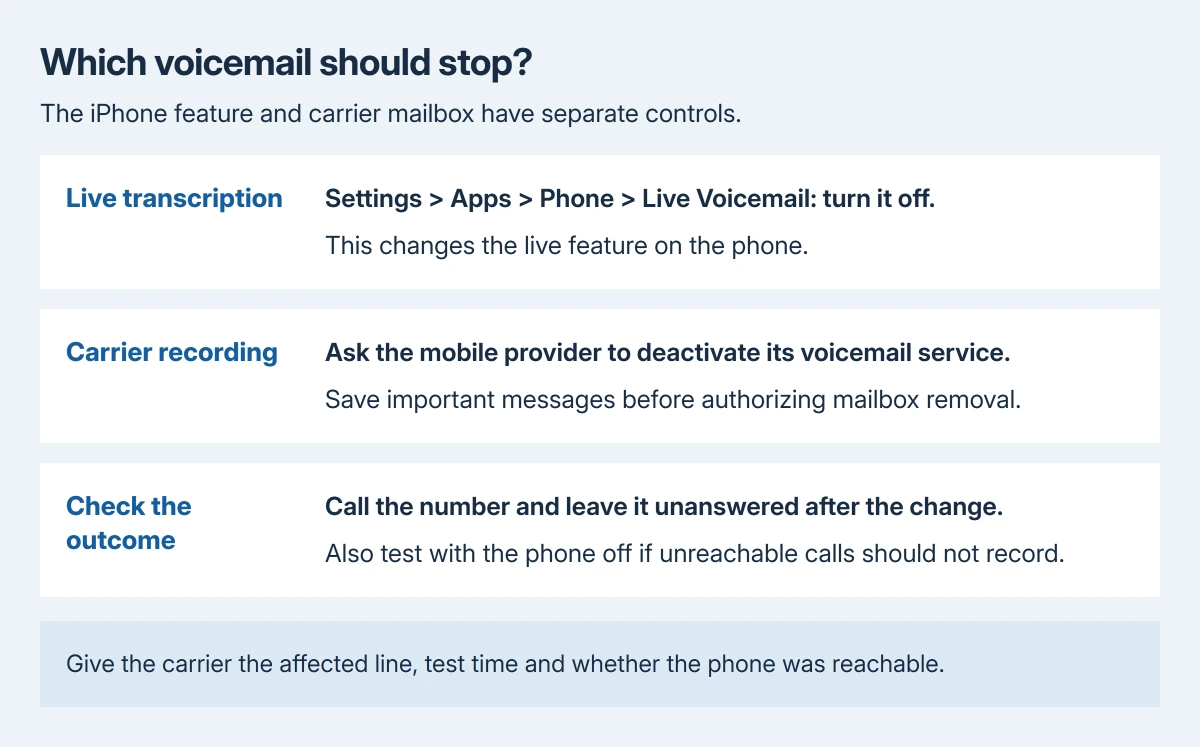
Switch off Live Voicemail under Settings > Apps > Phone > Live Voicemail to stop the iPhone's live transcription feature. Carrier voicemail requires a separate change with the mobile provider.
If callers can still leave messages afterward, that alone does not establish a failed iPhone switch. The carrier can answer calls when the phone is off or outside coverage too.
Switch off Live Voicemail in Phone settings
Open Settings, tap Apps, then Phone. Open Live Voicemail and turn its switch off. On older iOS layouts without the Apps section, Phone is directly in Settings.
Apple documents the feature in its voicemail setup guide. Live Voicemail displays a transcription while someone leaves a message and allows the call to be answered during it.
Status: Apple's Live Voicemail controls and carrier fallback checked October 29, 2026. AT&T documents carrier-mailbox removal by support request. No phone line or voicemail was changed.
This stops that live feature on the phone. It does not establish that the network mailbox has been removed. Continue with the provider if the goal is to stop callers leaving any voicemail at all.
If the switch is missing, check the installed iOS version and whether the feature is supported in that country, language and carrier configuration. Apple says availability varies. Ask Apple about an eligible phone with no control.
Ask the carrier to remove its voicemail service
Contact the provider for the affected mobile line and request voicemail deactivation, rather than only a voicemail password reset or a change to Visual Voicemail. Ask how unanswered and unreachable calls will behave afterward.
AT&T's turn-off instructions provide a support request for permanent feature and mailbox removal. AT&T customers can call 611 from an AT&T wireless phone for that request.
Mailbox removal through AT&T support is documented by the vendor. Other networks can apply different plan limits. Use that carrier's current support channel rather than assuming AT&T's number applies to every SIM.
Save important messages before authorizing mailbox removal. Confirm with the provider whether its change deletes the existing mailbox, whether deactivation is reversible, and whether the plan permits it.
For an iPhone with two lines, identify the number whose voicemail should stop. Ask about that line specifically. Deactivating one provider's mailbox does not establish what the other number will do.
Verify the result with an unanswered test call
After the carrier confirms its change, call the affected number from another phone and leave it unanswered. Our check is to listen for whether a mailbox still offers to record a message.
Repeat with the iPhone powered off if the provider says the change also covers unreachable calls. A working phone-side setting and a network-side mailbox can produce different results in those two conditions.
If recording is still offered, give the provider the called number, test time and whether the iPhone was reachable. Ask it to confirm the mailbox status and the conditional forwarding rules on that line.
Avoid entering a forwarding-cancellation code copied from another carrier. Supported codes and the services they affect vary; use one only when the provider confirms its effect for the actual plan.
Keep alert silence separate from mailbox removal
A silenced call or a muted voicemail alert is not evidence that recording has stopped. If the real problem is calls going straight to voicemail, inspect the Focus and ringing controls instead.
A missing list in Phone has a different remedy again. The voicemail layout and carrier checks help locate existing messages; changing the list's layout does not deactivate the service.
After a confirmed carrier removal, unexplained recordings need the provider to review the line.
If only Live Voicemail remains active despite its switch being off, contact Apple about that remaining behavior.
The Short Version
Turn off Live Voicemail in Phone settings for the live feature. Ask the carrier to deactivate its own voicemail when all message-taking should stop. Save needed recordings first, then verify with unanswered and unreachable-call tests.

Isaac Smith is the founder and editor of PC Glance, a website that covers computers, laptops, and technology. He is a tech enthusiast and a computer geek who loves to share his insights and help his readers make smart choices when buying tech gadgets or laptops. He is always curious and updated about the latest tech trends.