
You have gone looking for your voicemail and the tab has vanished, or your missed calls are not where they have always been. Nothing has been deleted.
iOS 26 redesigned the Phone app and folded calls, missed calls and voicemails into a single list.
The button you want is called Filter, and I will show you exactly where Apple has put it.
Where it went, and the three taps to reach it
The control you want is in the top corner, not the bottom row.
Apple's steps in Use Unified layout in the Phone app are exact.
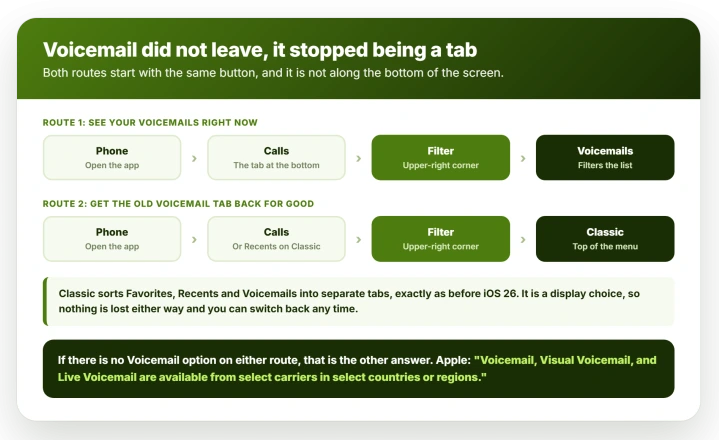
Open Phone, tap the Calls tab, tap the Filter button in the upper-right corner, then tap Voicemails.
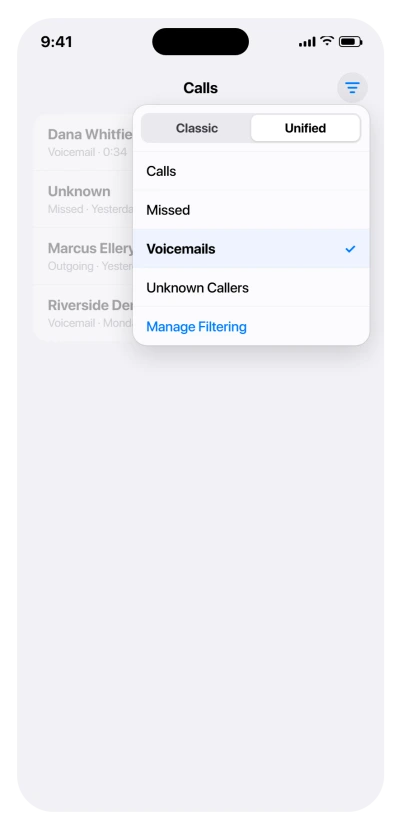
That filters the Calls list down to voicemails only. Apple also gives you the way back: "After choosing a filter, you can return to the default Unified view by reopening the filter menu and tapping Calls."
The same menu holds Missed and Unknown Callers, and Apple notes that extra filters such as Spam "depend on your carrier". That one unremarkable button is the whole navigation system for the new Phone app.
Get the Voicemail tab back permanently
If a filter you have to remember is not good enough, the old layout is still there and switching is a two-second job in the same menu.
- Open Phone.
- Tap the Calls tab, or Recents if you are already on Classic.
- Tap the Filter button in the upper-right corner.
- Tap Classic or Unified at the top of the menu.
Apple describes Classic as sorting your Favorites, Recents and Voicemails "into separate tabs", which is the arrangement every iPhone had before iOS 26.
Choose it and the Voicemail tab reappears along the bottom, badge and all.
Nothing is lost either way. This is a display choice, not a data setting, and you can move between the two as often as you like.
On iOS 27 a different Phone app fault turned up, with the app opening on the keypad every time. The keypad page has the restart that brought the Contacts tab back for one owner.
If there is no Voicemail option at all, look at your carrier
This is the case the competing pages skip, and it is the one where no amount of tapping helps.
Apple sets the limit in its voicemail setup guide: "Voicemail, Visual Voicemail, and Live Voicemail are available from select carriers in select countries or regions."
Visual Voicemail is the feature that produces a readable list of messages inside the Phone app.
Without it, your carrier still takes messages, but there is no list to show, so no filter and no tab will produce one. You dial in and listen instead.
Two things follow from that:
- A brand-new line or a switched carrier can lose the list even though nothing on the phone changed, because the new carrier does not offer the feature.
- A data-only or travel plan is a different case again. Those often carry no voice service at all, so there is no voicemail to list rather than voicemail without a list.
If you are in that position, the question for your carrier is whether Visual Voicemail is available on your plan, not whether voicemail is working.
If they say it is on your plan and you still have no list, install any pending carrier settings update: connect to Wi-Fi, open Settings > General > About, wait ten to twenty seconds, and tap Update if a Carrier Settings Update prompt appears.
Then restart. If that changes nothing, ask them to reprovision Visual Voicemail on the line itself rather than just confirm the plan includes it.
Apple documents how to reach messages anyway. Its instruction is to tap Voicemail and follow the prompts, which dials the carrier system rather than opening a list.
That instruction assumes the Classic layout, where a Voicemail entry is visible.
Apple does not say so, and every other section on that page splits by layout while this one does not, so read it as an un-updated page rather than a Unified route you are failing to find.
Switch to Classic first.
From any other phone, Apple gives a manual route: dial your own mobile number, press the star key or the hash key depending on your carrier to bypass your greeting, then enter your voicemail password.
If that password is the thing you do not have, Apple puts the reset at Settings > Apps > Phone > Change Voicemail Password.
The alert sound for a new message is separate again, at Settings > Sounds & Haptics > New Voicemail, which is worth checking if your real complaint is that voicemails arrive silently.
Voicemail transcription has the same limitation, and Apple flags it separately: it "is available from select carriers in select countries or regions".
So text you saw on an old phone or an old network can simply stop appearing on a new one.
If the messages are actually gone rather than hidden
Everything so far assumes your voicemails still exist. Sometimes they do not, and Apple is specific about how that happens.
First, check the recovery list. Get to your voicemails the usual way, by the Filter button then Voicemails in Unified, or the Voicemail tab in Classic, then scroll to the bottom for Deleted Messages.
Tap the message you want, then tap Undelete.
Deleted voicemails are not always gone immediately, and this is the first place to look before assuming the worst.
Then two causes to know about, both stated by Apple in its voicemail guide:
- Your carrier can erase them. Apple's wording is that messages "are saved until you delete them (or until your carrier erases them, if they're not stored in iCloud)". That parenthesis is the argument for turning on the iCloud switch described further down, because it is what takes your messages out of the carrier's hands.
- Changing your SIM can take them with it. Apple: "In some countries or regions, deleted messages may be permanently erased by your carrier. Your voice messages may also be deleted if you change your SIM card."
That second one catches people who never touched the Phone app.
Moving to a new plan, swapping a physical SIM, or setting up a line on a new handset can all end with an empty voicemail list, and our guide to an eSIM stuck on Activating covers the point in that process where the old line stops being yours.
If a message matters, save or share it before you change anything about the line.
New on iOS 27: voicemails vanished after the update. A forum thread with 16 Me too describes exactly this, including messages from family members who have died. One owner got them back.
Their order matters: "What worked for me is I first verified they were still on my carriers server". They dialled their own voicemail, saved each message there, then ran Reset Network Settings and reconnected to Wi-Fi, and the list came back.
A Level 9 volunteer added some hope for the patient: "I've had what I expected to be a lost voicemail reappear", after four or five days. So call your voicemail first, and save anything precious there before you reset anything.
Store voicemails in iCloud, so the carrier is not the only copy
Voicemails can sync, and when they do not the cause is usually a single switch rather than a fault.
Apple's route is Settings, tap your name, tap iCloud, tap See All next to Saved to iCloud, then turn on Phone & FaceTime.
Apple's description is that you "can store and sync your Live Voicemail and Carrier Voicemail in iCloud", and that stored messages "sync across your devices".
So a message on the iPhone and not on the iPad is worth checking that switch for first, rather than assuming anything is lost. Both devices also need to be signed in to the same Apple Account.
This is also the switch referred to earlier. Once messages are stored in iCloud, Apple's caveat about your carrier erasing them, which applies only to messages "not stored in iCloud", stops applying.
The badge that will not clear
A red count on the Phone icon after you have listened to everything is its own long-running annoyance, and it survives the layout change.
Start by separating two things.
Apple's sentence about the badge is specifically about the Voicemail icon inside the Phone app: "A badge on the Voicemail icon shows the number of unheard messages." The count on the Phone app icon on your Home Screen is broader than that, and an unopened missed call will hold it up on its own.
That changes the order to check in.
- Check missed calls first. Tap the Filter button and choose Missed. This is the step that gets skipped, and an unopened missed call keeps the count up no matter how many voicemails you play.
- Then check every voicemail. In Unified, filter to Voicemails so you are looking at the full list rather than a mixed one. In Classic, open the Voicemail tab, where an old message can be sitting unplayed.
- Play any straggler in full, then delete it.
- Check Blocked Messages at the bottom of the voicemail list. A blocked caller can still leave a message, it arrives with no alert at all, and our blocked numbers guide explains why.
- Only then think about the carrier. If a count survives all of that, Apple publishes no further fix and neither does anyone else. Something is still flagged unheard somewhere you cannot see. Your carrier can check what their system thinks is outstanding, which is worth one call, but do not expect a setting on the phone to clear it.
Voicemail summaries, if you have Apple Intelligence on
A quieter change, and it explains text appearing where you did not expect any.
Apple notes that "if you have Apple Intelligence turned on, voicemail summaries appear in-line with missed calls that left voicemails". So a one-line gist can sit in the Calls list next to the missed call itself.
That is separate from Live Voicemail, which transcribes a message as it is being left and can be turned on at Settings > Apps > Phone > Live Voicemail.
Apple flags that Live Voicemail "isn't available in all countries, regions, or languages".
To stop message-taking, separate Live Voicemail from the carrier mailbox before requesting deactivation.
One interaction to know if unknown numbers go quiet on you: Apple states that with Silence Unknown Callers on, "unknown numbers go directly to Live Voicemail without ringing you first", while carrier-identified spam calls "don't go through Live Voicemail and are instead instantly declined".
Our guide to blocked numbers still getting through covers those controls in full.
What does not help
- Hunting along the bottom of the screen. In the Unified layout there is no Voicemail tab to find. The control is the Filter button in the upper-right corner.
- Reinstalling or resetting anything. This is a layout change, and the switch back to Classic is free and instant.
- Assuming missing messages mean lost messages. Check the layout first, then the carrier's Visual Voicemail support, then the iCloud switch.
- Blaming iOS 26 when calls are not reaching you at all. That is a Focus or Do Not Disturb question, and our guide to an iPhone that is not ringing deals with it.
Status: current for iOS 26.6. Apple last revised its Unified layout page on 4 May 2026, and both layouts remain available. Recheck if a point release changes the Filter menu.
Where is voicemail on iOS 26?
In the Unified layout it is a filter rather than a tab. Open Phone, tap the Calls tab, tap the Filter button in the upper-right corner, then tap Voicemails. To get a permanent Voicemail tab back, tap Classic in that same menu.
Did Apple remove voicemail in iOS 26?
No. The Phone app was redesigned in iOS 26 so calls and voicemails share a single Calls list, and voicemail moved from a tab along the bottom to a filter behind the button in the upper-right corner. Nothing was deleted, and switching to the Classic layout in that same menu restores the separate tab exactly as it was.
Why do I have no Voicemail option at all?
Most likely because your carrier does not offer Visual Voicemail, which Apple lists as available "from select carriers in select countries or regions". Visual Voicemail is the part that produces a readable list inside the Phone app, so without it no filter and no tab will ever show one, and you dial in to listen instead.
How do I clear a voicemail badge that will not go away?
The badge counts unheard messages, so look for one that was never played through. Switch to Classic and open the Voicemail tab, or filter to Voicemails in Unified, play the message fully, then delete it. A count that survives that is a carrier-side mismatch.
The Short Version
- Voicemail is a filter, not a tab, in iOS 26's Unified layout. Phone > Calls > Filter button (upper right) > Voicemails.
- To get the old tab back for good, tap Classic in that same Filter menu. It is a display choice and nothing is lost.
- No Voicemail option anywhere usually means your carrier does not offer Visual Voicemail, which Apple states is carrier and region dependent.
- Messages on one device but not another: Settings > your name > iCloud > See All > Phone & FaceTime.
- A stuck badge counts unheard messages. Play the straggler in full, then delete it.
- With Apple Intelligence on, voicemail summaries appear in-line with the missed call.
Where to Next
Voicemail is a filter now rather than a tab, and once you know that the whole redesign stops feeling like something went missing.
Phone, Calls, then the Filter button at the top. Missed calls live in the same place.
If your Filter menu does not show the options I have described, tell me which carrier you are on, because Apple says some of them add their own.

Isaac Smith is the founder and editor of PC Glance, a website that covers computers, laptops, and technology. He is a tech enthusiast and a computer geek who loves to share his insights and help his readers make smart choices when buying tech gadgets or laptops. He is always curious and updated about the latest tech trends.