
You tap Phone to call someone, and instead of your contacts you get the number keypad. It happens every time you open the app, and it started with iOS 27.
It is a small fault that slows down every call you make. I read the thread where 7 owners pressed Me too, and one of them found what cleared it, at least for a while. I checked the rest against Apple's Phone app guides.
What the owners saw
The first owner, on an iPhone 15, described it simply: "Now when I launch the phone app, it opens to the number keypad."
That was not their setup. In their words: "I had my device setup to launch to the contacts." The usual suggestions did not help, and, as they put it, "It always launches to the number keypad."
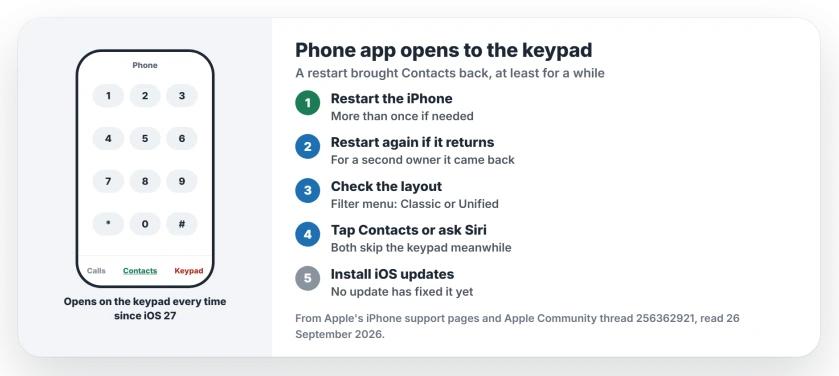
Status: iOS 27, checked 26 September 2026. Restarting the iPhone several times brought the Contacts tab back for one owner. For another, the keypad returned after a while.
1. Restart the iPhone, more than once
The fix came from the owner a few hours later: "After restarting the device multiple times the issue went away."
And the result, in their words: "I now launch the Phone app with the contacts tabs being the default view." That was the whole fix.
Apple's restart page covers every model.
On a Face ID iPhone, squeeze either volume key together with the button on the right edge, slide the phone off and give it thirty seconds.
To start it again, keep that right-hand button pressed until the logo shows. Repeat if the keypad still greets you.
2. Restart again if the keypad comes back
A second owner had less luck: "That only fixed it temporarily for me." Their pattern, in their words: "Restarting it fixes it temporarily again."
So treat a restart as a stopgap, not a cure. They also gave their verdict: "Looks like a bug in iOS 27." A bug like that usually waits for a later release, and that expectation is ours.
Open Settings, then General, then Software Update, and install any iOS 27 update that appears. Neither owner has reported an update fixing it yet, so I will add that here when someone does.
3. Check which layout your Phone app uses
Since iOS 26 there are two layouts, Classic and Unified, and Apple added the Unified one as the new look for the Phone app.
To see yours, tap Calls or Recents, open the Filter menu in the top right corner, and pick Classic or Unified. Switching once and back again may reset which tab opens first, but nobody in the thread tested it, so that idea is ours.
4. Call your contacts another way meanwhile
You do not need the Phone app's first screen to reach people. Apple says you can "dial the number on the keypad, tap a favorite or recent call, or choose a number in your contacts list."
Tap the Contacts tab in the Phone app, or ask Siri to call the person by name. Both skip the keypad.
Other iPhone call problems
If your voicemail went missing in the new layout, the voicemail page shows where Apple moved it. And if calls fail as soon as you dial, the call failed page separates line faults from phone faults.
Why does my iPhone Phone app open to the keypad?
Since iOS 27, the Phone app on some iPhones opens on the keypad instead of the tab it used to. One owner called it a bug in iOS 27.
How do I make the Phone app open to Contacts again?
Restart the iPhone, more than once if needed. That brought the Contacts tab back as the default for one owner.
Does restarting fix it for good?
Not always. For a second owner the keypad came back, and each restart only fixed it for a while.
What does Unified mean in the Phone app?
It is the iOS 26 layout that puts favorites, calls and voicemails in one Calls list. You can switch back to Classic under the Filter button.
The Short Version
- The keypad opening is an iOS 27 fault.
- Restart the iPhone, even several times.
- It may come back, so restart again.
- Check Classic or Unified under Filter.
- Tap Contacts or ask Siri meanwhile.
- Install iOS updates as they arrive.
Where to Next
Restart your iPhone now, then open Phone and see which tab greets you. If it is still the keypad, restart once more.
Did an iOS update or a layout switch fix it for you? Say so in a comment, so the other owners in that thread hear about it too.

Isaac Smith is the founder and editor of PC Glance, a website that covers computers, laptops, and technology. He is a tech enthusiast and a computer geek who loves to share his insights and help his readers make smart choices when buying tech gadgets or laptops. He is always curious and updated about the latest tech trends.