
To turn off a Samsung Galaxy A15, hold Side and Volume Down together until the power menu opens. Release the buttons, tap Power off, then confirm with a second tap. Holding Side briefly by itself can simply lock the screen.
The on-screen power icon provides another route when the touchscreen works. Choose Power off to leave the phone shut down; Restart switches it back on automatically.
Open the power menu with both buttons
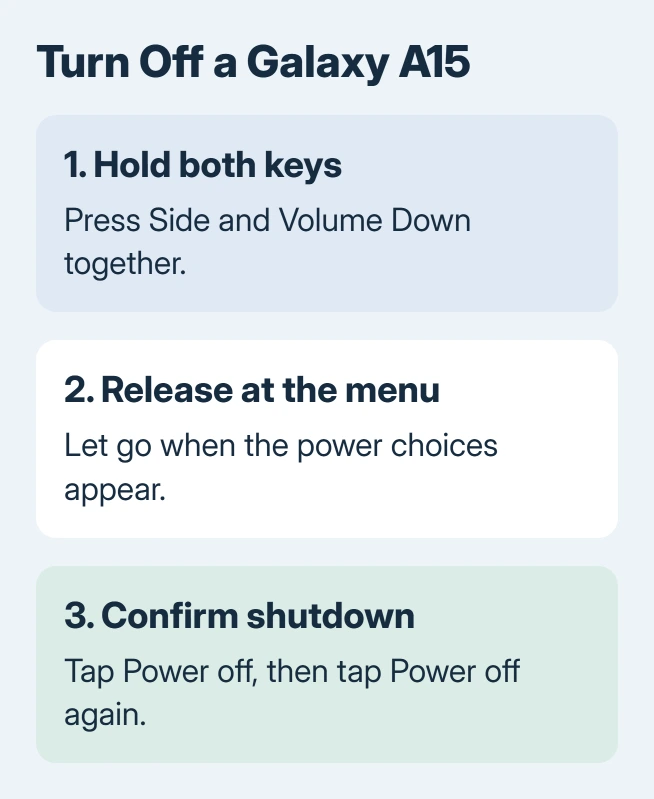
Save any unfinished work. Press Volume Down together with Side, keeping both held for a few seconds. Stop holding when the menu appears so the touchscreen can be used to choose the action.
Samsung says to select Power off and confirm it in the Galaxy A15 5G setup guide. The same button method is documented for Galaxy devices with a Side button.
Status: Galaxy A15 5G shutdown checked with Samsung's model-specific guide October 30, 2026. Quick-panel layout varies with software. No phone was switched off or reset.
A quick squeeze and release can capture the screen instead. The Samsung screenshot gesture uses the same pair for a shorter action. Wait for the menu when shutting down.
Do not choose Restart if the phone needs to remain off. Let the shutdown finish before putting it away or following a service instruction that requires power off.
Reach Power off through Quick settings
Samsung's power-control instructions describe a two-finger downward swipe from the screen's top to open Quick settings. Tap its power symbol, then choose Power off and confirm.
The panel can look different after software updates. If the gesture opens notifications without the power control, use the two-button menu instead. The shutdown choice is the same once that menu is open.
This on-screen route is useful when pressing both keys is awkward. A phone whose screen cannot respond needs the separate frozen-device procedure rather than repeated taps.
Switch it on again, or handle a frozen screen
Samsung states that the Side button starts the phone when held. Release when startup begins. The A15 5G guide describes vibration followed by the Samsung logo.
For a frozen phone, the Galaxy forced-restart method can restore control. It reboots the handset rather than leaving it shut down.
Once the screen responds again, use the normal Power off choice. Google says recurring Android freezes need additional checks, including updates and downloaded apps.
If a key is stuck or neither shutdown route responds, contact Samsung with the exact model and symptoms. A factory reset erases information and is not required merely to learn the power controls.
The Short Version
Hold Side with Volume Down, release at the menu and confirm Power off. Quick settings offers the same shutdown action. Side starts the phone again; a forced restart is a separate response to a frozen device.

Isaac Smith is the founder and editor of PC Glance, a website that covers computers, laptops, and technology. He is a tech enthusiast and a computer geek who loves to share his insights and help his readers make smart choices when buying tech gadgets or laptops. He is always curious and updated about the latest tech trends.