
The yt-dlp error Could not copy Chrome cookie database can appear while Chrome keeps its cookie file open on Windows. Save browser work, exit Chrome completely, then retry the command.
That addresses the file-copy failure. A later decryption message, sign-in request or download error needs its own treatment, even if it appears immediately after the first problem clears.
Release the browser's cookie file
Close every Chrome window after saving forms, uploads and other unfinished work. Retry the same yt-dlp command while Chrome remains closed. The upstream maintainers document closing Chrome in issue 7271.
The original report also describes success after the windows were closed. That outcome concerns the Windows file lock; cookie decryption can still fail afterward.
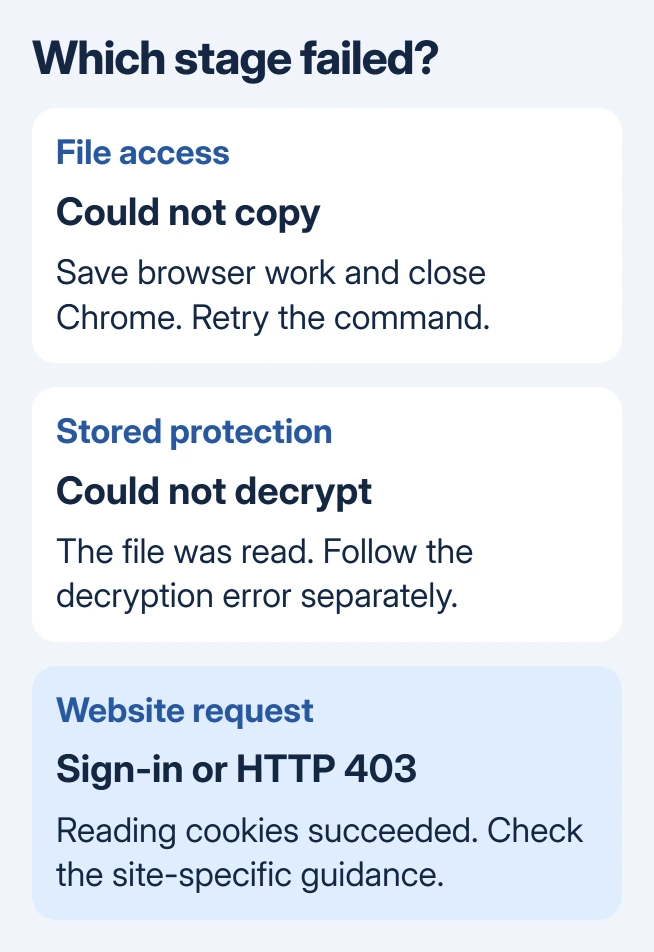
Status: yt-dlp's issue history, FAQ and current options checked October 31, 2026. Closing Chrome addresses the file lock; cookie decryption and website access are separate checks.
If a Chrome process remains after its windows close, check for background browser activity. The Windows file-holder tools can identify what retains a file. Close the responsible program normally before retrying.
Do not delete the Cookies database as an unlocking shortcut. Google says deleting cookies can sign you out and remove preferences. The separate cookie-clearing guide explains that cost.
Remove browser-cookie access when the URL does not need it
A public item may not require a signed-in session. If cookies were added to every command or saved in a configuration file, first test whether that particular URL works without them.
For a command-line test, replace VIDEO_URL with the intended address:
yt-dlp --no-cookies-from-browser --no-cookies --simulate "VIDEO_URL"These switches disable both browser extraction and a cookie file for that run. The simulation requests information without downloading the video. This is a suggested diagnostic command, not a download performed for this article.
Both switches are documented by the vendor; yt-dlp's README lists their accepted forms. A sign-in response means that item needs a session and cannot use this route.
Choose a readable session source when cookies are required
For a supported site where browser cookies are appropriate, sign in using Firefox and select that browser with --cookies-from-browser firefox. A Chrome login does not create a Firefox login.
Firefox was reported working by a user in February 2026. It changes the source yt-dlp reads; it does not promise that every website will accept the resulting request.
YouTube has separate, current cookie-export instructions. Its maintainers explain that open YouTube tabs rotate account cookies, so a successful browser read alone may not provide a lasting session.
For an existing Netscape-format export, use --no-cookies-from-browser --cookies "cookies.txt". This disables browser extraction. Adding a filename while retaining Chrome extraction still reads the locked database first.
Keep any exported cookie file private. It contains session data, and the project's FAQ warns that its general browser-export command collects cookies for all sites. Do not attach that file to a support request.
Follow the new error after the copy succeeds
A message about DPAPI or cookie decryption means yt-dlp got beyond the original file-access stage. The maintainers identify that as a separate issue. Repeatedly closing Chrome will not necessarily solve it.
The later owner replies also matter: an August 2026 report eventually confirmed that both browsers' cookies were being read, while missing audio formats and HTTP 403 remained. The final reply did not establish a precise repair.
Our stopping point is the first error still present in a fresh run. Read its linked issue and record the yt-dlp version, browser and operating system. If a desktop wrapper launches yt-dlp, include that app's version too.
For a new unresolved failure, use the upstream reporting instructions or the wrapper's support channel. Remove private addresses and account details from diagnostic logs, and never include the browser profile or session export.
The Short Version
Save browser work and close Chrome before retrying the copy. Skip cookies for items that do not require a session. When authentication is necessary, follow the supported source or export method and assess any subsequent error separately.

Isaac Smith is the founder and editor of PC Glance, a website that covers computers, laptops, and technology. He is a tech enthusiast and a computer geek who loves to share his insights and help his readers make smart choices when buying tech gadgets or laptops. He is always curious and updated about the latest tech trends.