
To show the bookmarks bar in Chrome on a computer, open the three-dot menu and choose Bookmarks and lists > Show bookmarks bar. The saved-link row appears beneath the address bar, giving quick access to the bookmarks stored there.
A visible bar that lacks the wanted links needs a folder check. Inspect the Bookmarks bar folder before assuming saved addresses have disappeared.
Bring the bar back with the menu or keyboard
Open Chrome's More menu at the top right, then Bookmarks and lists. Enable Show bookmarks bar. Google states that this option toggles visibility in its Chrome bookmark instructions.
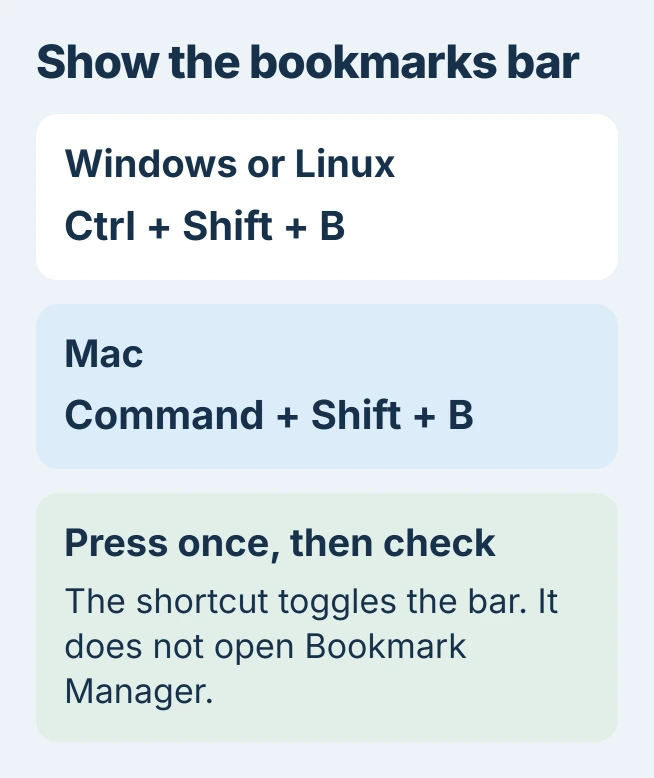
The keyboard alternative is Ctrl + Shift + B on Windows or Linux, or Command + Shift + B on Mac. Press it once and check the result; repeating the shortcut toggles the visibility again.
Status: Google desktop and Android tablet bookmark instructions checked November 2, 2026. Visibility settings vary by build. No browser profile or bookmarks were changed.
These platform-specific keys are documented by Google. Click inside a normal Chrome window first so a different application does not receive the keys.
Choose visibility on websites as well as new tabs
Open Settings > Appearance and inspect the bookmarks-bar setting. If the version offers Always show, Only show on New Tab page and Always hide, choose Always show to retain the bar while browsing websites.
The available control depends on the Chrome build. An older layout can offer a simple Show bookmarks bar switch, so the absence of a dropdown is not itself a fault.
Open an ordinary website to check the result. Looking only at a new tab cannot establish whether the bar remains visible elsewhere. Our recommendation is to check both views before changing more settings.
The bar does not choose which website starts with Chrome. Use the Home and startup-page controls when the goal is to open a favorite site automatically.
Put the wanted bookmarks in the bar's folder
Choose More > Bookmarks and lists > Bookmark Manager. Inspect the Bookmarks bar folder. Links in another folder can exist normally without appearing directly in the bar.
Google says desktop Bookmark Manager supports dragging a bookmark into a folder. Move the intended link into Bookmarks bar, then return to the browser window and check its position.
When a crowded row hides some entries, inspect its overflow menu or group related links into folders. Do not delete saved addresses simply because the window cannot display every item at once.
For an existing collection on another computer, export and import the Chrome bookmarks before reorganizing. Turning on the bar alone does not transfer another profile's data.
Android tablets have a separate display setting
Google now documents a bookmarks bar for Chrome on Android tablets. Open More > Settings > Appearance and enable Show bookmarks bar when that setting is available.
Its Android bookmark guide says small windows or low resolutions keep the bar hidden. Expand the Chrome window before treating the switch as broken.
A connected keyboard can use Ctrl + Shift + B. Use More > Bookmarks to manage the collection when the bar is unavailable.
Check management if the setting cannot be changed
An employer or school can lock the bookmarks-bar setting through browser management. Google's BookmarkBarEnabled policy controls its visibility. Ask the administrator for a change when that policy prevents editing the preference.
If a personal computer still will not show the bar after the menu and Appearance checks, report the Chrome version and whether it appears on new tabs. Include a screenshot with private bookmark names hidden when contacting Chrome support.
The Short Version
Enable Show bookmarks bar or use the platform's keyboard shortcut. Check visibility on a website and inspect the bar's folder for missing links. On Android tablets, a narrow window can keep the bar hidden despite the setting.

Isaac Smith is the founder and editor of PC Glance, a website that covers computers, laptops, and technology. He is a tech enthusiast and a computer geek who loves to share his insights and help his readers make smart choices when buying tech gadgets or laptops. He is always curious and updated about the latest tech trends.