
July's KB5101650 brought Windows 11 security fixes and a Recycle Bin correction, but some Dell PCs were blocked from receiving it. KB5121767 repaired that Intel driver compatibility problem four days later.
For a PC you're updating now, install the current cumulative update offered in Settings. You don't need each July package separately. Use the details here to check an old installation, a changed feature or a failed update.
Check which Windows version received this update
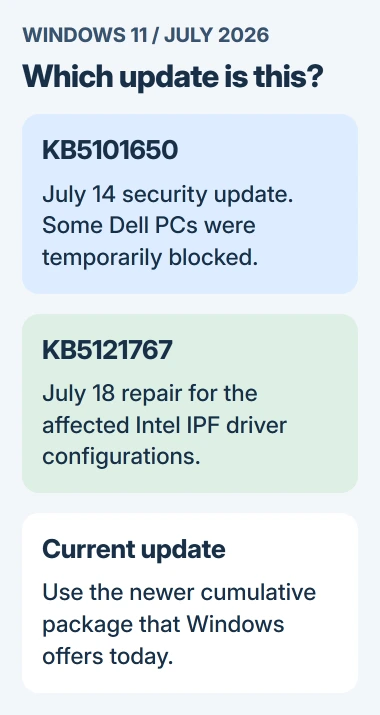
KB5101650 arrived on July 14, 2026. It updated Windows 11 24H2 to build 26100.8875 and 25H2 to 26200.8875. Those numbers tell you the July update was installed; they aren't the latest Windows builds.
Press Windows+R, enter winver, and confirm the version printed in the window. Then open Settings, select Windows Update, and look in Update history for the July installation or a newer cumulative update.
Your build number rises as more updates arrive for the same version. Keep the version and full build number together when checking your installation. The digits after the period aren't enough to identify the release.
The package also updates the servicing stack, the software that handles update installation. It comes with the cumulative update, so you don't need to switch on anything separately afterward.
Windows 11 24H2 Home and Pro reached their update deadline on October 13, 2026. Enterprise and Education have a later date. Check the 24H2 edition and support details before trying to keep a home PC on that version.
Understand why some Dell computers didn't receive it
Microsoft says a limited set of Dell PCs with an Intel Innovation Platform Framework driver, also called Intel IPF, had a temporary update block.
Intel IPF is a system driver, not a Windows Update setting. The driver problem could affect speed, power use or how the PC behaved after recent updates. It didn't affect every Dell or Intel computer.
On July 18, KB5121767 fixed the problem so affected PCs could update. Its builds were 26100.8894 for 24H2 and 26200.8894 for 25H2. That extra update was recommended for the affected computers.
The compatibility repair note explains which computers needed it. A Dell computer without those symptoms didn't need a special July repair simply because it used an Intel processor.
I'd leave the driver installed and check which update Windows offers now. Removing a system driver to force an old update is a much bigger change than letting Windows choose a supported package.
If updates are still missing, check what Settings says now. July's block doesn't explain every later failure. Record the current error and send it to Dell or your administrator with the exact PC model.
Know which changes belong to the July package
The update fixed more cases where permanently deleting a file showed the Recycle Bin's internal filename instead of the original name. It changed the confirmation text; it didn't add a way to recover deleted files.
It also updated curl, a command-line tool for transferring data, and included security improvements. Windows installs the curl change with the update, without a new button to turn on in Settings.
For organizations using Remote Desktop files, the update added support for stronger SHA-2 certificate thumbprints. These identify certificates and help administrators decide whose Remote Desktop files to trust.
That change is for whoever manages Remote Desktop at work. If you're updating a home PC, you don't need to edit certificates or Group Policy to install KB5101650.
The update also uses more information about your PC to deliver newer Secure Boot certificates. Secure Boot checks that startup software is trusted. This change doesn't call for disabling it or clearing the computer's firmware keys.
Some parts of the update are for Copilot+ PCs. Their names can appear in the update description even when your laptop doesn't have the hardware for those features.
Picture password enrollment changed too
The release note was updated on August 5, 2026, to describe a change to picture passwords, the sign-in method based on gestures over a chosen image. You can no longer set up a new picture password.
An existing picture password can keep working. But if it's removed or disabled, it can't be set up again. That distinction matters if you're considering removing it as a quick troubleshooting step.
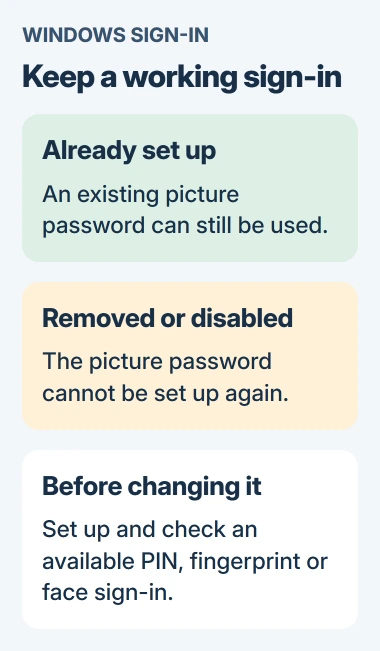
Check Settings > Accounts > Sign-in options for the methods your PC supports. A PIN, face recognition or fingerprint may be available. The Windows Hello setup guide explains the hardware and account requirements.
Face and fingerprint sign-in need the right hardware. Reinstalling July's update won't add a missing reader or camera. Set up a method your PC supports and try it before changing your current sign-in method.
Install the update Windows offers today
In Windows Update, select Check for updates to see the available package. Complete the download and installation, then restart when requested. Plug a laptop into power before starting so the installation can finish.
Current cumulative updates include earlier changes for their Windows version. If a newer package installed successfully, KB5101650 doesn't need its own entry in Update history, even if you set up the computer after July.
If the offered update fails, note its error number. In Settings, open System > Troubleshoot > Other troubleshooters and run the Windows Update troubleshooter. Then retry the update and check whether it installs.
For a managed computer, let IT check the approved update and driver combination. If a personal PC remains slow or uses much more power after updating, give support the before-and-after build numbers and the date the behavior began.
The Short Version
KB5101650 brought July's security fixes to Windows 11. KB5121767 resolved the limited Dell and Intel IPF problem. Use today's cumulative update, and keep a working picture password until another sign-in method is ready.
Checked November 4, 2026.

Isaac Smith is the founder and editor of PC Glance, a website that covers computers, laptops, and technology. He is a tech enthusiast and a computer geek who loves to share his insights and help his readers make smart choices when buying tech gadgets or laptops. He is always curious and updated about the latest tech trends.