
Yes, a hotspot uses cellular data when it shares your cellular connection. A laptop's Wi-Fi symbol doesn't change that: its traffic passes through your phone's plan. Check the hotspot allowance before starting a large download.
Sharing an existing Wi-Fi connection is different. Some Android phones can do that, while an iPhone's Personal Hotspot shares cellular data. Which allowance gets used depends on how the phone reaches the internet.
Follow the connection back to the phone
A hotspot connects your phone and another device locally. Wi-Fi carries traffic between them; cellular service can carry that same traffic between the phone and the internet. Both connections are working while you browse.
That's why a laptop's Wi-Fi icon doesn't mean free internet. It tells you how the laptop connects to the phone, but not how the phone reaches the internet.
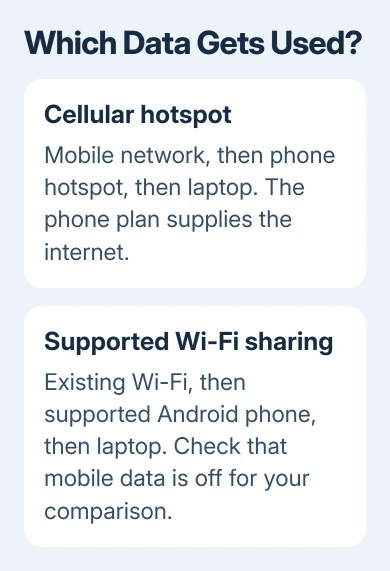
Apple's Personal Hotspot instructions describe sharing the iPhone or cellular iPad's cellular connection. Joining the hotspot over Wi-Fi doesn't turn that connection into home broadband.
A Wi-Fi-only iPad can join a phone hotspot, but it can't supply cellular service of its own. The data counts against the phone or other device supplying that service, even when you're streaming the movie on the iPad.
USB and Bluetooth sharing follow the same principle. Switching the connection between the phone and laptop to a cable doesn't change cellular internet into an unmetered connection.
Check whether hotspot data has its own limit
Read the plan details for the phone line providing internet. Look specifically for hotspot or tethering, which means sharing the connection. A plan advertised as unlimited for phone use can restrict high-speed sharing.
Some plans count shared data against the same allowance as phone use. Others provide a separate hotspot limit, restrict tethering entirely, or slow hotspot speeds after a threshold. The word unlimited alone doesn't answer that question.
The Google Fi tethering page gives examples of different allowances within one carrier. Check your own carrier's current plan details; another plan's limit won't tell you what's included in yours.
Ask the carrier three direct questions: whether tethering is included, how much high-speed hotspot data remains, and what changes after you reach the limit. Slower service, extra charges, and a blocked connection are different outcomes.
I'd settle that before tethering a work laptop for the day. A computer can begin syncing files or downloading updates without you opening a video, and that activity still travels through the phone.
When the hotspot connects but pages won't load at all, use the hotspot internet checks. That guide separates a missing mobile connection from a plan restriction or a problem on the joining device.
Know when Android can share Wi-Fi instead
Some Android phones can pass an existing Wi-Fi internet connection to another device. For example, the Pixel tethering instructions support sharing Wi-Fi on Pixel 3 and later.
That exception depends on the phone and its software. Don't assume every Android hotspot keeps its Wi-Fi connection active. On a phone that turns Wi-Fi off when hotspot starts, cellular service supplies the internet instead.
Check your model's own tethering instructions and look at its connection status after enabling sharing. To avoid cellular usage entirely, turn cellular data off and confirm the connected laptop can still load a fresh page.
A successful test with cellular data disabled shows that the page didn't need that cellular connection. If internet access stops, reconnect the laptop directly to the original Wi-Fi network rather than assuming sharing is free.
The original Wi-Fi network can also have a usage limit or paid access. Sharing it doesn't remove those terms. A hotel connection and your home broadband are both Wi-Fi connections, but their access rules can differ.
Measure usage over the dates that matter
Check your carrier's record for billed usage and your remaining hotspot allowance. Phone counters are useful for comparing activity, but the dates must match the billing period before you can compare the numbers.
On an iPhone, open Settings > Cellular. Review the usage information and its current period. Reset Statistics starts a fresh local measurement; it doesn't erase the carrier's usage record.
With two SIMs, identify the line supplying cellular internet. Compare that line with the matching account, not the plan used for calls on the other SIM. The cellular counter instructions explain the available statistics.
Android usage screens differ by maker. Search Settings for data usage, select the SIM supplying internet, and check the dates. Use a tethering total if provided; one app's usage doesn't represent all shared traffic.
Avoid resetting a counter until you've saved the reading you need. A screenshot of the dates and total can help when asking the carrier why its record differs from the phone's display.
Keep the laptop from using an allowance unexpectedly
Before connecting, pause cloud uploads and large downloads you can postpone. Check game launchers and other apps with their own download queues. Closing a browser tab doesn't necessarily stop a separate app's transfer.
On Windows 11, open Settings > Network & internet > Wi-Fi > Manage known networks, choose the hotspot network, then enable Metered connection. Windows 10 has the same Wi-Fi network property under Network & Internet.
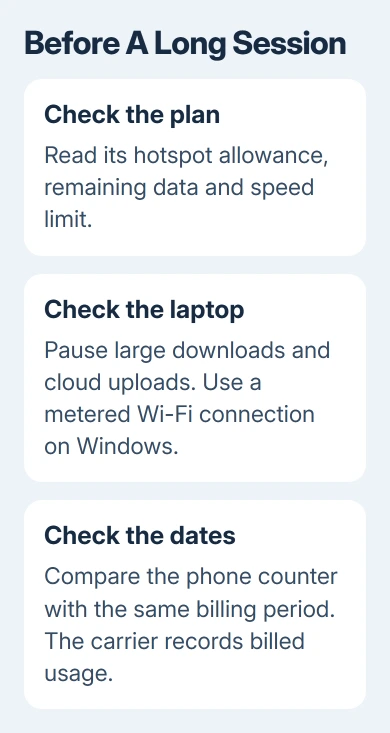
A metered connection helps Windows limit some background traffic. It isn't a hard data cap, and applications can still transfer information. Keep an eye on active downloads too.
Video calls still use data when your laptop is on the phone's Wi-Fi. The FaceTime data settings explain the difference between ordinary broadband Wi-Fi and a mobile hotspot for that app.
There isn't one reliable data-per-hour figure for every hotspot. A text page, cloud backup, and high-resolution movie move different amounts of information. Measure your actual tasks instead of budgeting by connection time alone.
Stop sharing when the session is finished
Disconnect the laptop from the hotspot when you're done. On the sharing iPhone, open Settings > Personal Hotspot and turn off Allow Others to Join. For USB sharing, unplug the cable as well.
On a Pixel, open Settings > Network & internet > Hotspot & tethering > Wi-Fi hotspot and turn it off. Other Android phones can call this Mobile Hotspot. Use the switch for the sharing feature you enabled.
If you see unexpected charges, give the carrier your phone line, dates, and hotspot usage record. Ask whether the amount came from the shared allowance or ordinary phone use and whether a plan change would alter that billing.
The Short Version
A hotspot sharing cellular internet uses the supplying phone's data plan. Wi-Fi on the laptop describes its connection to the phone. Check separate hotspot limits, measure the correct billing dates, and stop sharing after use.
Checked November 9, 2026.

Isaac Smith is the founder and editor of PC Glance, a website that covers computers, laptops, and technology. He is a tech enthusiast and a computer geek who loves to share his insights and help his readers make smart choices when buying tech gadgets or laptops. He is always curious and updated about the latest tech trends.