
Android Setup keeps stopping just as you try to finish setup or add another user, sending you back through the same questions.
Pixel owners confirmed a way past this. I'll separate their extra-user workaround from the general Android checks, because a new phone stuck before its Home Screen has fewer options.
Adding a Pixel user? Try the confirmed offline route
One owner in a Pixel setup discussion completed the extra-user flow by turning networking off and choosing offline setup. Another owner confirmed it on a Pixel 7.
The Pixel 8a discussion has another outcome. One owner still had this extra-user fault after installing the July 2024 update, but completed setup using the offline route.
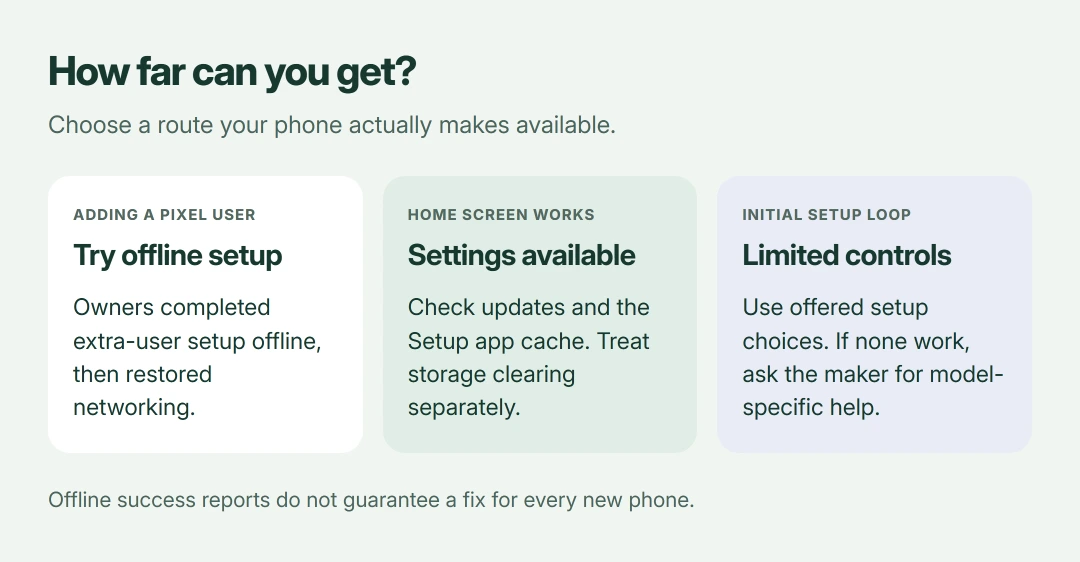
Status: Pixel owner outcomes from June to August 2024 checked alongside Google guidance on 18 October 2026. Offline setup is confirmed for extra users, not every new-phone setup.
Return to your working main profile first. Enable Airplane mode, check that Wi-Fi is also off, then start adding the user again and choose Set up offline if offered.
Complete the security questions, skipping optional additions. Once the new user's Home Screen opens successfully, turn networking back on, sign into your Google account and update the apps.
That final online step mattered in the report. I would use that offered offline choice before repeatedly deleting a user whose setup fails at the same question.
No Home Screen yet? Work with the setup options you have
Settings instructions won't help if Settings won't open. On a freshly reset phone, restart using your manufacturer's button instructions, then retry setup with a reliable connection.
If setup itself offers an offline or skip option, you can try it, but the confirmed reports concerned additional Pixel users. Some devices still require online ownership verification.
Keep the old phone intact during this. Our phone-transfer guide explains the preparation for moving your data once setup works.
If every attempt returns to the error before any useful controls appear, contact the manufacturer with your model and software version. Repeated resets have no confirmed benefit here.
If Settings opens, restart and install offered updates
Google's general checks come next. Documented by Google, the crashing-app checks include restarting your phone and installing available updates for Android and your apps.
Use Settings search to find Software update or System update, since manufacturers name the menu differently. Install an offered update, then finish its restart before trying setup again.
In Google Play, open your profile menu and select Manage apps & devices to check offered app updates. Update those before changing app data.
Updating didn't resolve that owner's setup loop. If your phone still fails after finishing an offered update, it doesn't mean you installed the update incorrectly.
Clear Android Setup's cache before its storage
Find Android Setup in your phone's app settings. You may need its option for showing system apps; labels and available controls depend on the manufacturer.
If Clear cache is available in that app's storage screen, try it and retry setup. Google's general app guidance includes this check, but it isn't a proven universal Setup repair.
Clear storage or Clear data resets that app's saved information and can discard setup progress. I would use it only after checking the manufacturer's instructions and confirming you selected the intended setup app.
Don't clear a similarly named service by guesswork. Our Android cache and storage explanation covers the difference between those controls.
There is a useful failed attempt here. The Pixel 8a thread starter had already cleared several Google-app caches, including Setup, without getting through the extra-user flow.
Update Google Play services without wiping it
Google states that Play services handles connections. These include app access to Google sign-in, and its Play services help recommends checking for an offered update first.
The current documented route starts in Settings with your Google profile, then All services > System services > Google Play services. Choose Update or Install if offered; your phone may arrange those controls differently.
Play services and Play Store are different apps. Clearing one is not the same action as updating the other.
Google warns that clearing Play services storage can remove saved information, including payment-related data, and require account authentication again. Keep this to the update check, leaving its storage untouched.
Safe mode helps only with a possible downloaded-app conflict
Google says safe mode helps check whether downloaded apps cause crashes. Use your manufacturer's entry instructions if the phone is usable enough to compare the behavior.
If the problem disappears there, restart normally and remove recently downloaded apps individually, checking after each removal. You may need to restore some widgets to your Home Screen afterward.
If the same setup flow cannot run in safe mode, you haven't tested that flow. For a brand-new phone without downloaded apps, this is not the strongest next step.
Send support the error text, the stage where it appears, and whether this is initial setup or an added user. That distinction led to the confirmed workaround and helps support understand the particular setup stage your phone cannot finish.
The Short Version
Owners finished Pixel extra-user setup offline. If Settings opens, try Google's restart, update and cache checks. Avoid guessing at system-app data; ask for model-specific support when setup blocks access.
Where to Next
Are you setting up the phone itself or adding a second user? Tell me which phone you have and which setup question sends it back to the error. If offline setup completes, I'd like to know whether sign-in works after networking returns.

Isaac Smith is the founder and editor of PC Glance, a website that covers computers, laptops, and technology. He is a tech enthusiast and a computer geek who loves to share his insights and help his readers make smart choices when buying tech gadgets or laptops. He is always curious and updated about the latest tech trends.