
When your downloaded episodes keep vanishing on iOS 26, it is tempting to blame one bug. I have to tell you it is several, and they need different answers.
It is actually a few separate things: the episodes you already finished, the ones from shows you never followed, and a real bug that deletes even unplayed episodes you meant to keep.
Two of those are Apple Podcasts doing exactly what it was built to do. The last one is not, and no setting reliably stops it. Sorting which you are hitting tells you whether a toggle fixes it or nothing will.
The two that are on purpose
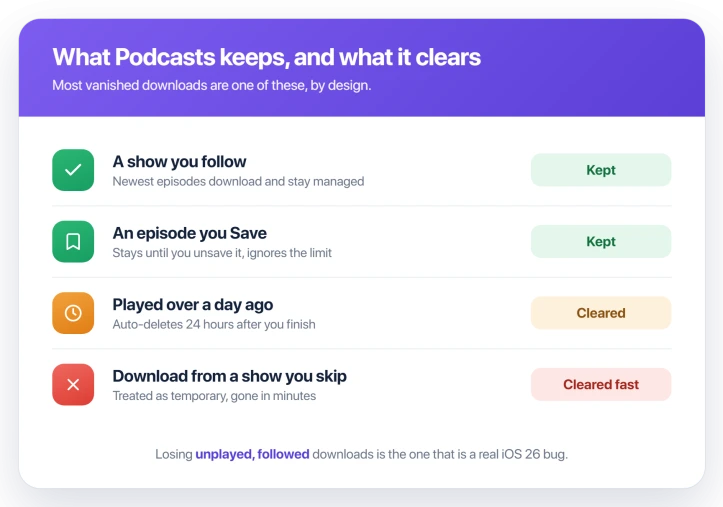
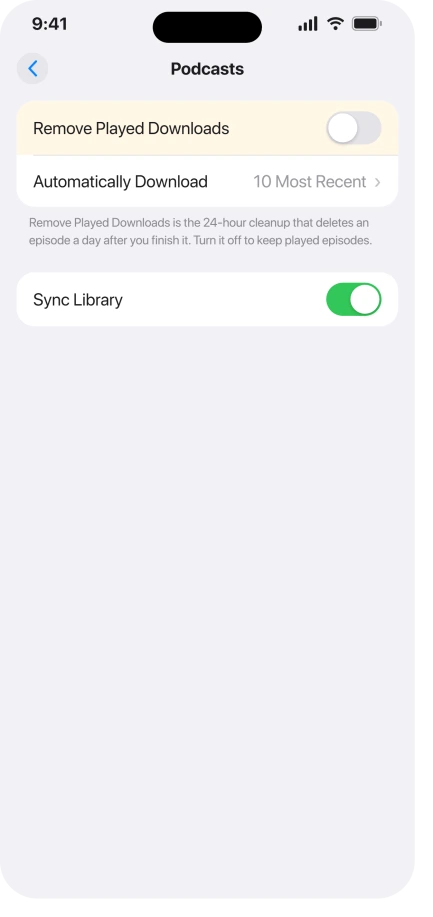
- You already played it. By default, Podcasts deletes a downloaded episode 24 hours after you finish it. If that is catching you, open Settings, tap Apps, tap Podcasts, and turn off Remove Played Downloads.
- You never followed the show. Episodes from shows you have not followed are treated as temporary and cleared quickly, sometimes within minutes. People notice a download survives only if they play a few seconds of it first.
There is also a quiet limit. By default Podcasts keeps only the latest five episodes of a show and trims anything older. Open Automatically Download in the same Podcasts settings to raise that, or set it to all episodes.
Apple lays out the delete behavior in Download and delete episodes in Apple Podcasts.
How to make an episode stay put
The strongest way to keep an episode is Save, not just Download. A saved episode downloads on its own and stays until you unsave it, and the keep limit does not touch it.
- Follow the show. Its newest episodes download and are managed as a set, rather than treated as throwaway.
- Save the one-offs. For an episode from a show you do not follow, swipe left on it and tap Save, or use the More button. It lands in Library, then Saved.
- The community trick. Playing a few seconds of an unfollowed episode gets the app to stop treating it as temporary. An unofficial fix, but a common one.
Apple covers saving in Download, save, remove, and share podcast episodes.
The one that is a real bug
If Remove Played Downloads is already off, you follow the show, and your unplayed downloads still vanish, you are not fighting a setting. That is the iOS 26 bug.
It shows up in a recognizable way: hundreds of unplayed episodes wiped across several shows, every episode of a show gone except the oldest one, or an episode disappearing in the middle of listening.
Re-downloading holds for a while, then they go again.
This is not new. A close cousin of it hit Apple Podcasts back in 2023, on iOS 16.4, and Apple cured it in the very next point update, iOS 16.5. The iOS 26 version is back, and Apple has not acknowledged it yet.
Until a fix lands, this is what helps:
- Save the episodes you care about. The retention on a saved episode is stronger than a plain download, so it is your best shield right now.
- Turn off Background App Refresh for Podcasts. In Settings, Apps, Podcasts, one person traced the purge to a background pass. It is worth a try.
- Keep iOS updated. The last version of this bug was cured in an update, so a point release is the likely real fix.
- Report it to Apple. Feedback from more people is what gets a server or point-release fix moving.
Do not waste time on the dead ends. Deleting and reinstalling the app, or toggling Sync Library on and off, are the two most-tried steps in the forums, and neither one stops the deletions.
What this is not
- Not your storage filling up. Podcasts clears downloads by its own rules, not the general iPhone cleanup. If storage is the real worry, that is iPhone System Data ballooning.
- Not downloads that never finish. If episodes will not download in the first place, that is a stuck-download problem, closer to apps stuck on Waiting, not this one.
Status: Most vanishing downloads are by design: played episodes clear after a day, unfollowed shows are temporary. Save an episode to keep it. Losing unplayed followed ones is the iOS 26 bug.
Why does Apple Podcasts delete episodes I have not even played?
Normally it should not. The built-in cleanups only ever touch episodes you have already played or ones from shows you do not follow. Unplayed episodes from a show you follow are supposed to be safe.
When those vanish anyway, the bug is deleting them in spite of the rules that are meant to protect them. That gap, between the tidy-up you can predict and deletions you cannot, is the line where the iOS 26 fault begins.
How do I stop podcasts from auto-deleting after I listen?
Open Settings, tap Apps, tap Podcasts, and turn off Remove Played Downloads. That stops the normal 24-hour cleanup that removes an episode a day after you finish it.
You can also set it per show. Touch and hold a show in your Library, open its settings, and turn Remove Played Downloads off there too.
Will re-downloading or reinstalling fix it?
Re-downloading only holds until the next purge, and reinstalling Podcasts does not stop the bug either. Both are the most common forum advice and the most common disappointment.
Reinstalling just pulls your library and its state back down from your account, the same sync pass that keeps clearing the episodes, so it drops you right back where you started.
The Short Version
- Downloads vanishing is three things: played episodes clearing after a day, unfollowed shows being temporary, and a real iOS 26 bug.
- The first two are by design. Turn off Remove Played Downloads to stop the 24-hour cleanup.
- To keep any episode for good, Save it. Saved episodes stay until you unsave them and ignore the keep limit.
- If unplayed episodes from shows you follow still vanish, that is the bug, and no setting reliably stops it.
- Save what matters, keep iOS updated, and skip reinstalling or toggling Sync Library, since neither helps.
Where to Next
- Storage disappearing instead of episodes: iPhone System Data storage ballooning
- Downloads that never start: apps stuck on Waiting on iOS 26

Isaac Smith is the founder and editor of PC Glance, a website that covers computers, laptops, and technology. He is a tech enthusiast and a computer geek who loves to share his insights and help his readers make smart choices when buying tech gadgets or laptops. He is always curious and updated about the latest tech trends.