

Your Mac used to sleep and wake without a hitch.
Since Tahoe, mostly 26.3 and 26.3.1, it reboots itself while asleep instead, and you come back to a "Your computer restarted because of a problem" message with a panic report sitting behind it.
This is two problems wearing the same face: a driver from some other app choking during sleep, or a change in how Tahoe writes its sleep image.
The panic report tells you which one you have, so read it first and you will know which fix you need.
First, read the panic report
It usually names the culprit outright.
When your Mac restarts, the dialog has a Report button. Open it and copy the whole text out before you send it, because these logs can disappear.
You can also open Console from Applications, then Utilities, click Crash Reports in the sidebar, and open the newest file that ends in .panic.
They also live in the /Library/Logs/DiagnosticReports folder.
Look for two things: the line right after the word panic, and a section headed Kernel Extensions in backtrace.
If any outside name shows up there, something like macfuse, paragon, tuxera, or a VPN or antivirus tool, that is your cause.
A clean log with no third-party names points at Tahoe's own sleep handling instead.
Apple's own steps for a restart message are in If your Mac restarts and a message appears.
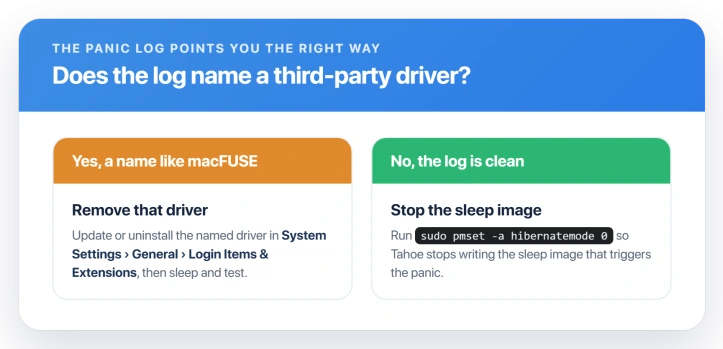
If a driver is named, remove it
The usual suspect is macFUSE, a filesystem driver that a lot of apps quietly bundle.
On an M4 MacBook Pro its panic shows a 60-second busy timeout on IOMediaBSDClient, with the macFUSE extension named as the last one loaded before the crash.
Third-party NTFS drivers like Paragon and Tuxera, VPN clients, and antivirus tools all crash the same way in sleep.
Update or remove whichever one the log named. Open System Settings, then General, then Login Items and Extensions, and check under Driver Extensions.
Use the app's own uninstaller to pull the driver out, then let the Mac sleep and see if the reboot is gone.
For macFUSE, updating it or switching your apps to its newer kext-free mode takes the extension out of the equation, which is worth trying.
To confirm a driver is behind it, start in Safe Mode and let the Mac sleep.
On Apple silicon, shut down, hold the power button until Loading Startup Options appears, pick your disk, then hold Shift and choose Continue in Safe Mode. On an Intel Mac, restart holding Shift.
Safe Mode blocks every third-party driver, so if sleep is quiet there, one of them is your problem.
If the log is clean, stop the hibernate write
If no outside name appears and your Mac just reboots after a few minutes, or always after a full night asleep, the trigger is Tahoe writing its sleep image to disk. Stopping that write skips the crash.
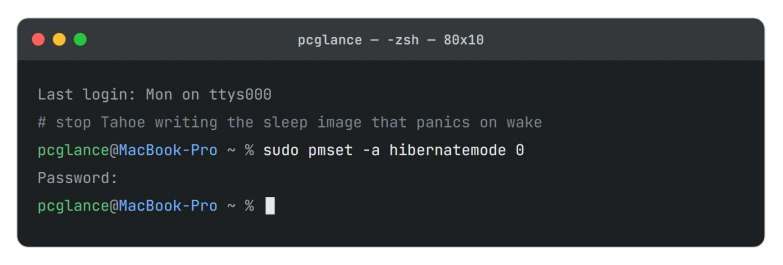
Open Terminal and run:
sudo pmset -a hibernatemode 0That tells the Mac to keep its memory powered during sleep rather than copy it to disk, which is exactly how desktops already sleep. Normal sleep still works, and nothing on disk changes.
The one trade-off is on a laptop: if the battery drains all the way to empty while asleep, you lose anything unsaved, since there is no disk copy to restore from.
On a plugged-in or topped-up Mac that almost never happens.
To set it back to the laptop default later:
sudo pmset -a hibernatemode 3For some people, flipping it off and back on is the whole fix, because it forces the Mac to rebuild a corrupted sleep image.
A few more things to rule out
- Unplug everything. A dock, hub, external drive, or second display can set off the panic on sleep. Disconnect them all, test for a night, then add them back one at a time. If a drive is involved and it also refuses to mount, that is an external drive not mounting, a related fix.
- Turn off Wake for network access and Power Nap. They sit in System Settings under Battery, then Options on a laptop, or under Energy on a desktop. This helps the wake-related panics more than the hibernate one, but it is quick to try.
- Skip the SMC and NVRAM resets. Apple silicon Macs have neither to reset, whatever an old guide tells you. The nearest thing is a full shutdown, thirty seconds off, then power back on.
- A Mac that will not wake is a different problem. If yours instead sleeps and never comes back, a black screen with no reboot, that is a Mac that won't wake from sleep, which has no panic behind it.
About updating
Keep installing macOS updates, but do not sit and wait for one to fix this.
As of now Apple has not acknowledged the sleep restart, and no Tahoe update is on record as fixing it, so a clean reinstall is the heaviest hammer worth swinging when nothing else isolates it.
The panic log and the fixes it points to are what actually help people today.
Status: A Mac that reboots in its sleep on Tahoe is a kernel panic. Read the panic log first. If it names a third-party driver, remove that; if the log is clean, run pmset hibernatemode 0.
Why does my Mac restart by itself while it is asleep?
It is hitting a kernel panic during sleep, so it reboots and shows the restarted-because-of-a-problem message when you return.
A giveaway is that it then asks for your full password, with Touch ID and Apple Watch unlock unavailable.
The cause is either a third-party driver failing during sleep or Tahoe's own sleep image, and the two leave different fingerprints in the panic report.
Is it safe to set hibernatemode to 0?
For most people, yes. It only stops the Mac from saving a copy of memory to disk during sleep, which is how every desktop Mac already runs, and ordinary sleep is unaffected.
The single risk is a laptop whose battery dies completely while asleep, since there is no saved image to restore from. If you tend to sleep your Mac on battery for days, leave it at 3.
Did a macOS update cause this, and will one fix it?
The reports line up with Tahoe 26.3 and 26.3.1, so an update is the likely trigger. Apple has not acknowledged it, and no later Tahoe build is documented as fixing it.
Keep updating in case a quiet fix lands, but rely on the panic log and its fixes for now, not on waiting.
The Short Version
- The Mac is kernel panicking in sleep, then rebooting, which is why you see the restart message and get asked for your full password.
- Read the panic report first. A third-party name like macFUSE, Paragon, or a VPN driver in it means remove that driver.
- A clean report points at Tahoe's sleep image. Run sudo pmset -a hibernatemode 0 to stop it writing that image.
- Safe Mode confirms a driver cause, and unplugging external devices rules out a bad dock or drive.
- Do not reset SMC or NVRAM on Apple silicon, and do not wait for an update to fix it.
Where to Next
And if the wallpaper drops to black when you switch Spaces, that is a separate Tahoe fault.
Where a mapped network drive drops every time the Mac sleeps, that is a separate Tahoe fault.
- Different symptom, no reboot: Mac won't wake from sleep on macOS Tahoe
- A drive that vanishes instead: external drive not mounting on Tahoe

Isaac Smith is the founder and editor of PC Glance, a website that covers computers, laptops, and technology. He is a tech enthusiast and a computer geek who loves to share his insights and help his readers make smart choices when buying tech gadgets or laptops. He is always curious and updated about the latest tech trends.