

An iPad doesn't have a removable back cover for swapping its battery. A service provider can replace it, but check battery health and coverage before booking a repair.
With eligible AppleCare coverage, capacity under 80% qualifies for battery replacement at no extra charge.
Check whether the battery needs service
Open Settings > Battery > Battery Health if available. Read maximum capacity to see how much charge your aging battery can hold. The percentage in the status bar shows its current charge instead.
The current supported list includes iPad Pro M4 and M5, iPad Air M2, M3 and M4, iPad mini A17 Pro and A20 Pro, and iPad A16. Apple lists these models in its battery health instructions.
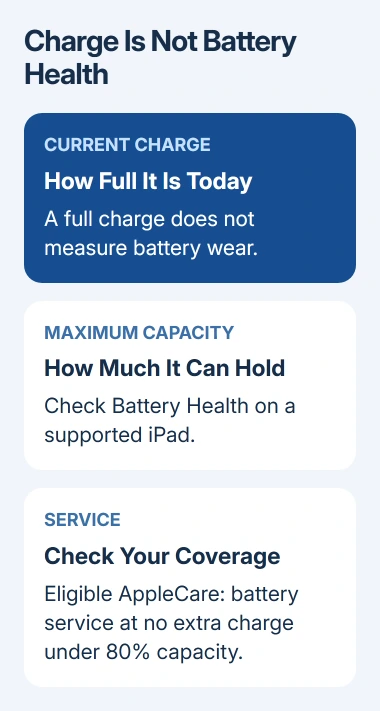
An older iPad may have no Battery Health page. That doesn't tell you whether its battery is healthy. Ask Apple Support to assess it, and use the missing Battery Health explanation to check the model limit.
Note what changed: shorter running time, sudden shutdowns or failure to charge. A battery that drains quickly after an update may need software checks first. The iPad battery drain steps cover that situation.
I'd get the battery assessed before paying for replacement solely because one day's charge ran out early. Give the provider the capacity reading and describe any shutdowns.
Get an estimate for the exact iPad
Use the iPad service page to check coverage and start a repair request. Select your model and battery service when those choices appear. The estimate depends on the model, location, coverage and inspection.
An AppleCare battery benefit applies when capacity drops under 80%. Ordinary battery wear isn't the same as a defective battery covered by a warranty. Have the provider confirm which coverage applies to your iPad before approving the work.
Ask whether other damage changes the estimate. A damaged display or case can affect the available service. Ask what each charge covers if the quote includes another repair.
Choose a Genius Bar appointment, an authorized Apple repair shop or mail-in service where offered. AppleCare may also offer Express Replacement, which sends a replacement iPad before you return the original.
Confirm whether the proposed service returns your own iPad or supplies a replacement device. Availability depends on parts and location.
Back up and prepare for an appointment
Make a current iCloud or computer backup before handing over the iPad. Service may erase it or replace the device, so a copy stored only on that iPad won't be enough to restore your data.
Check that iCloud syncing has finished too. Open Settings > your name > iCloud and check the status beside Saved to iCloud. Look for a green status icon.
Next, prepare Find My for your iPadOS version:
- On iPadOS 27 or later, open Find My, select the iPad, tap More > Repair or Trade In > Enable to prepare it for repair.
- On iPadOS 26 or earlier, open Settings > your name > Find My > Find My iPad and turn off Find My iPad.
Follow the service appointment checklist for your device, including any Wallet items and unfinished repairs. If the iPad can't respond, tell the provider which preparation steps you couldn't complete.
Bring the iPad, any accessory connected to the reported problem, identification and your receipt if available. Check whether the location requires an appointment. An Apple Store Genius Bar visit should be booked before traveling.
Never give someone your Apple Account password or passcode to take away. If software support requires you to enter one, remain present while the technician has access to the device.
Follow the instructions for mail or replacement service
For mail-in service, follow the packing and preparation instructions supplied with the request. Send only the accessories it asks for. Use the shipping checklist rather than the appointment checklist.
If Express Replacement is offered, follow the supplied return instructions and deadline. Complete the transfer to the replacement before preparing the original for return as directed.
When the serviced or replacement iPad arrives, restore the backup if setup asks for it. Use it normally and check whether the battery problem returns. Its charge level when it arrives won't tell you that.
If the problem continues, return to the same service provider with the repair reference and the symptoms. The service guarantee is 90 days or the remaining Apple warranty term, whichever is longer, alongside applicable consumer rights.
For home repair, check for an official manual and supported parts for the exact model first. Opening an iPad can damage its display, so ask a repair provider if you don't have the required tools and experience.
The Short Version
Read maximum capacity if available, ask for a battery check and estimate, then make a backup. Prepare Find My for your iPadOS version and follow the chosen service route's handover instructions.
Checked November 7, 2026.

Isaac Smith is the founder and editor of PC Glance, a website that covers computers, laptops, and technology. He is a tech enthusiast and a computer geek who loves to share his insights and help his readers make smart choices when buying tech gadgets or laptops. He is always curious and updated about the latest tech trends.