
Chrome's Manage windows button has disappeared on your Android phone, and the project tabs you kept in separate windows seem out of reach.
I found an owner who brought the menu back with one Chrome flag. I'll show you that workaround, then where to look for windows that remain missing.
Bring back the missing menu
The October 2026 Google discussion has 25 upvotes and 11 replies. One owner restored Manage windows by disabling In-app window manager deprecation. In their words, "This brought back my manage windows button in the 3 dot menu."
The owner did not name their device or Chrome build, so try this only if you can find that exact flag. Experimental settings can disappear or revert after updates.
Status: checked 17 October 2026. Chromium still lists the flag, and a Google Community reply confirms it restores the menu. The owner did not name their Chrome build.
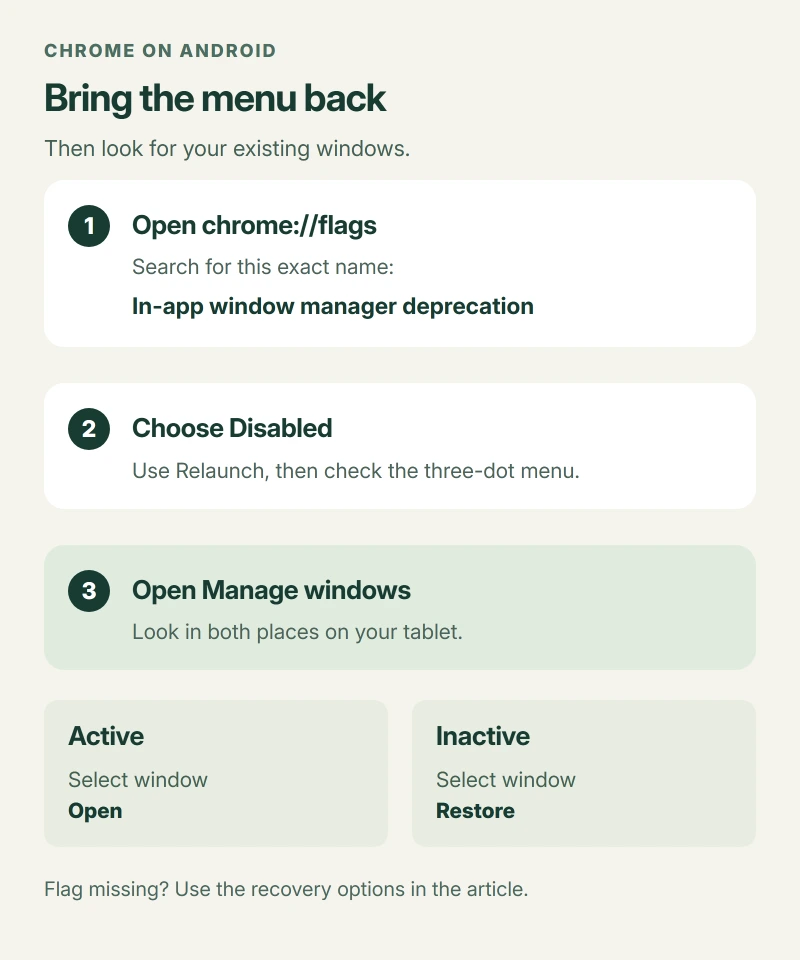
- Type chrome://flags into Chrome's address bar and open that page on your Android device.
- Search for In-app window manager deprecation using the search field on that page.
- Set that entry to Disabled, then use the offered Relaunch button to restart Chrome.
- Open the three-dot menu again and look for Manage windows among its entries.
Leave other flags alone. If the change causes trouble, return this same entry to Default and relaunch again.
Can't find the entry? Skip to the recovery options later in this article, because another similarly named flag is a different setting.
Why Disabled is the useful choice
The name is easy to misread. You are switching off the removal of the window manager, which lets the older menu appear again.
Chromium's description says the flag enables deprecation of Android's in-app window manager, and its current source still names this control, matching the owner's successful setting.
I'd use this to regain the menu. The owner didn't confirm whether their missing windows came back too.
The menu is back, but where are your windows?
Start with Active. If the window you need appears there, select it and use Open to return to its tabs.
For tablets, Google's window instructions also include an Inactive tab inside Manage windows. Select the missing window there, then tap Restore.
Google says restoration can fail when you have reached the window limit, so save anything needed from an unwanted active window before closing it to make room.
Be careful with Close. Google says a window closed through this manager does not move into Inactive and cannot be restored there.
Phone layouts may differ. Google's window instructions name Android tablets, while the October discussion includes reports from phone and tablet users.
If the window list stays empty
Check the ordinary tab switcher too. Its Inactive tabs area holds tabs and groups separately from the window manager's list.
Google's steps also let you reopen a saved group from the Tab groups view. That can recover the pages without reconstructing their previous arrangement across windows.
On a tablet, try Recent tabs from the main menu for a listed tab or window.
If the loss happened on your computer instead, use the desktop session recovery instructions. They concern different files and controls.
Opening more windows did not fix this report
The recommended reply suggested opening another window to make the button return, although the asker already had three running and still couldn't see it.
They also checked the tab switcher's menu without success. Moving a tab between windows only showed their active windows, leaving the missing projects out of reach.
I wouldn't keep opening windows after that.
Thinking of resetting the phone out of frustration? Check what Android backup actually saves before making that decision about your data.
The Short Version
- An owner recovered the menu by disabling its deprecation flag and restarting Chrome.
- Use the exact flag only if your installed Chrome still offers that entry.
- Check Active and Inactive windows, then saved groups and Recent tabs if needed.
Where to Next
Did the menu return with your old project windows still inside it? Tell me your device and Chrome version, and whether you recovered the windows or only the button.

Isaac Smith is the founder and editor of PC Glance, a website that covers computers, laptops, and technology. He is a tech enthusiast and a computer geek who loves to share his insights and help his readers make smart choices when buying tech gadgets or laptops. He is always curious and updated about the latest tech trends.