
Your contact posters have stopped showing up on iOS 26, and it looks completely random. It is not, and the pattern is worth knowing before you start editing contacts.
Line up the contacts whose poster stopped showing on iOS 26 and a pattern jumps out: nearly all of them are saved with more than one phone number.
It is the one thread that runs through the forum reports.
Either way, the picture that fails is the one you set for that person, and the reliable way to bring it back is to build it again.
What is actually happening
When someone calls, iOS 26 has to match their incoming number to the poster you saved for them, then draw it.
On iOS 26 that lookup quietly fails for some contacts, so the call falls back to a blank black screen instead of their photo. The small circle photo can drop out the same way.
A contact with several numbers gives iOS more to match against, which is the leading theory for why they break more often.
Nobody outside Apple can confirm the exact trigger, and one detail points at Apple's own servers: recreating the poster fixes it, then it can break again days later.
The fix that works: build the poster again
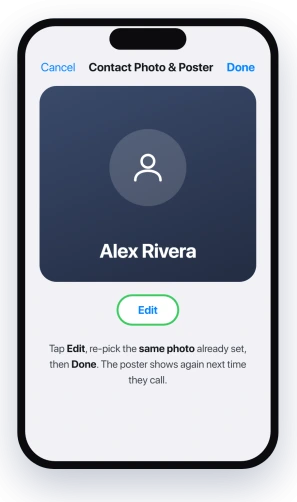
This is the one step with real success behind it. Open the Phone or Contacts app, tap the contact, tap Edit, then tap Contact Photo & Poster.
Pick the same photo that is already set, move through the screens, and tap Done.
The next time that person calls, the poster shows up as it should.
Apple covers the poster screens in Add or edit your contact info and photo.
Two honest caveats. It is often temporary, and for some people the poster goes blank again after a few days, because the underlying bug is on Apple's side.
And if you have hundreds of contacts, redoing them one by one is rough, so start with the people who call you most.
Do not blame Name and Photo Sharing
This is the setting nearly every other guide sends you to, and for this problem it is the wrong one.
Name and Photo Sharing lives on your own card in Contacts, when you tap it, tap Edit, and open Contact Photo & Poster.
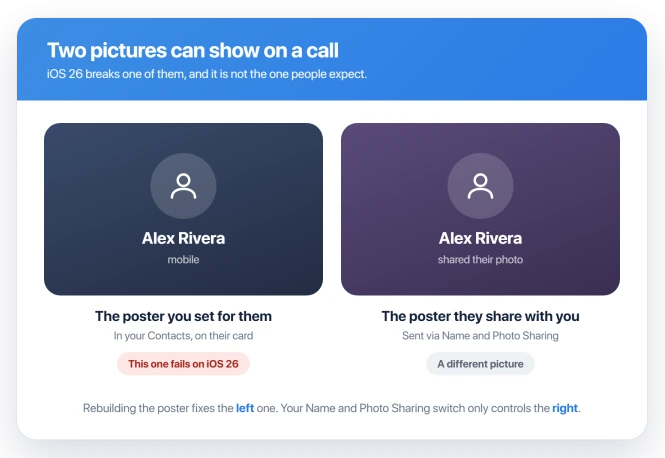
It controls whether your name and poster get shared out to other people, and turning it on helps when your poster does not show up on other people's phones.
It does not restore the poster you set for someone else.
Those are two different pictures: the one you assigned to them in your Contacts, which is what is failing here, and the one they choose to share with you.
Toggling your own sharing switch will not fix the black screen you see when they call.
A couple of faster things to rule out
- Restart, then nudge your own card. Power the iPhone off, wait ten seconds, turn it back on, then open Contacts, tap your own card, and edit your poster slightly. That can shake loose a background sync that stalled after the update.
- Make sure Contacts is syncing. Open Settings, tap your name, tap iCloud, tap Apps Using iCloud, and check Contacts is on. Posters ride along with contact sync, so if that is off, they cannot resolve.
- Photos missing in Messages on a Mac? The Mac contact photos page covers the poster and photo mix-up behind it.
What will not fix it, and what is not this bug
- Waiting for an update. iOS 26.2 still has this, and Apple has not acknowledged it. The "fixed in 26.0.1" note you may have read was a different problem, the Phone and Contacts apps opening to blank white screens, not the call poster.
- A Focus mode. If your calls are being silenced or hidden entirely, that is a Focus setting, a separate issue covered in Focus mode blocking calls. A Focus does not blank the poster on a call you actually answer.
- The poster editor freezing or wiping your photo. Trouble while building a poster, like the editor locking up or a black background erasing the image, is a separate editing bug, not this display failure.
- No sound once you answer. If the poster shows fine but you cannot hear each other on the call, that is no sound on iPhone calls, a separate audio problem.
Status: On iOS 26 the poster you set for a contact can go black on a call instead of their photo. Rebuild that contact's poster in Contacts to bring it back, an Apple-side bug that returns.
Why does it break for one contact and not another?
There is no setting on your end that decides it. The poster lookup fails on and off on Apple's side, so it lands on some contacts and skips others with no reason you can see.
Contacts with several numbers seem to draw it more often, but two people with the same setup can still get different results, which is the mark of a sync bug rather than a fix you control.
Does turning on Name and Photo Sharing fix it?
No. That toggle only governs your own outgoing poster. If you do want your poster to appear on friends' phones, turn it on and set Share Automatically to Contacts Only.
To fix a poster you saved for a caller, rebuild that contact instead.
Will an iOS update fix it?
Not so far. It was still being reported on iOS 26.2, and Apple has made no statement about it. Until a real fix lands, recreating the poster is the stopgap, and it may need repeating.
The Short Version
- The poster you set for a contact can fail to draw on a call in iOS 26, leaving a black screen, and the small circle photo can drop out too.
- It favors contacts saved with several phone numbers, but it also hits single-number contacts, so that is a clue rather than a rule.
- The one fix with real success is to rebuild that contact's poster: Edit the contact, open Contact Photo & Poster, re-pick the same photo, and Done.
- It tends to be temporary and can return after a few days, because it is an Apple-side sync bug, unacknowledged and still present on 26.2.
- Name and Photo Sharing is for sharing your own poster out, not for restoring one you set for someone else, so it is not the fix here.
Sharing a poster by touching phones: NameDrop sends your Contact Poster along with your name and one number, and our guide to what NameDrop sends and how to switch it off covers what else travels with it.
Where to Next
- Calls being silenced, not just the photo: Focus mode blocking calls on iOS 26
- No audio once you answer: no sound on iPhone calls

Isaac Smith is the founder and editor of PC Glance, a website that covers computers, laptops, and technology. He is a tech enthusiast and a computer geek who loves to share his insights and help his readers make smart choices when buying tech gadgets or laptops. He is always curious and updated about the latest tech trends.