
You open Google Maps in Safari, drag the map, and it crawls. Zooming jerks and labels draw late, long after you stop moving. The member who started the MacRumors thread called it "so laggy that it is unusable" on a brand new Mac.
I would turn off one Safari feature flag, OffscreenCanvas in Workers, before you try anything bigger. An owner did that and the lag went away, though they had to do it again after Safari 27 switched it back on.
The thread opened in July on macOS Tahoe 26.5.2 and has had about 3,000 views since.
Why Maps crawls in Safari and not in Edge
Safari keeps a list of switches for its newer web features, called Feature Flags. OffscreenCanvas in Workers sits on that list. It starts switched on, and WebKit's own settings file marks it stable.
Apple says in its developer notes that a stable flag "can be toggled to help determine if a feature is causing an issue". That is the whole method here: you switch one feature off and watch the map.
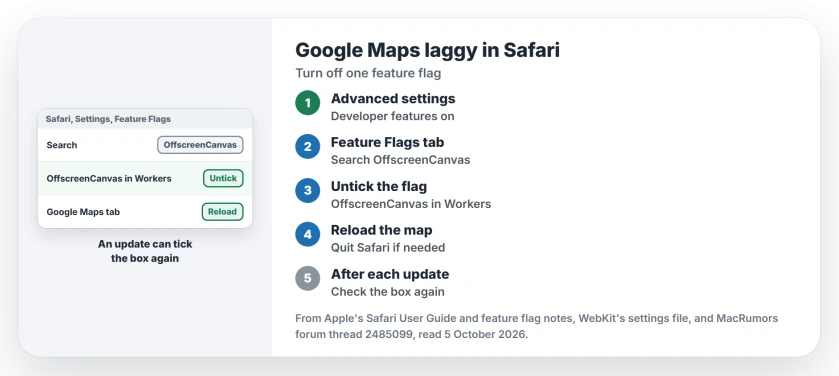
Status: checked 5 October 2026. Owners on macOS Tahoe and Sequoia saw Google Maps crawl in Safari. One fixed it by turning off the OffscreenCanvas in Workers flag, then again after Safari 27.
Owners narrowed it down to Safari fast. One wrote that "Google Maps works perfectly on the same Mac if I use Edge". Another found it "fluid on Firefox 152.0.6 and Safari 26.5.2", so not every Mac shows the lag.
1. Show the developer settings in Safari
Open Safari, choose Safari, Settings, then click Advanced and tick Show features for web developers. Apple's guide says the box will "Show the Develop menu in the menu bar and show Developer and Feature Flags settings in Safari Settings".
Normal browsing stays the same, and you only gain a Develop menu and two more tabs in Settings.
2. Untick OffscreenCanvas in Workers
Click the Feature Flags tab, type OffscreenCanvas in its search field, and untick OffscreenCanvas in Workers.
Apple states that "When you toggle a feature to a non-default state, its name is displayed in bold", so your change is easy to spot later.
Reload the Google Maps tab and drag the map around for a few seconds to compare. The owner who found the flag confirmed it after the Safari 27 update, in their words: "Disabling the flag fixed it again".
Ours: I would quit and reopen Safari if one reload does not do it. A tab that was open before the change can keep running the old way.
3. Check the box after every Safari update
This step catches people out. The same owner wrote "Mine was enabled after Safari 27 landed and lag was there". A month earlier they had warned that "feature flags may reset after updates".
So when your map slows again after a macOS or Safari update, open Feature Flags first, because a ticked box means the update turned it back on.
Two workarounds that leave the flag alone
Another owner listed "2 functioning workarounds to the problem". The first is to turn off advanced tracking and fingerprinting protection in Safari's Advanced settings. Then refresh the page.
Apple describes that option as "Use advanced privacy tracking for Private Browsing or all browsing". Ours: if yours says all browsing, try Private Browsing before you switch it off. You keep the extra protection in private windows.
The second keeps your protection on. In Google Maps, open the Layers tile, click More, and tick Globe view. The owner warned that it is "not persistent if not signed in to your Google account".
What did not help
A fresh Mac did not escape it. The first owner had no plugins and wrote that "the Mac is newly installed". The map still crawled.
A hardware acceleration setting came up in the thread too, as something to look at. Ours: Safari on a Mac has no such switch. There is nothing to change there.
That owner later erased the Mac and set it up again. Then they wrote "Now it works flawlessly". Ours: that costs hours for a fault one checkbox fixes, so I would leave it for last.
If every app on your Mac feels slow, not only Maps, start with Apple's five causes of a slow Mac instead.
Is this only a macOS Tahoe problem?
No. One owner saw it on macOS Sequoia 15.7.7 and another on the macOS 27 betas, while the flag fix was confirmed on macOS Tahoe 26.7 with Safari 27.
If every site stutters as you scroll, you have a different fault. Safari 27 scrolling stutter on Mac covers that one.
Has Apple fixed it yet?
Not that anyone on the thread has seen. One member wrote that "Feedback Assistant says there is more than 10 reports of this". The flag owner also found no lag in Safari Technology Preview, even with the flag left on.
Ours: Technology Preview is Apple's early build of the next Safari. A later update may carry a fix. Until then, keep checking the box.
The Short Version
- Google Maps can crawl in Safari on a Mac while Edge and Firefox run it smoothly.
- Tick Show features for web developers in Safari's Advanced settings.
- In Feature Flags, untick OffscreenCanvas in Workers and reload the map.
- Check that box again after every Safari update.
- Owners also used Globe view, or turned off advanced tracking and fingerprinting protection.
- A full erase fixed it for one owner, but try the flag first.
Where to Next
Open Feature Flags now and search OffscreenCanvas. Is the box already unticked while Maps still lags? Try Globe view next.
Did the flag fix it for you, or is your Mac on a different Safari version? Say which in the comments.

Isaac Smith is the founder and editor of PC Glance, a website that covers computers, laptops, and technology. He is a tech enthusiast and a computer geek who loves to share his insights and help his readers make smart choices when buying tech gadgets or laptops. He is always curious and updated about the latest tech trends.