
You forgot the password to your Mac, picked the Apple Account option to reset it, and signed in. Then the reset stops with There was an error communicating with iCloud. Every retry ends there.
I would check one iCloud setting on your iPhone before anything drastic. Apple support first told one owner to erase the Mac. Turning that setting off got them in instead.
Asked in February 2024, the question has 5,145 views on Ask Different, and the owner's own answer has eleven votes.
Where the reset breaks
The asker had an M2 MacBook Pro on Sonoma and their FileVault recovery key in hand. The error came "right after the step where it tries to load FileVault recovery key".
They had no backup. Repeated tries had locked the account.
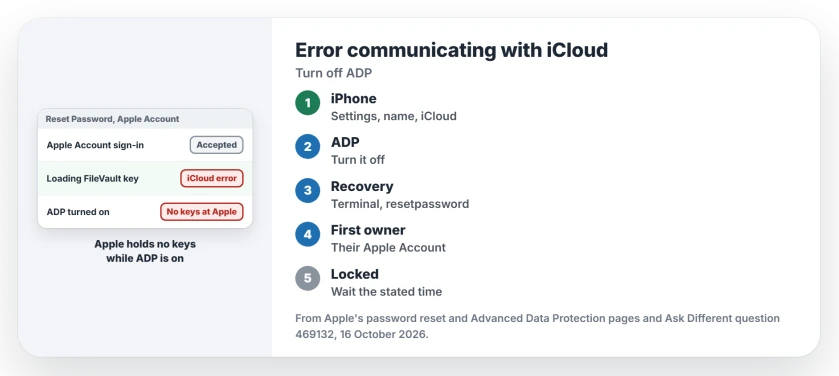
Apple's Advanced Data Protection page explains the part that matters. With it on, "Apple doesn't have the encryption keys needed to help you recover your end-to-end encrypted data".
Ours: none. No Mac was locked or reset while writing this; Apple's pages and two owners who lived through it supply every step.
Status: as of 16 October 2026, from Apple's password reset and Advanced Data Protection pages and two owners on Ask Different, from 2024 and 2025.
Turn off Advanced Data Protection on another device
A second call to Apple support gave a different answer: turn Advanced Data Protection off. The asker did it on their iPhone.
On iPhone, Apple's steps are: "In Settings, tap your name, then tap iCloud. Then scroll down and turn off Advanced Data Protection". On another Mac, it sits in System Settings under your name, then iCloud.
Turning it off changes where the keys live. In Apple's words, "Your device will securely upload the required encryption keys to Apple servers".
My reading is that the reset needs those keys, so with them back on Apple's servers it gets past the iCloud step.
Run the reset again from Recovery
Start your Mac in macOS Recovery. In Recovery's Utilities menu, choose Terminal, then type resetpassword and press Return.
Choose "I forgot my password" when asked. Once the setting was off, the asker's reset "worked perfectly fine without showing any errors".
If the reset asks for your FileVault recovery key instead, type it in, because that is the route the asker wanted all along.
Apple says the key "does not include the letters I (i) or S, or the numbers 1 or 0". That helps when a character looks unclear.
Try the Apple Account the Mac first used
In 2025, a second owner hit the same error on a Mac that had once been their wife's. It was first set up with her account. In their words, "I tried with her account and it worked".
Apple's steps point the same way, since Recovery may ask for "the Apple Account previously used with this Mac". On a used or handed-down Mac, ask the first owner to sit with you and sign in.
If the account says it is locked
Too many wrong passwords lock the account. Apple's advice is to "wait until the stated time has elapsed", then restart and try again.
Use the wait to turn off the iCloud setting on your iPhone, so the keys are back on Apple's servers before you try. Then the next try can work.
If your Mac rejects a password you are sure of, the Tahoe login page covers a keyboard bug that looks the same.
Should I turn Advanced Data Protection back on?
Yes, once you are back in, if you used it before. Apple lets you turn it on again from your iPhone or Mac, from the same iCloud screen where you turned it off. A recovery contact or key comes first.
I would also save the FileVault recovery key somewhere you can reach without this Mac, such as a password manager on your phone. On Tahoe or later, Apple says your iPhone's Passwords app may already hold the key.
Can I use my FileVault recovery key instead?
That is what the asker wanted. Their Mac kept reaching for iCloud, and their guess was that it looked for a key there that they had never stored.
If the reset offers the key, take that route. If yours is missing from Passwords, you can make a new FileVault key once you are logged in.
The Short Version
- The error can come from Advanced Data Protection, because Apple holds no keys to help the reset.
- Turn it off on your iPhone in Settings, your name, iCloud. The owner's reset then worked.
- Run resetpassword again from Terminal in Recovery and choose I forgot my password.
- On a used or handed-down Mac, try the Apple Account it was first set up with.
- Locked out? Wait the stated time, then try again, and turn the setting back on afterwards.
Where to Next
The iCloud switch or the first owner's account: which one let you in? A comment from you tells me, because I only have two cases so far.

Isaac Smith is the founder and editor of PC Glance, a website that covers computers, laptops, and technology. He is a tech enthusiast and a computer geek who loves to share his insights and help his readers make smart choices when buying tech gadgets or laptops. He is always curious and updated about the latest tech trends.