

Outlook crashes the moment you right-click inside an email, and the message you were writing disappears with it. The plan was only to fix a word or paste something.
I would check the installed Office build before rebuilding your mailbox. Owners of classic Outlook found that updating stopped this particular crash, although the same thread also contains cases that needed more help.
Does it close while you're editing a message?
The June 2026 reports concern classic Outlook on Windows. One owner could trigger the crash by right-clicking an empty message body; the subject line and address fields still behaved normally.
The thread's asker described crashes while sending, correcting spelling or adding a snapshot. Their Microsoft Q&A question now shows 200+ people asking the same question.
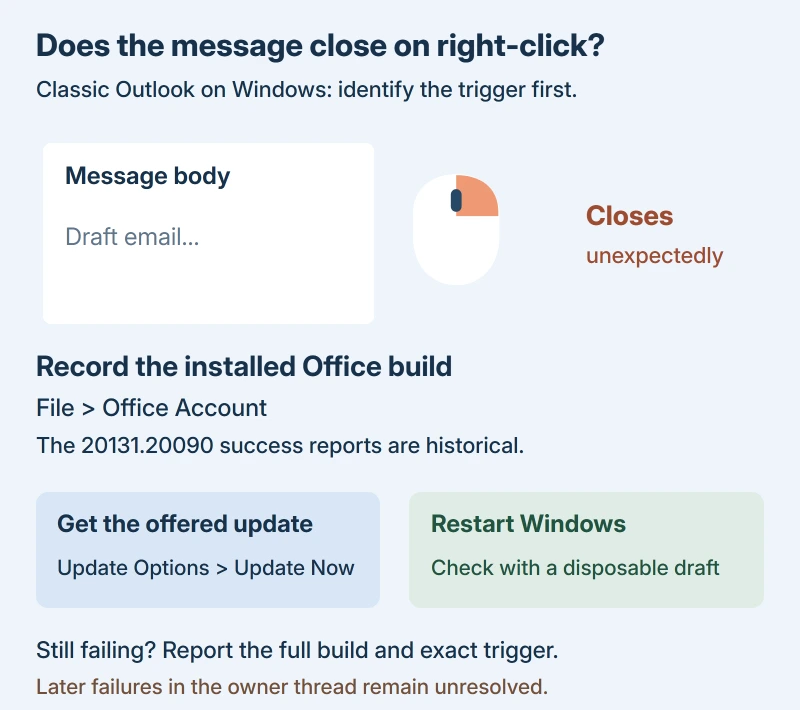
Status: classic Outlook for Windows, sources checked 17 October 2026. Updating helped owners in June; later failures in the same thread prevent a universal fix claim.
Does your Outlook fail before you can reach a message? Start with the Outlook opening problems guide. A launch failure needs different checks from a crash during editing.
Find your build, then request the current update
In classic Outlook, select File > Office Account and read the version shown with the product details. About Outlook gives you further version information. Keep the complete build, including the digits after the dot.
Microsoft's release notes place Version 2606, build 20131.20090, in Current Channel on June 25, 2026. Updating to that build was reported working by the person helping users previously on 20026.20182.
The asker said the update helped. Other owners agreed. That build is a historical success report. Use the current update offered for your installation, rather than trying to install that older release now.
Save any work still open. Microsoft documents the update control as File > Office Account > Update Options > Update Now in classic Outlook, in its Office update instructions.
If Outlook won't stay open, use Word: its starting menu is File > Account, followed by the same Update Options control. You're updating the installed Office apps from there.
Missing Update Now? Enable Updates may appear first. If Update Options itself is absent and you only see About, Microsoft says volume licensing or company policy may control updates; ask your help desk to check.
After updating Office, restart Windows and retry Outlook. One owner initially reported failures after updating, then returned to say both affected users were working after a reboot.
Use a short throwaway message for that check. I wouldn't risk another long reply while you're finding out whether right-clicking still closes the app.
Why I wouldn't start with another repair
Quick Repair failed for the users in the accepted answer, while updating helped. Another owner reported the same difference, so a failed repair doesn't mean you have exhausted the useful options.
Other owners did recover after Online Repair, but several said it also installed the newer build. That makes updating directly a reasonable first move for this symptom.
Two owners said Safe Mode didn't stop their right-click crash. A fresh Outlook profile also failed for one of them. I wouldn't call this an add-in fault just because the crash involves a menu.
Registry edits and rollbacks appear in the thread. Neither is necessary to follow the accepted update route, and the later replies don't give one setting that reliably resolves every case.
Still crashing on a newer build?
One owner reported continued trouble on build 20131.20112 despite repairs, reinstalling and rebuilding the profile. Another owner also had a later failure, but theirs became a startup loop asking about Safe Mode.
Those reports matter. An update that helped the asker doesn't prove your newer crash has the same cause, especially if the trigger has changed.
Tell your help desk which build is installed and exactly what closes Outlook: a right-click in the message body, sending, or starting the app. Include whether a restart changed anything and whether colleagues see the same trigger.
If Outlook closes normally but refuses to reopen afterward, the stuck closing process guide addresses that separate pattern. It isn't the editing crash described by the original asker.
The Short Version
For classic Outlook that closes during a right-click in an email, record the build and install the offered Office update. Restart, then check with a disposable draft. If it continues, report the exact trigger and newer build.
Where to Next
Did right-clicking stop closing your message after the update and restart? Tell me the full build and whether it happens in the message body only, so the next report has something concrete to compare.

Isaac Smith is the founder and editor of PC Glance, a website that covers computers, laptops, and technology. He is a tech enthusiast and a computer geek who loves to share his insights and help his readers make smart choices when buying tech gadgets or laptops. He is always curious and updated about the latest tech trends.