
Power banks for cell phones need a charged battery, a compatible cable and an output port. USB-C can be input-only on one bank and work in both directions on another. Check its labeling before replacing the cable or phone.
Charge the bank first, connect the phone to a documented output, then look for the phone's charging indicator. A light on the bank alone doesn't confirm that power is reaching the phone.
Read input and output as two different jobs
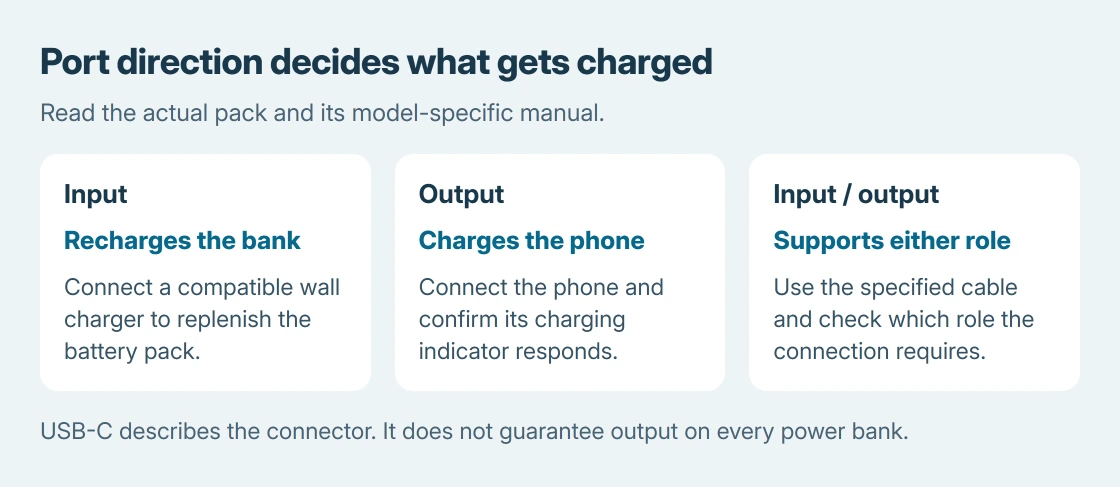
Input recharges the power bank from a wall charger. Output charges the phone from the bank. Input/output supports both roles through that socket, using a suitable cable and compatible devices.
Anker's power-bank use instructions explain charging the bank before first use, connecting the device and pressing a power button on models that require it. Other models start automatically.
Status: Anker's charging guidance and A1286 port specifications checked October 25, 2026, with Apple and Google charging instructions. No battery pack or phone was tested.
Use the manual for the full model number, not just the marketing family. A charging-port assumption copied from another bank can be wrong even when both have a similar product name.
USB-C does not establish the port's direction
Anker's A1286 user guide lists USB-C input and output. This PowerCore 20K II can therefore use that socket to recharge itself or supply a connected device.
A separate Anker 325 troubleshooting answer describes a different port arrangement: USB-A output, with USB-C and Micro-USB reserved for input.
That answer doesn't identify the A1286 and must not override its explicit specifications. Match the actual pack's model and markings. The shared 325 name isn't sufficient to decide where a phone connects.
Match the cable and charging standard
Use a cable that fits the phone and the bank's output. For faster charging, check the supported protocol as well as the connector. A large capacity number describes stored charge; it doesn't identify the port's charging speed.
Google says USB-A charging is slower than USB-C in its Pixel charging instructions. Check the recommendations for the exact Pixel model rather than assuming every bank delivers its fastest rate.
Apple says to check the battery icon in its iPhone charging instructions. A phone approaching full charge can slow or pause through its own battery management.
For that symptom, use the slow-charging checks instead of treating every pause as a dead bank. Alternative power sources are covered in the phone charging options.
Test the side of the connection that fails
If the bank won't recharge, try another compatible wall adapter, cable and outlet. If it recharges but won't charge a phone, test a known-working cable and another device on the confirmed output.
Those substitutions are documented in Anker's charging-fault guidance. Test each replacement separately to identify the failed connection.
This support cutoff is ours: repeated failure with a charged bank, correct output and working cable. Give the manufacturer its model number and whether the failure is recharging the bank or powering the phone.
Use a reset only when the instructions for that exact model specify it. A cable loop or button sequence from another bank isn't a general USB charging procedure.
The Short Version
Recharge the bank, select a documented output and confirm charging on the phone. Connector shape and product-family name don't establish port direction. Separate a bank-input fault from a phone-output fault before requesting support.

Isaac Smith is the founder and editor of PC Glance, a website that covers computers, laptops, and technology. He is a tech enthusiast and a computer geek who loves to share his insights and help his readers make smart choices when buying tech gadgets or laptops. He is always curious and updated about the latest tech trends.