

You right-click a key in Registry Editor, choose Delete, confirm, and Windows answers with Error Deleting Key. Being an administrator does not help, and Safe Mode often fails too.
I would not start by fighting permissions. Microsoft wrote a support article about this error. The first cause it names is one Registry Editor never shows you.
Since a Super User member asked about it in May 2015, that page has passed 280,000 views. On Microsoft Q&A the same refusal turns up after an interrupted Office uninstall and after Avast was removed.
Why Registry Editor refuses
The full message reads "Error while deleting key", and Registry Editor gives no reason. Three different things produce it, a fourth gives the same failure from a script, and each needs its own fix.
Microsoft documents the first one in KB 2021860. The error "can be caused if you attempt to delete a registry key that contains embedded null characters". Those characters "aren't visible when viewing the registry entry".
The rest came from owners. The key belongs to TrustedInstaller or SYSTEM. A driver that loads with Windows protects it. Or a script looks in the wrong half of the registry.
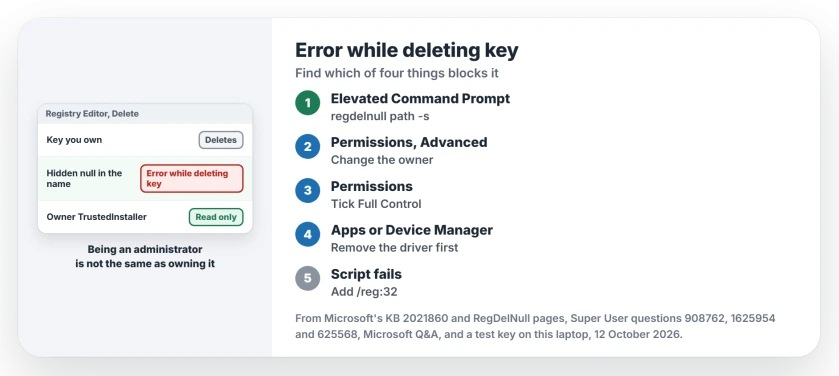
Status: Microsoft's KB 2021860 and RegDelNull pages, a null-named test key made and removed here, and eleven years of owner reports, checked 12 October 2026.
1. Look for a hidden null with RegDelNull
A key name can carry a null character in the middle. The Windows kernel reads the whole name, but Registry Editor stops at the null, so it asks to delete a key that does not exist.
The fix in Microsoft's article on this error is a free Sysinternals tool, RegDelNull. Microsoft says to "replace the null character with another character", and the tool does that for you before deleting.
Download it and open an elevated Command Prompt in its folder. Point it at the parent of your stubborn key, with -s to search every key under it.
regdelnull HKLM\SOFTWARE\ExampleApp -sIt prints each key it finds with the null shown as a star and asks before deleting each one. Export the parent first with File, then Export in Registry Editor, so you can undo it.
Ours: we made a key with a null in its name under HKEY_CURRENT_USER on this laptop, through Windows' own NtCreateKey call. Then reg delete on its parent failed with "ERROR: The system was unable to find the specified registry key or value".
The parent stayed put. Once we deleted the hidden key through its own handle, the parent deleted normally and nothing was left. So a null really does block an ordinary delete.
RegDelNull does not clear every stuck key. Microsoft says this "usually occurs because of a corrupt application installation or similar".
Yet one Q&A owner with a broken Office key wrote "I try the RegDelNull and the key is still there". If that is you, move on to step 2.
2. Take ownership, then give yourself Full Control
Many keys are not owned by you or by Administrators. Ours: of the first 400 keys under HKEY_LOCAL_MACHINE\SOFTWARE\Classes\CLSID on this laptop, TrustedInstaller owned 278.
On a sample key, Administrators had Read and nothing else. So your admin account can see the key, and it cannot remove it.
Right-click the key, choose Permissions, then Advanced. Next to Owner, choose Change, type your user name, press Check Names and OK.
Tick the box that replaces the owner on subcontainers and objects, then Apply. Back in Permissions, select your account (Add it if it is missing), tick Full Control under Allow, and delete the key.
One owner who followed those steps wrote that taking ownership "worked when the other methods did not work".
On another Super User question, the accepted answer opens the key to all accounts with Full Control when your own account still fails.
3. Remove the driver or program behind it
The asker of the big Super User question solved it themselves. In their words, "There was a driver preventing the deletion". It loaded even in Safe Mode.
So if the key belongs to a program or driver you no longer want, uninstall that first, restart, and then delete the leftovers. Our guide to an app that stays in Installed apps after removal covers the uninstall side.
Not sure which process belongs to the program? Judge a strange .exe in Task Manager before you end anything.
Registry Editor's own message file has a line for one more case: "The key currently selected is marked for deletion". I read that as good news. The delete went through, and the key goes once the program holding it closes or you restart.
4. Deleting from a script? Check the 32-bit view
A 64-bit PC keeps two copies of some keys. An owner who could delete a Run entry in Registry Editor but not with reg.exe found the key lived in the 32-bit view.
They saw the same "unable to find the specified registry key or value" line as our null test. Their fix was the reg.exe in SysWOW64 for 32-bit keys.
Ours: reg delete /? on this laptop lists /reg:32, which "Specifies the key should be accessed using the 32-bit registry" view. The 32-bit Run key here holds three values and the 64-bit one holds one, so the two really differ.
Two shortcuts to skip
Running Registry Editor as SYSTEM with PsExec is the common forum answer. One owner on Super User and one on Q&A tried it and their key stayed. SYSTEM has more rights than you, but rights do not get past a hidden null.
Tools that open Registry Editor as TrustedInstaller do the same job as step 2 with more risk. I would take ownership of one key rather than give a whole session that much power.
The Short Version
- Run RegDelNull with -s on the parent key.
- Take ownership, then tick Full Control.
- Uninstall the program or driver behind it.
- Script failing? Add /reg:32 to reg delete.
- Export the parent key before every delete.
Where to Next
Which of the four was yours? Post the key path in a comment if you can share it. Each new path helps me point the next stuck reader at the right step.

Isaac Smith is the founder and editor of PC Glance, a website that covers computers, laptops, and technology. He is a tech enthusiast and a computer geek who loves to share his insights and help his readers make smart choices when buying tech gadgets or laptops. He is always curious and updated about the latest tech trends.