
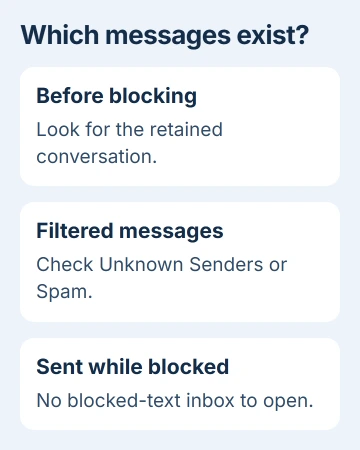
No, an iPhone doesn't keep an inbox of texts sent while a number was blocked. Those messages aren't delivered, so unblocking the sender won't bring them back.
Messages that arrived before the block are different. Look for the existing conversation, check whether it was filtered or deleted, and unblock the sender only if you want to receive new messages from them.
Check which messages you're trying to read
Start with when the texts were sent. A conversation that was already on your phone may still be there. Texts someone sent after you blocked them never arrived, so you won't find a stored copy on your iPhone.
Apple's blocking instructions say messages from a blocked contact aren't delivered. The blocked-contact list shows who you've blocked, rather than saving what they sent.
The Blocked Messages folder in voicemail is different. A blocked caller can leave a voicemail without an alert, but that folder doesn't hold blocked SMS or iMessage texts.
Blocked email works differently too: it can go to Mail's trash. That folder holds email, so you won't find blocked texts from Messages there.
If you need a message sent during the block, ask the sender to send it again through a channel you choose. Messages can't download old texts from Blocked Contacts.
I'd check the old conversation before changing the block. Reading messages that are already on your phone doesn't require letting that person contact you again.
Find the conversation that arrived before the block
Open Messages and return to the conversation list. Look for the sender's name or number. Blocking someone doesn't delete the conversation you kept, so you may still be able to read that earlier exchange.
If the list is long, use the search field. On iOS 26 or 27, look along Messages' bottom edge. On iOS 18 or earlier, pull down on the conversation list to reveal search.
Try a word you remember from the exchange, then the person's name or number. Open a result and check its date. An older text is part of your pre-block history, not a sign that later blocked texts were saved elsewhere.
The Messages search guide explains how to narrow results to a person or attachment. Start with a simple term if a more detailed search returns nothing.
A contact can have several addresses or numbers. If two conversations look similar, check the sender shown in each, especially if the person has changed their number.
Search can't restore a conversation you deleted. If you removed the thread, try the recovery check next rather than searching for it again.
Look in filters when the sender wasn't actually blocked
Open Messages' Filter menu and check Unknown Senders. On current software, Spam can also hold messages separated from the ordinary conversation list.
These folders hold messages your phone received but kept away from the main list or its usual alerts. Finding a text there means it was filtered, rather than blocked before delivery.
Open the conversation and read it before deciding whether to move it. A wanted message can be filtered even if you never added its sender to Blocked Contacts.
The filters you see depend on your iOS version and filtering settings. In an older layout, look for Filters in the upper-left corner instead of the current filter button.
Use the missing-message checks if more than one wanted conversation has disappeared. That guide also covers syncing and message retention, which blocking doesn't control.
If the message is visible but you only missed its alert, check notification or Focus settings separately. Silencing an alert doesn't remove the text or put its sender on the blocked list.
Recover a thread that you deleted
For an accidentally deleted conversation, open Messages > Filter > Recently Deleted. An older layout may place it under Edit > Show Recently Deleted.
Select the conversation, choose Recover, and confirm Recover Messages. Return to the conversation list and check the dates to see how much history came back.
The deleted-message recovery instructions cover messages deleted within the last 30 to 40 days on supported iOS versions. Older deletions may no longer appear in that list.
Recently Deleted holds messages you removed from your history. Texts from a blocked sender never reached that history, so they won't appear there even if the dates match.
Check what a backup contains before erasing your phone to restore it. An older backup can replace newer data, and it can't supply texts that never reached your message history.
If you can't recover the conversation, ask the other person whether they still have it. They can share the messages or attachments you need without you restoring the whole phone.
Unblock the sender for a new message
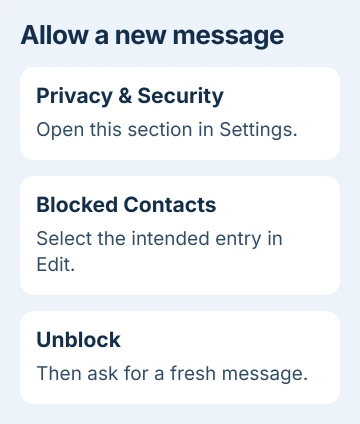
On iOS 26 and 27, open Settings > Privacy & Security > Blocked Contacts. Tap Edit, remove the intended contact or number with the delete control, then tap Unblock.
For numbers grouped as unknown contacts, open that group first. Check the full number so you unblock the right entry and leave similar-looking numbers blocked.
On iOS 18, look under Settings > Apps > Messages > Blocked Contacts. Earlier versions place Messages directly in Settings. Searching Settings for Blocked Contacts can help locate the list.
Once you've unblocked the number or address, ask the person to send a new message. Unblocking allows future contact; reopening Messages won't bring back texts sent during the block.
If the new message doesn't arrive, check that it came from the number or email you unblocked. If that matches, give Apple Support the affected address, delivery time and your iOS version.
The Short Version
Blocked texts have no inbox on iPhone. Search for earlier conversations, check received-message filters, or recover a deleted thread when available. Unblock only for future contact and ask the sender to resend the missing text.
Checked November 5, 2026.

Isaac Smith is the founder and editor of PC Glance, a website that covers computers, laptops, and technology. He is a tech enthusiast and a computer geek who loves to share his insights and help his readers make smart choices when buying tech gadgets or laptops. He is always curious and updated about the latest tech trends.