
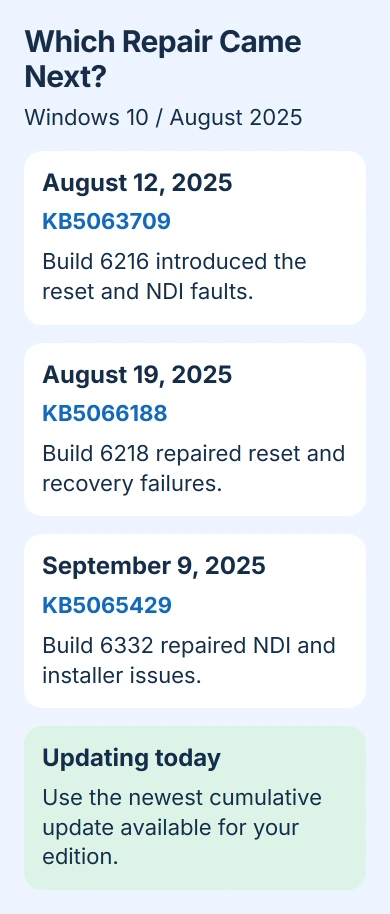
KB5063709 is the Windows 10 security update released on August 12, 2025. KB5066188 fixed its reset problem, and later updates fixed NDI streaming and installer problems. Start with the newest update available for your PC.
An old KB5063709 entry in update history doesn't tell you which update your PC is running now. Check your installed build, the full Windows version number, before removing anything or trying to install the August package again.
1. Check whether the August build is still installed
Press Windows+R, enter winver, and press Enter. Write down the version and OS build. KB5063709 installed 19045.6216 on Windows 10 22H2, or 19044.6216 on supported Enterprise LTSC 2021 editions.
Microsoft lists those builds in the KB5063709 release notes. The update included security improvements and earlier July changes; it isn't a new Windows feature version.
Next open Settings > Update & Security > Windows Update > View update history. Check the dates and whether the failed entry is KB5063709 or a newer package. Keep its complete error code if installation failed.
An August failure can stay in update history after a newer update succeeds. That entry records what happened at the time. Check winver and the latest successful quality update to see what's installed now.
Don't try to force this update onto Windows 11 or a different Windows 10 release. If it says the update isn't applicable, you may have selected the wrong package or already have a later replacement.
2. Install the latest update available for your edition
Choose Check for updates. Let the scan finish and restart if asked, then reopen winver. A cumulative update includes earlier repairs too, so you don't need to install every old KB in order.
Windows 10's regular support ended on October 14, 2025. Eligible Windows 10 22H2 PCs need Extended Security Updates, or ESU, to keep receiving security updates. Enterprise LTSC editions follow their own support schedules.
If updates have stopped, check your enrollment against the current consumer ESU requirements. Installing the old August update won't enroll your PC for current monthly security updates.
If you've already enrolled, check the Windows 10 ESU coverage dates before relying on the original enrollment period. If IT manages your work PC, ask which update it needs.
I'd check whether your PC can receive current updates before downloading individual packages. An old update can seem to fix the problem while leaving newer security fixes missing.
3. Update before retrying a failed PC reset
The August security update could make a PC reset or recovery fail. The fix arrived on August 19, 2025, as KB5066188, bringing those builds to 19045.6218 and 19044.6218.
The out-of-band repair notes name the affected August update. Out-of-band means the fix arrived outside the usual monthly update schedule.
If Windows still opens, install a later cumulative update for your PC before trying Reset this PC again. Find it under Settings > Update & Security > Recovery in Windows 10. Back up your important files before a reset.
Repeating a failed reset on build 6216 won't install the fix. If you've already updated to a newer build and the reset still fails, save the current error message.
If the PC won't start, give a repair technician or your IT team its installed build, August-update history and exact recovery error. They can choose suitable recovery media instead of having you repeat destructive recovery attempts.
4. Repair NDI stuttering on the computers sharing video
NDI carries video and audio between computers on a network. The August update could cause delays, stuttering and uneven sound in tools such as OBS Studio and NDI Tools, especially with Display Capture on the PC sending video.
The Windows 10 repair shipped on September 9, 2025, in KB5065429, build 19045.6332 or 19044.6332. Its release notes include the network change involved in this failure.
Install that update or a later cumulative update for the affected PCs, restart them, then try the same video feed again. Changing the broadcast bitrate alone won't replace the Windows fix.
If you're on an earlier build and can't update yet, you can temporarily change the NDI receive mode from RUDP to TCP or UDP. Look for that control in the app receiving the video.
Once you've installed the Windows fix, you don't need that workaround for this fault. If the feed still stutters, note both PCs' builds, NDI versions and the capture source that fails, then ask the streaming-app developer for help.
5. Treat installer permission prompts separately
Another August change affected Windows Installer repairs. If you used a standard account, opening certain apps could ask for administrator approval, or a repair running without prompts could fail. Some Autodesk apps were affected.
The September 9 update fixed this too. Install it or a later cumulative update before changing account permissions or reinstalling a whole app suite. A prompt after a security change doesn't by itself mean the app is infected.
If an app managed by IT still asks for administrator approval, tell them its name and what you did to trigger the prompt. Don't make your everyday account an administrator just to hide an unexplained repair request.
6. Troubleshoot an installation that still fails
On Windows 10, open Settings > Update & Security > Troubleshoot > Additional troubleshooters. Select Windows Update, then Run the troubleshooter. Apply its suggested repair and restart before retrying the current update for your PC.
The update troubleshooting procedure also covers connection, storage and damaged system files. Choose the Windows 10 instructions; Windows 11's Settings menus have different names.
If it fails again, use the update error-code checks with the code you saved in step 1. That helps you choose a repair for this error instead of treating it as the old reset bug.
If the update still won't install, contact your PC maker, IT team or Windows support. Give them winver's output, the KB you tried, its error and the troubleshooter result so they can check why it's failing.
The Short Version
Check the current build first. KB5066188 fixed the reset fault; KB5065429 fixed NDI and installer issues. Install a newer eligible cumulative update, confirm update coverage, and troubleshoot the package that's failing now.
Checked November 5, 2026.

Isaac Smith is the founder and editor of PC Glance, a website that covers computers, laptops, and technology. He is a tech enthusiast and a computer geek who loves to share his insights and help his readers make smart choices when buying tech gadgets or laptops. He is always curious and updated about the latest tech trends.