
You signed your Windows 10 PC up for Extended Security Updates, and you remember an end date of 13 October 2026, less than two weeks away. I would check that your PC is enrolled, because Microsoft's own pages now give a later date.
Earlier this year, owners asking in Microsoft's Q&A forum were still working from the 2026 date. The program page now says 12 October 2027.
The date Microsoft gives now
In March, one asker on the board wrote: "When Microsoft states that ESU is available until 13 October 2026", and asked what exactly ended on that day. That was the date owners worked to.
Microsoft's consumer ESU page now says you can enroll any time before it "ends on 12 October, 2027". Microsoft states the same date on its page about the end of Windows 10 support, and a Q&A adviser gave owners that date in August.
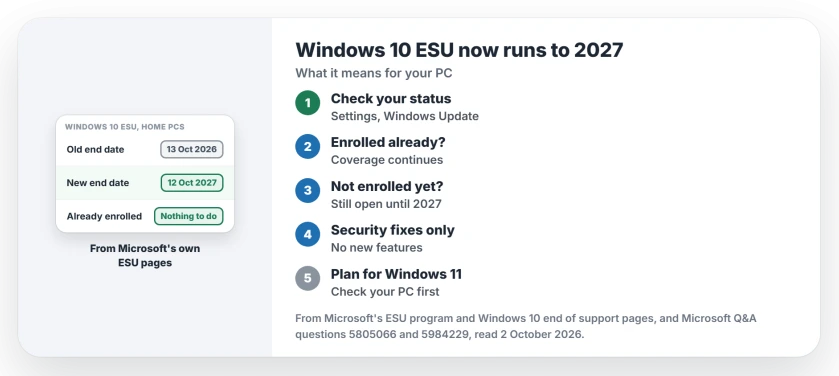
Status: checked 2 October 2026. Microsoft's ESU pages give 12 October 2027 as the end of the consumer program; enrolled PCs carry on automatically, and enrollment stays open until then.
If you are already enrolled
Enrolled PCs need no action at all. Microsoft says: "If you're already enrolled, your coverage will automatically continue through that date".
That applies whichever way you signed up: the free route through PC settings backup, 1,000 Microsoft Rewards points, or the $30 one-time purchase. Microsoft says those enrollment options give updates "through 12 October, 2027".
To be sure your PC is in, open Settings, Update & Security, Windows Update. Microsoft says you can check your enrollment status there at any time.
If that page shows a red warning after this month's update installed, the status can be stale, and owners reset it in the registry.
If you have not enrolled yet
You still can, because Microsoft says you can enroll any time until the new end date, though "devices will be more vulnerable and susceptible to viruses and malware before enrollment".
The requirements have not changed: Windows 10 version 22H2, the latest update, the KB5126256 licensing package and an administrator Microsoft account. One license covers up to 10 PCs.
If the enrollment page says something went wrong, the ESU enrollment error page has the fixes owners found, starting with Find my device.
What ESU covers, and what it does not
ESU is security fixes only, and in Microsoft's words it "delivers critical and important security updates for enrolled Windows 10 PCs".
It brings no new features, and Windows 10 itself left support on 14 October 2025, a date that has not moved.
Ours: an enrolled PC still needs Windows Update to run. Pausing updates for months leaves you as exposed as if you had never enrolled.
After October 2027
Home PCs stop getting security updates then. The adviser's answer to an owner put it simply: "after that date, you would no longer receive security updates".
Enrolling does not lock you in either, since Microsoft says it "does not prevent you from upgrading your PC to Windows 11" if the hardware qualifies.
So the extra year is time to plan. PC Health Check shows whether this machine can move, and the Windows 11 upgrade page walks through each result it can give.
When does Windows 10 ESU end?
For home PCs, Microsoft's ESU page now gives 12 October 2027. Earlier this year the date quoted was 13 October 2026.
Do I need to re-enroll for 2027?
No, because Microsoft says enrolled PCs carry on to 12 October 2027 automatically. Check the status under Settings, Update & Security, Windows Update.
Is Windows 10 ESU still free?
The no-cost route through backing up your PC settings is still listed. Microsoft also offers 1,000 Rewards points or a $30 one-time purchase, covering up to 10 PCs.
The Short Version
- Microsoft's new end date is 12 October 2027.
- The older date was 13 October 2026.
- Enrolled PCs continue automatically.
- Check your status in Windows Update.
- You can still enroll until the new date.
- ESU is security updates only.
- Use the extra year to plan for Windows 11.
Where to Next
Open Settings, Update & Security, Windows Update and check that your PC shows as enrolled. If it does, there is nothing else to do this October.
If yours says something different, describe it in the comments. I will add any message owners see that this page does not cover.

Isaac Smith is the founder and editor of PC Glance, a website that covers computers, laptops, and technology. He is a tech enthusiast and a computer geek who loves to share his insights and help his readers make smart choices when buying tech gadgets or laptops. He is always curious and updated about the latest tech trends.