The python310.dll loading error on Windows 7 points to a system limit: Python 3.10 doesn't support Windows 7. Use an app release compatible with Windows 7 or move to supported Windows; a replacement DLL won't add that support.
The same limit applies when Sims-4 Updater reports this error. An updater's startup error and the current game's requirements are separate problems. Installing another Python version won't replace the copy an app includes to run its code.
In this guide
1. Read the error and confirm the Windows version
Save the complete message, including the DLL path and any text after it. A message about loading a DLL isn't automatically saying that the file is absent. The file can be there, but Windows still can't load it if it needs a newer system.
Press Windows+R, type winver, then press Enter. Confirm whether the computer really runs Windows 7. An old desktop appearance or a folder name isn't enough to identify the operating system.
On Windows 7, open Control Panel > System and Security > System and note System type too. This tells you whether Windows is 32-bit or 64-bit, information a developer may need when checking an application's requirements.
If the message appears only when opening the updater, the updater is the program failing at that moment. Launching the game through its supported launcher is a separate check. Don't start replacing files in the game's installation folder.
2. Match the program's runtime to its operating system
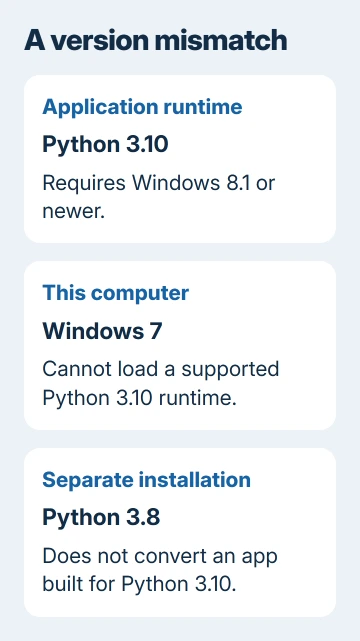
Python's Windows compatibility documentation lists Windows 8.1 and newer for Python 3.10. It points Windows 7 users toward Python 3.8. That older interpreter isn't a replacement for python310.dll.
A DLL is a library of code a program loads while running. The digits in python310.dll identify the Python 3.10 runtime. A Python 3.8 library has a different version and cannot simply be renamed to provide the newer runtime.
Some desktop tools include their own copy of Python. They load that copy instead of the Python you've installed for your scripts. The path into the updater's folder or temporary files can tell its developer which Python copy it uses.
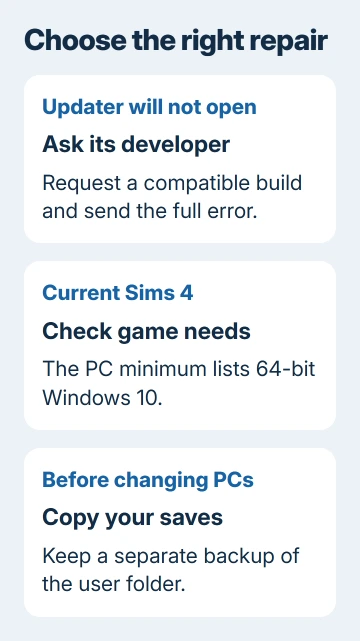
Python 3.8 can run compatible scripts on Windows 7. It doesn't convert a program built for 3.10. Ask the developer whether they offer a Windows 7-compatible application build, rather than installing interpreters at random.
If they don't, there is no supported Python installation setting that adds Windows 7 support to their current build. I'd check that requirement before spending time repairing runtimes that the program can't use on this system.
3. Keep the updater error separate from the game requirements
The current Sims 4 system requirements list 64-bit Windows 10 as the minimum PC operating system. A Windows 7 computer therefore falls outside that requirement even if an updater could be made to open.
An independently distributed updater has a different publisher and support channel from the game. Its Python error doesn't mean the game files are damaged. Note which program opens the error message before you ask for help.
Launch the official game through its supported launcher and your account. Give EA support the game's own error if it fails on a compatible PC. A third-party updater's startup problem needs its developer's assessment.
Avoid mixing files from different updater releases or copying a DLL out of a different program. Matching filenames can hide different versions, processor types or Windows requirements.
4. Choose a supported system before reinstalling
Check whether the computer can move to a supported Windows release. The PC Health Check guide explains Windows 11 eligibility, including hardware requirements that a Windows 7-era PC might not meet.
Python 3.10's Windows 8.1 minimum tells you what it can run on. It doesn't make Windows 8.1 a good choice to install today. An operating system can run a runtime while no longer receiving normal security support.
Use Microsoft's Windows support explanation when planning the move. Don't assume an old Windows 7 product key supplies a free license for a new installation.
Back up personal files and Sims saves before replacing Windows or moving to another PC. Keep a separate copy that you can open, rather than relying on files left on the disk you're about to change.
In a standard Windows setup, the game's user folder is Documents > Electronic Arts > The Sims 4. A redirected Documents folder can put it under OneDrive. Check the folder that actually contains your saves before copying it.
The Windows 11 upgrade guide covers preparation when the hardware qualifies. If it doesn't qualify, ask a repair shop about a supported replacement system instead of forcing an unsupported upgrade for one utility.
5. Get a complete application package on compatible Windows
If winver shows you're already on supported Windows rather than Windows 7, check the app's other requirements. Ask its developer for a fresh complete package, supplying the exact DLL error and application version.
If the package is a ZIP, extract all its contents to a new folder before launching the program. The program may need other files from the ZIP to start. Follow the developer's installation instructions.
Check Windows Security > Virus & threat protection > Protection history on current Windows if files disappeared during extraction. Note the detection name and affected file so you can send them to the developer.
Ask the developer to verify the package and any detection. Don't restore a quarantined file just because a download page says it's required. Getting the app to launch doesn't resolve an unexplained security warning.
If the package still fails, send its developer the full message, Windows edition, system type and whether it fails before its main window opens. Ask which Windows versions it supports and whether its included Python copy causes the error.
The Short Version
Python 3.10 doesn't support Windows 7. Installing Python 3.8 or renaming a DLL won't convert a packaged app. Use a compatible build or supported Windows, and check the game's own requirements before changing its files.
Checked November 13, 2026.