
Windows Update on your Windows 10 PC shows red text: "Your device is missing important security and quality fixes." You click Check for updates, it finds nothing, and the warning stays.
I would answer two questions before changing anything. Is the PC enrolled in Extended Security Updates, and did this month's update install? If both are yes, the warning is usually stale, and owners cleared it by resetting one registry key.
On Microsoft Q&A, the main question about this message counts 50+ people. The thread with the fix has 10+, and replies thanking it run into 2026.
When the warning is telling the truth
Microsoft's ESU page is plain: "Windows 10 reached end of support on 14 October, 2025." An unenrolled PC gets no security updates, so the red text is accurate.
One asker on the 50+ thread was in exactly that spot: "I should say this old Windows 10 PC hasn't been updated since May 2021." No registry change fixes that. Updating does.
Enrollment needs the right version, too: "ESU is available for eligible devices running Windows 10, version 22H2." If enrolling fails, the ESU enrollment errors have their own causes.
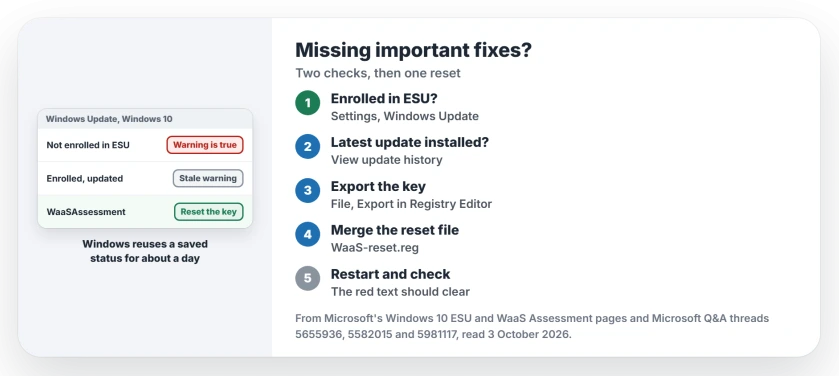
Status: checked 3 October 2026. On enrolled, updated PCs the warning comes from a stale update assessment. Owners cleared it by resetting the WaaSAssessment registry key.
Check enrollment and this month's update
Open Settings, Update & Security, Windows Update. Ours: an enrolled PC says so there, with no Enroll now link.
Microsoft says the updates arrive the normal way: "These security updates will be delivered through Windows Update as they're made available."
Then open View update history and look at the newest Cumulative Update. If it installed this month, your PC is current and the red warning is wrong.
One owner checked further, and Windows' own assessment data listed their installed build as the latest. "Despite these conditions, Windows Update continued to display" the warning, on a PC fully patched in August 2026.
Why an up to date PC still shows it
Windows Update does not check your status afresh each time. Microsoft documents the assessment behind it: "The WaaS Assessment Platform uses the COM API model and runs automatically at least once a day."
The key word is cached. "During the cached period, assessments are made against the cached release information." Ours: after ESU enrollment, that saved answer can stay wrong.
A volunteer moderator on a September 2026 thread describes the fix the same way: "The purpose of this registry change is to remove the old WaaSAssessment status and allow Windows to regenerate the Windows Update status."
Reset the WaaSAssessment key
Back up first. Open Registry Editor, go to the key, choose File, Export, and save your copy somewhere safe. The key lives here:
HKEY_LOCAL_MACHINE\SOFTWARE\Microsoft\Windows\CurrentVersion\WaaSAssessmentThe fix owners used is a small registry file. Open Notepad, paste these lines exactly, and save as WaaS-reset.reg with All Files chosen, so it does not end in .txt:
Windows Registry Editor Version 5.00

[-HKEY_LOCAL_MACHINE\SOFTWARE\Microsoft\Windows\CurrentVersion\WaaSAssessment]

[HKEY_LOCAL_MACHINE\SOFTWARE\Microsoft\Windows\CurrentVersion\WaaSAssessment]
"Endpoint"="settings-win.data.microsoft.com"

[HKEY_LOCAL_MACHINE\SOFTWARE\Microsoft\Windows\CurrentVersion\WaaSAssessment\Cache]
"UpToDateStatus"=dword:00000000
"UpToDateImpact"=dword:00000000
"UpToDateDays"=dword:00000000
It deletes the stored assessment and puts back an empty one. Double-click the file and accept the prompt. Restart, then look at Windows Update.
What owners saw afterwards
The answer has 30+ helpful votes and a moderator's recommendation. One owner who had just enrolled wrote: "Your regfile took care of it when I merged it and I clicked Windows Update and it now says all up to date!"
Another tried it last: "Editing registry is a bit scary, but after trying everything else (except reinstalling Windows), this was my last option and it did work."
Nothing changed on the first try? Check that the file really ends in .reg, not .txt. One owner's import did nothing until they renamed the file from the command prompt.
If the import complains that some keys are open by the system, a registry key that will not go has a short list of usual causes, and ownership is one of them.
What did not help
Update repairs on their own. An owner on the fix thread put it simply: "They did get the updates installed, but didn't clear the error message." Clearing SoftwareDistribution, sfc and DISM fall in that group.
A forced scan, for the owner patched in August. "The red warning remained afterward." They had run a fresh scan from the command line first.
If you plan to stay on Windows 10 for a while, the ESU end date has moved, so check how long your coverage runs.
Is it safe to ignore the missing security fixes warning?
Only after you confirm two things: the PC is enrolled in ESU, and the latest Cumulative Update shows as installed. Then the warning is stale. Without ESU, it is accurate.
Why does Windows 10 say missing fixes after ESU enrollment?
The status screen reads a saved assessment, refreshed about once a day. After enrollment it can keep showing the old answer. The registry reset clears it.
Does this registry change affect my updates?
Ours: it removes a stored status and lets Windows rebuild it. It does not install or remove any update, and you can import your exported copy to undo it.
The Short Version
- Not enrolled in ESU? The warning is true.
- Check update history for this month's update.
- Enrolled and updated: the status is stale.
- Windows caches the assessment for about a day.
- Export the WaaSAssessment key first.
- Merge the reset file, restart, check again.
- Repair tools install updates but leave the red text.
Where to Next
Open View update history now and confirm this month's Cumulative Update installed. If it did and you are enrolled, export the key and apply the reset.
Did the red text clear after the restart? Leave a comment with the build number winver shows, so other readers can match it to theirs.

Isaac Smith is the founder and editor of PC Glance, a website that covers computers, laptops, and technology. He is a tech enthusiast and a computer geek who loves to share his insights and help his readers make smart choices when buying tech gadgets or laptops. He is always curious and updated about the latest tech trends.