
You click Enroll now for Windows 10's Extended Security Updates, and the last page says something went wrong. Windows cannot enroll you right now. It does not say why. I would check one setting first: Find my device.
Microsoft's ESU program now runs to 12 October 2027, so getting in still matters. A single Q&A question about this error has 20+ people marked as having it, with owner fixes underneath.
The error, and what Microsoft requires
The asker saw it at the very end, right after Windows told them they were eligible, when the next page said it could not "enroll you in Extended Security Updates right now".
Microsoft lists the conditions. Its ESU program page says your PC needs Windows 10 version 22H2, the latest update, and a licensing package called KB5126256.
It also needs "an administrator account" for the Microsoft account you sign in with. PCs on a company domain, or "enrolled in a Mobile Device Management (MDM) solution", are not offered it.
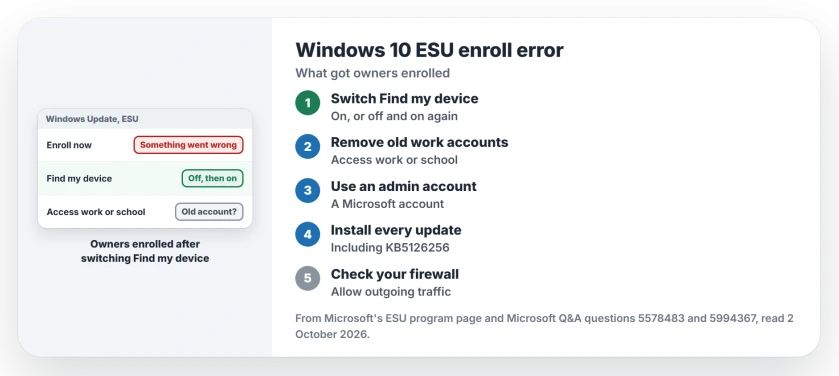
Status: checked 2 October 2026. Microsoft's ESU program now runs to 12 October 2027. Owners enrolled after switching Find my device, or after removing an old work or school account.
1. Switch Find my device on, or off and on
The answer with 30+ helpful votes came from an owner whose Find my device was off. They turned it on and could enroll "the very next time".
The reverse worked as well. One owner wrote: "Find my device was ON, switching off and back on again fixed the issue". Another: "Mine was On and I couldn't enroll. I turned it to Off and I could".
On Windows 10 it sits under Settings, Update & Security, Find my device, behind the Change button. Flip it, wait a minute, then go back to Windows Update and select Enroll now again from the same page.
Our Find My Device page explains what the switch does and what it lets you do with a lost laptop.
2. Disconnect an old work or school account
This is the fix for people who once used the PC for a job or college. One owner removed their account under Settings, Accounts, Access work or school, restarted, and enrolled.
Their explanation: "I guess Windows thinks my computer is ineligible if I have a Work or School Account associated with my machine". It fits Microsoft's rule about managed PCs.
Two more owners confirmed it. One found an old college account still listed. Another, retired for a year, wrote: "This worked after trying every other possible fix that was suggested".
Disconnecting removes the sign-in from this PC, not the account itself. If you still need it for work, ask the IT team first, because they may have to add it back for you.
3. Sign in with an administrator Microsoft account
A different message says you must use another account to enroll, and it has a simpler cause. A Q&A volunteer's accepted answer: "you should be signed in with a Microsoft account that has Administrator status".
Signed in with a local account? Microsoft says enrollment may prompt you for a Microsoft account. If that account is locked, Microsoft account recovery is the only route back in.
4. Install updates and the licensing package
Microsoft requires the latest Windows update and KB5126256 before your Enroll now link appears. Open Windows Update, install everything offered, restart, and look for the Enroll now link again.
Enrolled, yet Windows Update still shows red text about missing fixes? That warning is often a stale status, cleared by one registry reset.
5. Let your firewall and tune-up tools out of the way
One owner's third-party firewall was the block: "I have TinyWall firewall and I changed Mode from Normal to Allow Outgoing". Enrollment then worked.
Another enrolled after disabling a tune-up app and a driver updater in Task Manager's Startup tab. Both reports are user-reported.
What did not help
Switching off the built-in Windows firewall changed nothing for one owner. Editing the ESU eligibility values in the registry only brought the link back briefly for another, and the error stayed.
Two owners also found that Find my device made no difference for them, even after switching it both ways, so do not stop there if yours does nothing. That is why the work or school account check comes next.
Why does Windows 10 say it can't enroll me in Extended Security Updates?
Often something on your PC makes it look ineligible to Microsoft's check, even though the eligibility page said yes. Owners fixed it by switching Find my device, by removing an old work or school account, or by letting a third-party firewall pass the request.
Does Find my device really affect ESU enrollment?
It did for the owners who reported back. The answer that says so has 30+ helpful votes, and owners report that switching it on, or off and on again, let them enroll at once.
How long does Windows 10 ESU last now?
Microsoft's ESU page says you can enroll until the program ends on 12 October 2027. If you are already enrolled, Microsoft says coverage continues to that date, and there is nothing you need to do.
The Short Version
- The error appears after Windows says you are eligible.
- Switch Find my device on, or off and on again.
- Remove an old work or school account and restart.
- Sign in with an administrator Microsoft account.
- Install updates, including KB5126256.
- Let a third-party firewall allow outgoing traffic.
- Microsoft's ESU now lasts until 12 October 2027.
Where to Next
Flip Find my device, then select Enroll now again. If that fails, look under Access work or school for an account you no longer use.
If something else got you enrolled, post it in the comments. This page grows from what owners report.

Isaac Smith is the founder and editor of PC Glance, a website that covers computers, laptops, and technology. He is a tech enthusiast and a computer geek who loves to share his insights and help his readers make smart choices when buying tech gadgets or laptops. He is always curious and updated about the latest tech trends.