
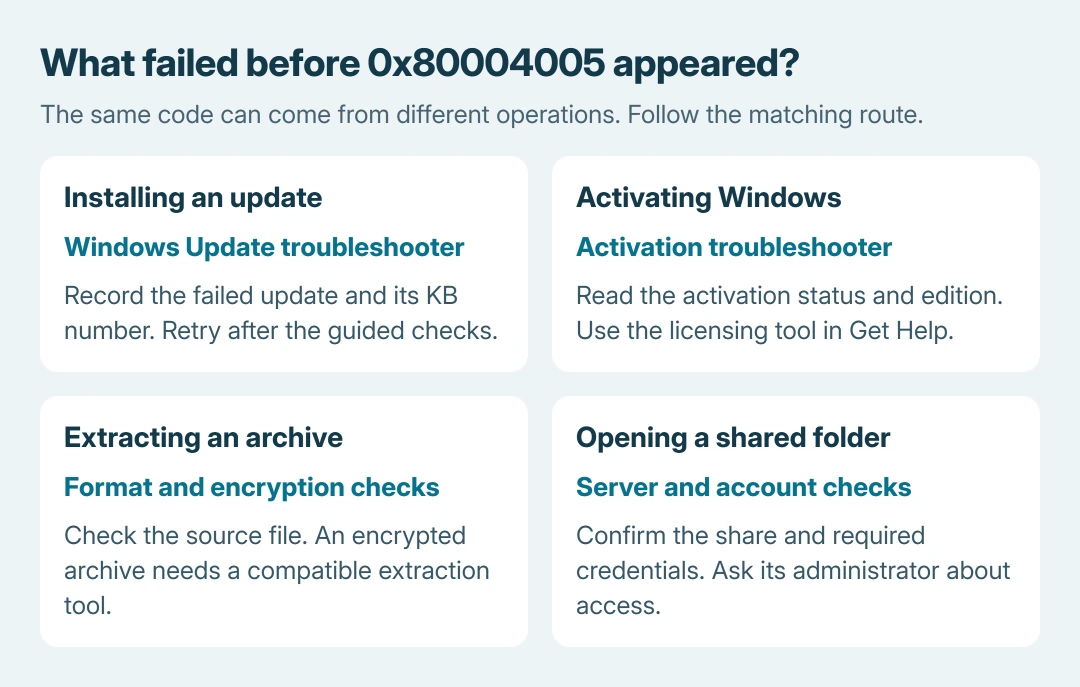
Error 0x80004005 in Windows 11 means an unspecified failure. The fix depends on what failed: installing an update, activating Windows, opening an archive or connecting to a shared folder.
Start with the app and action that produced the message. This code alone does not establish a permissions problem, damaged Windows files or a need to reinstall the system.
Match the message to the failed action
Microsoft documents 0x80004005 as E_FAIL in its generic COM error table. The description leaves the underlying cause unspecified; it is not a diagnosis of a particular component.
Record the complete message and the program showing it. Include the KB number for an update, the archive name for extraction or the server/share name for a network connection. Keep passwords and product keys out of support screenshots.
Status: Windows 11 guidance checked October 26, 2026, against Microsoft's error, upgrade, activation and archive documentation. Each remedy is limited to the action it addresses.
The spelling uses zeros: 0x80004005. Searches containing 0x80004oo5 have letter o characters in place of zeros. Use the actual code when checking documentation or reporting the failure.
Windows Update or an upgrade fails
Save current work, choose Start > Power > Restart, then try the failed update again. Microsoft says its upgrade error guidance recommends a restart and the Windows Update troubleshooter for this exact code.
Open Settings > System > Troubleshoot > Other troubleshooters and choose Run beside Windows Update. Microsoft's troubleshooter page also provides the current Get Help route.
Follow the tool's prompts, then retry through Settings > Windows Update. If it fails again, open Update history and record the update and current error. A changed code needs its own explanation.
Use the Windows Update code guide if the retry returns a more specific error. Do not treat every failure as component corruption and start deleting update folders on that assumption.
Windows reports an activation failure
Open Settings > System > Activation and read the full status. Use Microsoft's Activation troubleshooter or the automated activation option in Get Help, using an administrator account.
This tool is for an inactive Windows installation. It is separate from the update troubleshooter and cannot extract an archive or repair access to a network share.
Microsoft's activation error page still shows a Windows 10 Update & Security path in its 0x80004005 row. For Windows 11, use System > Activation, the route given in that page's Windows 11 instructions.
Check the activation status and edition before purchasing a key. For a work device, involve the administrator; for a newly purchased PC, ask its seller to resolve the supplied license.
File Explorer cannot extract an archive
Keep the original archive and extract into a new folder where the account can create files. Check whether the sender used password encryption and whether the download finished successfully.
Microsoft states that encrypted archive operations are unsupported in Windows 11 version 24H2. Its ZIP and extraction guide recommends a compatible application such as 7-Zip or WinRAR for encrypted archives.
Use an approved compatible tool and obtain the password from the sender. That documented format limitation is relevant when extraction fails; the code alone does not prove that encryption caused this particular failure.
Our recommendation is to compare a fresh download or a sender-provided replacement before attempting Windows repairs. The comparison is ours, not a claim that every archive showing this code is damaged.
A shared folder or another app shows the code
For a network share, check whether the server is reachable and whether its administrator expects a named account. The Windows shared-folder guide separates discovery, credentials and SMB requirements.
Do not enable old SMB versions, guest access or weaker signing merely because this number appeared. The server's configuration and complete connection message must establish which setting needs attention.
For a different application, give its developer the action that triggers the error, app version and full message.
Microsoft directs application failures to the software's support provider; E_FAIL does not specify one universal registry repair.
If the matching vendor tool cannot resolve the fault, contact Microsoft or the responsible application, archive or server provider with those details. A repeatable failure gives support a concrete trigger to reproduce.
The Short Version
Read 0x80004005 as an unspecified failure, then match the remedy to its source. Updates, activation, encrypted archives and network shares have different checks.
Preserve the complete message and any changed error before escalating to the responsible provider.

Isaac Smith is the founder and editor of PC Glance, a website that covers computers, laptops, and technology. He is a tech enthusiast and a computer geek who loves to share his insights and help his readers make smart choices when buying tech gadgets or laptops. He is always curious and updated about the latest tech trends.