
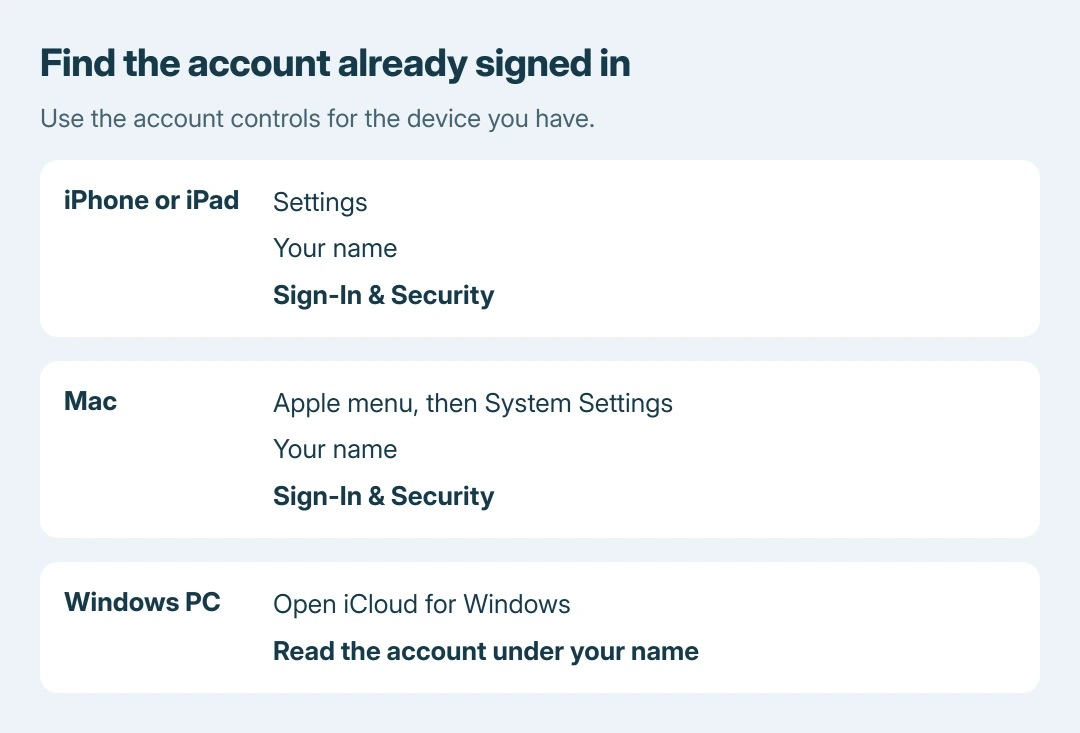
Apple ID lookup starts with a device already signed in to the account. On an iPhone or iPad, open Settings > your name > Sign-In & Security to see the email addresses and phone numbers available for signing in.
Apple now calls Apple ID Apple Account. The name changed; an existing account still uses its associated email addresses or phone numbers. A forgotten address does not require creating a replacement account.
Look in the account already on the device
Open Settings, select the account name in its first row, then open Sign-In & Security. Read the listed addresses and numbers; the person's display name is not the sign-in identifier.
Apple says the account accepts sign-in with any of its listed email addresses or phone numbers. Its forgotten account address instructions provide the device routes.
Status: Apple Account identification routes checked October 26, 2026. The current Apple ID name and masked-address limitation are documented by Apple; no account was accessed.
On a Mac, choose Apple menu > System Settings > your name > Sign-In & Security. On a Windows PC already using iCloud for Windows, open that app and read the account address or number beneath the name.
If Settings offers a sign-in prompt instead of a signed-in name, that device cannot reveal an account through this route. Check another device or the alternatives in the next section.
An address lookup does not change the account. Use the Apple Account email-change controls only when the goal is to replace the primary address.
No signed-in device available?
Check whether the App Store, Messages or FaceTime still has a signed-in session. Apple documents those services as other places to look for the account information.
Visit account.apple.com directly and inspect the sign-in screen. A browser may remember the email address or phone number used previously. A blank field simply means this route has supplied no saved identifier.
For an account in Family Sharing, ask a family member to check their Family Sharing settings for your account information. This can supply the address without signing out of a working device.
Search existing inboxes for Apple receipts, repair messages, support correspondence or billing emails. Read the message body: Apple says some of these messages include the primary account address.
A partly hidden address cannot reveal its exact length
An address shown with asterisks is deliberately masked. Apple warns that the number of asterisks may differ from the number of hidden characters, so counting them cannot reliably reconstruct the address.
Our recommendation is to compare the visible beginning and domain with addresses already used for Apple services. That comparison is ours; it does not establish ownership or bypass the sign-in check.
Open Apple's account website separately rather than entering credentials through an unexpected receipt or account-warning link. An email can help identify an address without becoming the route used to sign in.
The address is known but the password fails
Keep identification and password recovery separate. A device already trusted by Apple can offer a password change without creating another account.
For a forgotten password, Apple's account-access instructions explain the available recovery factors and trusted-device options. Knowing the address alone does not remove two-factor authentication.
If none of the identification routes supplies an address or number, contact Apple Support with the exact sign-in problem. Keep verification codes private and avoid creating another account just to test whether old purchases appear.
The Short Version
Check Sign-In & Security on an already signed-in Apple device, or the account shown in iCloud for Windows. Without one, inspect remembered sign-in details, Family Sharing and older Apple correspondence.
A masked address has no dependable character count. Once the identifier is known, use the separate password-recovery process if necessary.

Isaac Smith is the founder and editor of PC Glance, a website that covers computers, laptops, and technology. He is a tech enthusiast and a computer geek who loves to share his insights and help his readers make smart choices when buying tech gadgets or laptops. He is always curious and updated about the latest tech trends.