
A missing Apple ID password can be reset through Forgot password? at Apple's sign-in prompt. Start with an Apple device already signed in. Without it, recovery depends on the phone number, contact or key linked to the account.
Apple renamed Apple ID to Apple Account. A forgotten password does not require a new account, and account recovery is different from erasing an iPhone to remove its screen passcode.
Check which recovery method is still available
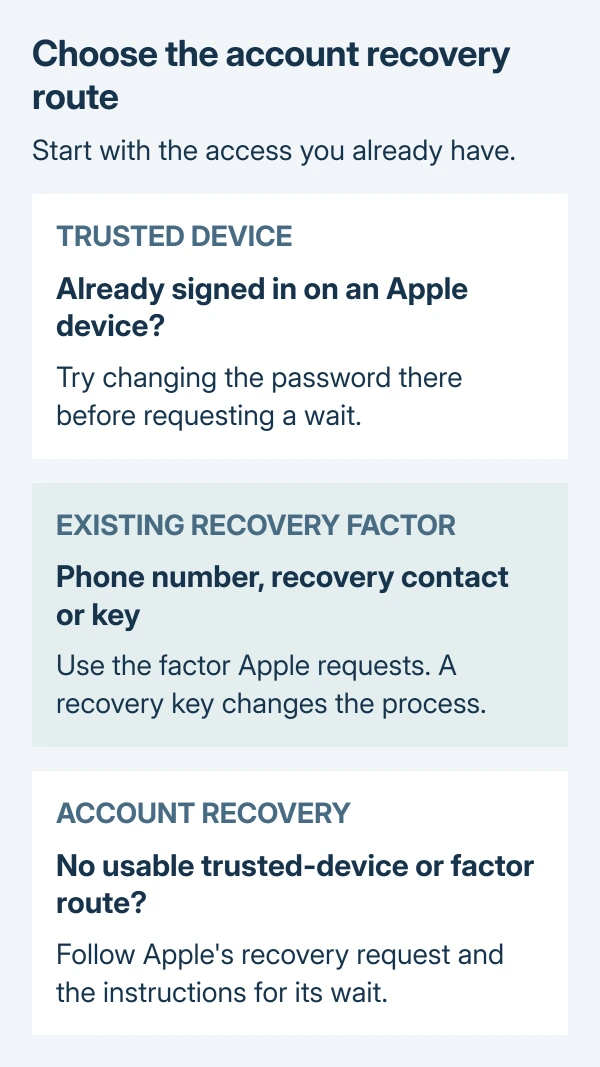
Apple recommends an already trusted device first in its forgotten-password instructions. If an old iPhone or Mac is still signed in, use the trusted-device password change before starting a waiting period.
If the account address is also missing, find the Apple ID email or phone number first. A known address identifies the account; it does not replace verification.
Status: Apple's password-reset and account-recovery guidance checked October 29, 2026. Recovery-key limits and waiting-period rules reviewed. No account was accessed.
Without a trusted device, check whether the registered number can receive verification codes and whether the account's email inbox is accessible. If access to the trusted phone or number will return soon, Apple recommends waiting for it.
For an alert that explicitly says disabled or inactive, follow the Apple Account message-specific checks. Those alerts need their own access or reactivation request.
Ask an existing recovery contact for their code
A recovery contact must already have been designated for the account. Start Apple's recovery process and complete its initial verification, then contact that person privately when the process requests their help.
Apple documents a six-digit recovery code supplied by that person in its recovery-contact instructions. Enter it on your own device to continue resetting the password.
The contact cannot open the account or read its contents through this role. Their recovery code helps verify access; it is not permission to hand them the new password.
Without a recovery contact, check the recovery-key exception next. Adding a contact is a preparation step for an accessible account, not something an unrelated friend can do to unlock it afterward.
A recovery key changes the available route
An enabled 28-character recovery key turns off Apple's standard account recovery. Apple states that recovery without a trusted device requires this key and a verification code sent to the trusted phone number.
Look for the copy saved when the key was created. Apple cannot retrieve a lost key, and losing both the required key and trusted-device access can mean permanent lockout.
A physical security key is a separate optional feature. If the reset screen requests one, follow Apple's instructions for that feature. The 28-character recovery code is not its substitute.
Start recovery without signing into someone else's account
On a borrowed Apple device, open the Apple Support app. Scroll to Support Tools, select Reset Password, then Help Someone Else. Apple says information entered through this route is not saved on the borrowed device.
The alternative is iforgot.apple.com. Apple's current Safari instructions specify iOS 17 or later, or macOS 27 or later. Follow its prompts; the site can redirect a reset to a trusted device when one is available.
These routes verify the account before allowing a new password. They do not guarantee immediate access when the available recovery information is insufficient.
Keep the request active through the wait
Apple's waiting-period guide says confirmation arrives within 72 hours and gives the expected recovery time. Recovery itself can take several days or longer.
Device use depends on how the request began:
- On the web: turn off all Apple devices during the wait.
- On a device running iOS 17, iPadOS 17 or macOS 27 or later: that initiating device may remain in use. Turn off other signed-in devices if they cannot complete a password change.
Check an existing request at iforgot.apple.com, using the same email address and phone number. Do not submit duplicates to accelerate it. Additional requests can extend the wait.
If confirmation is absent after 72 hours, check junk mail and the request's online status. An inactive request may need to be started again.
After the stated completion time, apple.com/recover is Apple's fallback if the text or call never arrives. Apple Support can explain a failed step, but cannot shorten the wait.
The Short Version
Try a trusted device or existing recovery factor before account recovery. A configured recovery key has separate requirements. During a wait, follow the device-use rule for the route used and check the existing request's status.

Isaac Smith is the founder and editor of PC Glance, a website that covers computers, laptops, and technology. He is a tech enthusiast and a computer geek who loves to share his insights and help his readers make smart choices when buying tech gadgets or laptops. He is always curious and updated about the latest tech trends.