
You try to sign in, or open the App Store, and Apple says your account is disabled. You want to know whether it can be fixed, and what to do first.
That is worrying when years of apps, photos and purchases sit on that account. I read Apple's page on locked and disabled accounts, and the MacRumors thread of an owner who lost their App Store account after a scam.
Read the wording first
Apple treats these as different problems. Its page on locked and disabled accounts gives each message its own fix.
A security lock, a locked or inactive account, and a disabled Media & Purchases account are three separate cases. Each of them needs its own set of steps from you. So before you try anything, write down the exact words on your screen.
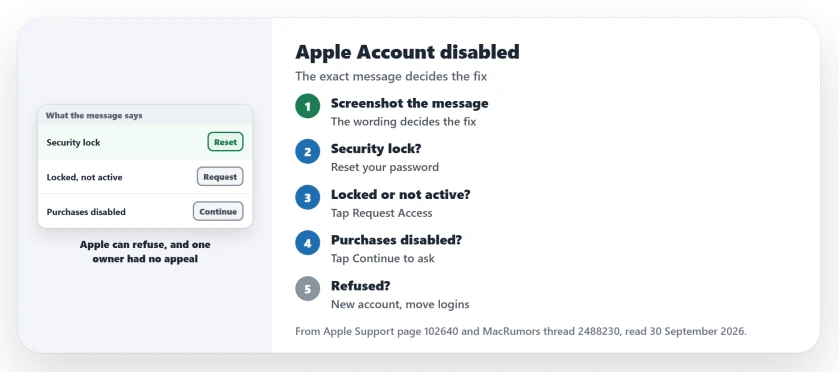
Status: checked 30 September 2026. Apple gives each disabled or locked message its own fix. One owner's Media & Purchases account stayed disabled after a scam, with no appeal.
1. Disabled for security reasons: reset your password
Apple lists three versions of this message. One reads: "This Apple Account has been disabled for security reasons".
Apple says it can follow too many wrong tries at the password or other account details, by you or by someone else. In that case, "To regain access, you need to reset your password."
This is the most hopeful message on the list. The lock protects you, and a reset clears it.
2. Locked or not active: tap Request Access
If the alert says your account is locked or not active, Apple says you "might be able to request access to your account by tapping Request Access right from the alert."
You can also request access from Apple's page. Apple warns that the request can be refused, with an alert saying the account "is locked and can't be used".
3. Media & Purchases account disabled: tap Continue
This one is about the App Store and your other purchases. Apple says you "might be able to request reactivation by tapping Continue right from the alert."
The thread shows what happens when Apple says no. The owner found their iTunes and App Store "permanently disabled due to breach of terms." In their words: "Wouldn't say why. No appeals."
They spent "4 days straight" with Apple Support. A member who says they worked as an Apple Senior Advisor wrote that "once they make a determination there is no recourse."
4. If Apple refuses, start a new account with care
For an account you cannot get back, Apple's first option is to create a new Apple Account. With proof of purchase, you can also file an Activation Lock request.
The rest of this section is user-reported. The owner took the new account route. They re-downloaded their apps on it, and "Only lost one book as they don't allow transfer from closed accounts."
The harder part was other companies. Services that used the old Apple email as a login would not let them back in. Only some of those companies moved the points to a new account. I would list those services before you switch.
5. Watch for the scam that started it
The owner's trouble began with a fake offer. In their words: "Scam on instagram that tricks you into thinking you're requesting a credit line increase with Apple Card."
They added: "They even copied Apples verification process." If an ad asks you to verify your Apple Account, close it and check the account in Settings on your iPhone instead.
Need to reach Apple?
Our Apple Support chat page lists the ways to chat with Apple, and how to spot fake support. If the iPhone instead nags you for your password again and again, the sign-in loop page fits better.
Why is my Apple Account disabled?
Apple says a security lock can follow too many wrong attempts at your password or account details. A disabled Media & Purchases account is a separate case, with its own reactivation request.
Can a disabled Apple Account be restored?
A security lock clears with a password reset. For a disabled Media & Purchases account, Apple offers a reactivation request, but one owner was told theirs was permanent.
Do I lose my purchases with a new Apple Account?
Purchases stay with the old account. One owner re-downloaded their apps on a new account and lost one book that could not be moved.
The Short Version
- Write down the exact message first.
- Security lock: reset your password.
- Locked or not active: tap Request Access.
- Media & Purchases disabled: tap Continue.
- Apple can refuse, and one owner had no appeal.
- A new account means moving logins by hand.
- Never verify your account from an ad.
Where to Next
Screenshot the exact message now. Then follow the step that matches it, starting from the alert itself.
If you were refused and found another way back, describe in a comment how you got back in. It could help the next person.

Isaac Smith is the founder and editor of PC Glance, a website that covers computers, laptops, and technology. He is a tech enthusiast and a computer geek who loves to share his insights and help his readers make smart choices when buying tech gadgets or laptops. He is always curious and updated about the latest tech trends.