
An iCloud connection error on Windows can come from Apple's service, the PC's connection or software blocking the app. Check Apple's service status, then compare iCloud.com with the Windows app before changing account settings.
That comparison separates a failure to reach iCloud at all from an app-specific sign-in problem. It also avoids treating a working password as the cause of every connection message.
Compare the website with the Windows app
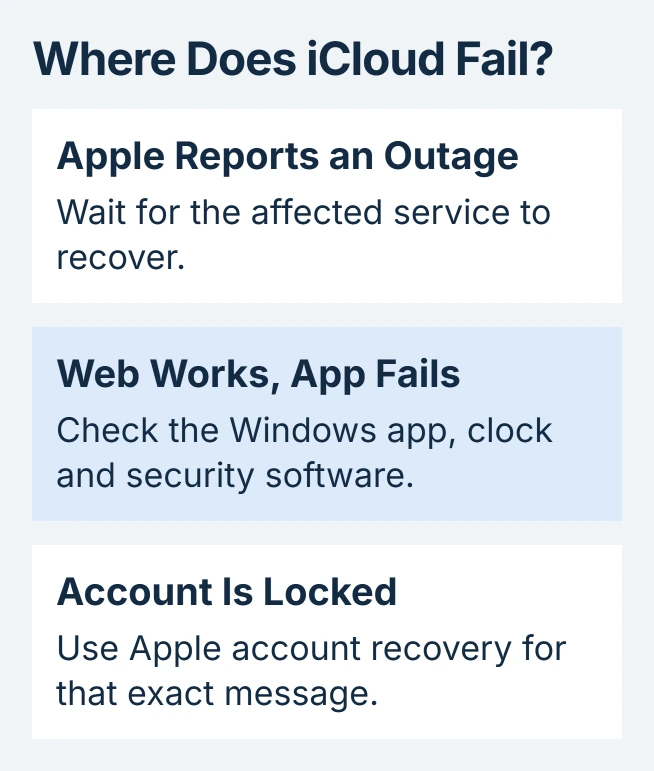
Open Apple's iCloud connection guidance and follow its System Status link. Apple says to check for an outage or maintenance before troubleshooting the device.
When no relevant interruption is listed, sign in at iCloud.com with the account configured in the Windows app. Record whether the website opens, accepts the login and displays the expected content.
Status: Apple's iCloud and Windows security-software instructions reviewed October 30, 2026. This guide covers PC access; browser success does not prove the app's connection is working.
If the library opens in the browser, viewing iCloud Photos on the web can provide temporary access while the app is being repaired. Browser access does not establish that Windows has downloaded every file.
A message explicitly saying the account is locked needs the Apple Account recovery route. For a connection failure on both the website and app, compare another trusted network before changing the installation.
That network comparison is ours: success elsewhere points toward the original connection or its filters. Failure on both networks leaves several possible causes, so a password reset would be premature without an account-specific error.
Correct the PC clock and check app support
Apple states that the date, time and time zone should be correct before changing security software. In Windows, open Settings > Time & language > Date & time. Enable Set time automatically and verify the displayed time zone.
Microsoft's clock-setting instructions also allow manual zone selection when automatic detection is wrong. Retry the app after correcting the actual clock, not just its display format.
Get iCloud from the Microsoft Store through Apple's Windows download page. Check the Store for an offered iCloud update and finish any required restart before testing again.
Apple currently lists Windows 11 or later for the latest iCloud app, and Outlook 2021 or later for its Outlook integration. A Windows 10 installation may therefore be using an older app rather than the currently supported combination.
Managed Apple Accounts are unsupported by iCloud for Windows. If a school or employer issued the account, request the approved access method from its administrator instead of repeatedly reinstalling the app.
Check Windows sign-in and security software
Apple's security-software troubleshooting calls for an administrator account and Windows Hello setup. Open Settings > Accounts > Sign-in options to review the PC's available Hello methods.
Follow any setup prompt for the method offered on that PC. If the option is controlled by an organization, involve IT. Completing Hello setup is a prerequisite check, not evidence that every authentication error has the same cause.
Apple also warns that third-party security tools can interrupt iCloud authentication and syncing. Check the security product's blocked-connection history, then ask its vendor how to permit Apple's required services.
Do not leave the firewall disabled as a permanent solution. Apple recommends working with the security vendor when configuration changes or removal are necessary; managed security software belongs with the administrator.
Give support the comparison that failed
If the app still cannot connect, send Apple Support the exact error, Windows version, iCloud version and whether iCloud.com works on the same PC. Include the result from the second network if one was available.
When browser access works but the app fails after these checks, that difference is useful to support. Keep locally stored files intact while they check the installation; deleting a photo library is not a connection test.
The Short Version
Compare service status, browser access and the Windows app. Correct the clock, verify the supported app setup and check security filtering. Use the account-recovery process only when the message actually identifies an account restriction.

Isaac Smith is the founder and editor of PC Glance, a website that covers computers, laptops, and technology. He is a tech enthusiast and a computer geek who loves to share his insights and help his readers make smart choices when buying tech gadgets or laptops. He is always curious and updated about the latest tech trends.