

Photos stored in iCloud can be viewed at icloud.com/photos in a browser. Use the Apple Account that holds the library, then choose Library. The Photos app also shows them on devices using that account with iCloud Photos enabled.
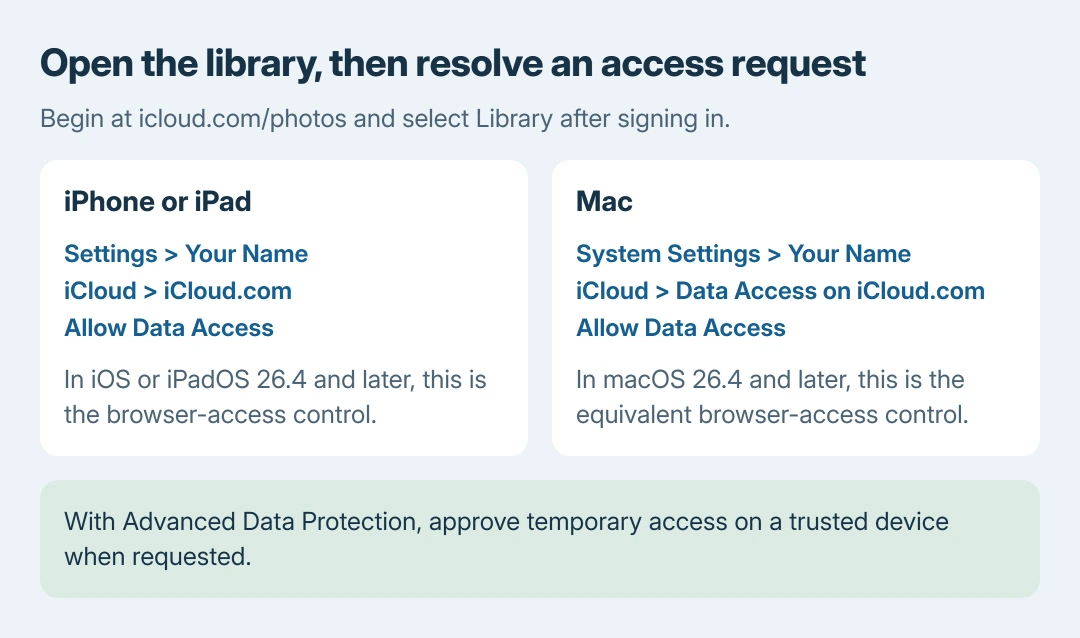
When the website says web access is off, change the iCloud web-access setting on a trusted device. With Advanced Data Protection, opening the library can also require approval from that device.
Open the library in a web browser
Go directly to iCloud Photos and sign in. Apple documents Library in the sidebar for the complete photo and video grid. An individual album shows only that album's contents.
On a phone or tablet, tap a thumbnail to open the picture and swipe between items. On a computer, double-click the thumbnail to open it; the arrow keys move through the pictures.
Status: Apple's iCloud Photos viewing and web-access instructions checked October 26, 2026, including the menu changes in version 26.4. No account or private library was opened.
Apple's photo-viewing guide covers both browser layouts. Viewing does not require downloading the library or installing iCloud for Windows first.
For a picture that has not reached the website, check the uploading device's iCloud Photos sync status. A browser can display only the items already stored in that library.
Web access is off? Use the trusted device's settings
In iOS or iPadOS 26.4 and later, open Settings > your name > iCloud > iCloud.com. Turn on Allow Data Access when browser access is wanted.
On macOS 26.4 and later, the route is System Settings > your name > iCloud > Data Access on iCloud.com. Use its Allow Data Access control.
Earlier supported versions use Access iCloud Data on the Web directly in the account's iCloud settings. Apple says these web-access controls require iOS 16.2, iPadOS 16.2 or macOS 13.1 and later.
The paths are in Apple's web-access instructions. The current iCloud.com submenu matters: searching only for the earlier switch can miss where the control now lives.
Apple states that Advanced Data Protection initially disables web access. After allowing it, sign in on the website and approve the trusted-device request. This procedure keeps Advanced Data Protection enabled.
Find an older picture without scrolling through everything
Choose Library, open the View Months control, then select a year and month. Apple documents this date-navigation route for finding older pictures in the browser.
Search is a separate permission. In version 26.4 and later, trusted devices can supply search results when Allow Search is enabled in the web-access settings. Browsing the grid and approving search are different choices.
Apple's iCloud photo search guide lists dates, places, captions and other search terms. If prompted to enable search, follow the trusted-device approval rather than assuming the library is empty.
The grid opens but the expected photos are missing
Check the signed-in account before changing synchronization settings. Our first comparison is the account and library selection, because an empty album and an empty account are different results.
If Shared Photo Library is in use, check whether the selected view is personal, shared or both. A photo outside the selected view need not have been deleted.
For pictures actually removed from iCloud, use the deleted-iCloud-photo recovery guidance. Do not delete more items while trying to make the displays match.
If the account and web-access permissions are correct but the library still will not open, give Apple Support the exact access message and whether Photos works on the trusted device. Keep account passwords and verification codes private.
The Short Version
Open icloud.com/photos and select Library. For blocked access, enable the iCloud web setting and approve the trusted-device request. Check the account, library view and upload status before treating pictures as deleted.

Isaac Smith is the founder and editor of PC Glance, a website that covers computers, laptops, and technology. He is a tech enthusiast and a computer geek who loves to share his insights and help his readers make smart choices when buying tech gadgets or laptops. He is always curious and updated about the latest tech trends.