
You were only trying to free up iCloud space. You saved your photos to a computer, deleted them from iCloud, and now they are gone from your iPhone as well. That is a horrible moment, and it catches careful people too.
Before you do anything else, stop deleting. Do not change any settings yet. I will explain why it happened, then go through the only places your photos can still be, in the order I would search them.
Why your iPhone lost them too
iCloud Photos is not a backup. It keeps one library in step on every device. Apple's page on deleting photos says so directly: with iCloud Photos on, a photo you delete on one device is deleted on your other devices too.
A forum thread about exactly this has 166 people saying Me too.
Its first post described the trap: "downloading photos from the iCloud account to my PC then deleting from the iCloud". Then: "At some point, I noticed no more photos were in the iPhone".
An owner in the thread put the reason plainly: "If you had iCloud Photos turned on, your iPhone and iCloud were being synced rather than iCloud simply keeping a separate backup copy."
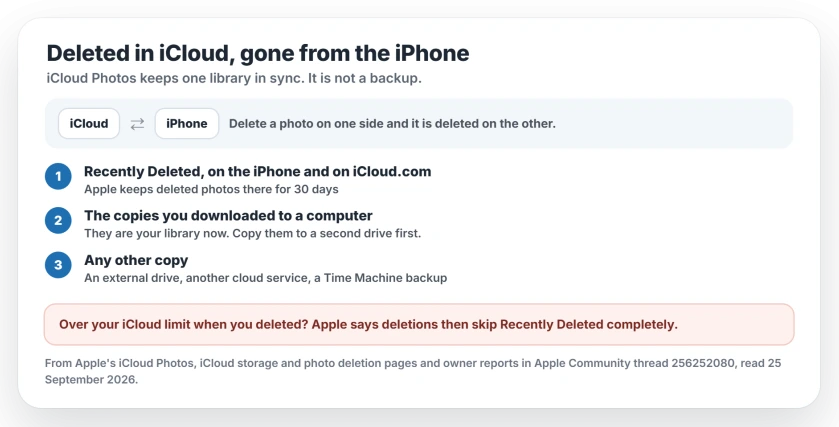
Status: checked 25 September 2026. Apple's pages say deletions sync to every device and that Recently Deleted holds them for 30 days, except when iCloud is over its limit. In the 7-page thread, no owner got photos back any other way.
1. Check Recently Deleted, on both
This is your best chance. Check the iPhone first. Apple's route is: "Open Photos, then tap Collections at the bottom. Swipe up, then tap the Recently Deleted album under Utilities."
Then check iCloud.com too. Apple's iCloud guide says: "If you change your mind, you have 30 days to recover it before it's permanently deleted." Its step is short: "Select the Recently Deleted album in the sidebar." Then choose Recover.
An owner in the thread agreed: "If the deletions happened within the last 30 days, Recently Deleted is your best and safest recovery option."
Why Recently Deleted can be empty
Apple hides one exception in its iCloud storage page. When your account is over its iCloud limit, deleted photos and videos are removed at once and never reach Recently Deleted.
So if you were deleting because iCloud was full, that album may be empty for exactly that reason. It fits the thread's starter, who was deleting to make room, and that reading is ours. Our iPhone storage guide covers that limit from the storage side.
2. Go back to the copies you downloaded
If you saved the photos to a computer first, those copies are now your library. Open a few, then copy the whole folder to a second drive before anything else.
When you are ready, move them back onto the phone from that computer. Leave your iCloud settings alone until the copies are safe.
3. Look for any other copy
A Level 10 adviser in the thread listed the places to check: an external drive, another cloud service, a Mac's Time Machine backup. If none of those has them, the adviser's verdict was that "your photos are gone forever".
One more thing Apple points out: iCloud Photos is not part of your iCloud backup. So your phone's backup will not have them either, and your own copies are the only safety net.
Free up iCloud space safely next time
Back up the photos you want outside iCloud first, and check the copies open before you delete anything.
A Level 7 member described how iCloud Photos behaves: it syncs one library, "trusting that what you do there will be done everywhere". So a copy you keep has to live outside it.
To inspect the online library before making changes, view iCloud Photos in a browser and check the selected account.
If space is the real problem, a bigger iCloud plan may be kinder than deleting. The iCloud upgrade badge guide explains what that prompt means.
If photos are missing for another reason
Photos that never left iCloud but will not show on the phone need the photos-not-showing guide, which starts from the photo count. If uploads are stuck, iCloud Photos paused syncing has its own fixes.
Why did deleting photos from iCloud delete them from my iPhone?
Because iCloud Photos keeps one library in sync across your devices. Apple says a photo deleted on one device is deleted on your other devices that use the same Apple Account. It is not a separate backup.
Can I recover photos deleted from iCloud?
Within 30 days, from Recently Deleted on the iPhone or on iCloud.com. If your iCloud was over its storage limit, Apple says deletions skip Recently Deleted. After that, only a copy outside iCloud can bring them back.
How long does Recently Deleted keep photos?
Apple says 30 days. After that the photos are gone for good.
How do I free up iCloud space without losing photos?
Copy the photos you want outside iCloud first, and check the copies open. Then delete, knowing it deletes on your iPhone too. A bigger iCloud plan avoids the risk.
The Short Version
- Deleting in iCloud Photos deletes on your iPhone too. It syncs. It does not back up.
- Check Recently Deleted on the iPhone and on iCloud.com. Apple keeps photos there for 30 days.
- Over your iCloud limit? Deletions skip Recently Deleted.
- Your downloaded copies are now your library. Protect them.
- An external drive, another cloud or Time Machine may hold more.
- Without a copy outside iCloud, the photos cannot come back.
Where to Next
Check Recently Deleted on iCloud.com today. The 30-day clock is already running.
Was your Recently Deleted album full or empty? Leave a comment with what you found. It helps the next reader know whether the full-storage exception hit them too.

Isaac Smith is the founder and editor of PC Glance, a website that covers computers, laptops, and technology. He is a tech enthusiast and a computer geek who loves to share his insights and help his readers make smart choices when buying tech gadgets or laptops. He is always curious and updated about the latest tech trends.