

An unknown error occurred in Apple Music on PC can leave Home, New, and Radio empty while Library still works. Check Apple's service status and try the web player first. When only the Windows app fails, a damaged local cache is one reported explanation.
The error message does not identify a single cause. A service outage, connection problem, and app-only failure need different next steps, so compare them before deleting app data.
Check whether Apple Music works elsewhere
Use the System Status link in Apple's connection guidance. Apple says to check that page when its apps cannot load content. An Apple Music incident is a reason to wait for service to recover.
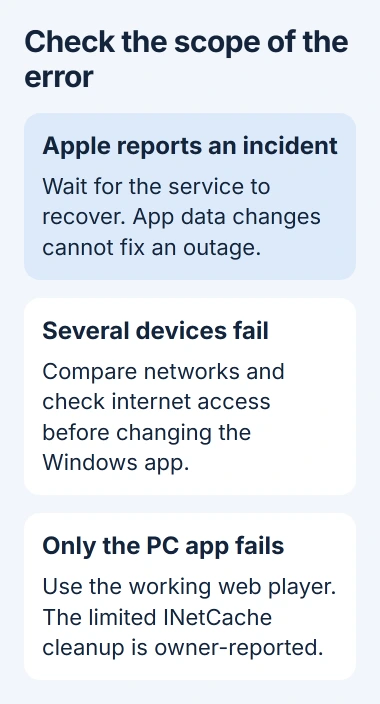
Status: checked November 3, 2026. Apple documents service and connection checks. Owners report a Windows cache workaround, but Apple has not confirmed it as a universal fix for this error.
Sign in to Apple Music on the web with the same account and try a song. A working web player gives temporary access and helps separate the desktop app from a wider service or account failure.
If unrelated websites also fail, address the PC's connection first. If Music fails on every device using one network, test a different network before changing the Windows app.
An iPhone with only its Music Home tab blank needs phone-specific checks. Do not assume a Windows cache folder explains a phone's behavior.
Correct the connection checks that apply to this PC
Apple states that the device needs updated software and an accurate clock, including its time zone. On Windows, open Settings, Time & language, then Date & time, and correct any mismatch.
Install available Windows and Apple Music updates, then restart the PC. Reopen Home and Radio to see whether the online content loads; a working local song alone does not test those pages.
Apple also identifies VPNs and security software as possible connection obstacles. If permitted, briefly disconnect a VPN and retry Music, then restore it. A managed PC needs the administrator's help with any security change.
When iCloud also has a connection error, check the shared network and Apple service status before treating each app as an independent cache problem.
Clear the reported cache only when the app alone fails
One owner restored the Windows app by clearing its INetCache contents after reinstalling had failed. Two replies confirmed success. This is a user-reported workaround; it does not establish why every copy of the app shows this message.
Close Apple Music. Open Task Manager with Ctrl+Shift+Esc and end Apple Music and AMPLibraryAgent if they remain running. Then paste this exact folder path into File Explorer's address bar:
%LOCALAPPDATA%\Packages\AppleInc.AppleMusicWin_nzyj5cx40ttqa\AC\INetCacheDelete only the files and folders inside INetCache, then reopen Apple Music. Leave the package folder, LocalState, music folders, and library files untouched. If the exact path does not exist, skip this procedure.
Try Home, New, and Radio again. The report does not prove a permanent repair, and a recurrence should be recorded for support rather than answered by deleting increasingly broad folders.
If the error survives
Keep using a working web player while Apple Support checks the problem. Send support the Windows and Apple Music versions, affected tabs, results on another network, and whether Library still works.
That comparison gives support a clearer case than the error text alone. Avoid resetting the whole app or removing your music library without understanding what local data the action deletes.
The Short Version
- Check Apple's service status and compare the Windows app with the web player.
- Correct connection, clock, and software problems that affect the PC.
- For an app-only failure, the narrowly scoped INetCache cleanup has owner confirmations.
- If it persists or returns, keep using a working player and give Apple the comparison results.

Isaac Smith is the founder and editor of PC Glance, a website that covers computers, laptops, and technology. He is a tech enthusiast and a computer geek who loves to share his insights and help his readers make smart choices when buying tech gadgets or laptops. He is always curious and updated about the latest tech trends.