
You want to type to a real person at Apple, not wait on hold. You open Apple's support site and click around. Every road seems to end at a phone number.
That is annoying when chat is what you wanted. Apple does offer chat, in three places. One of them is already on your iPhone.
I will take you through all three, quickest first. Then I will explain why the chat button sometimes never appears. That has a reason too.
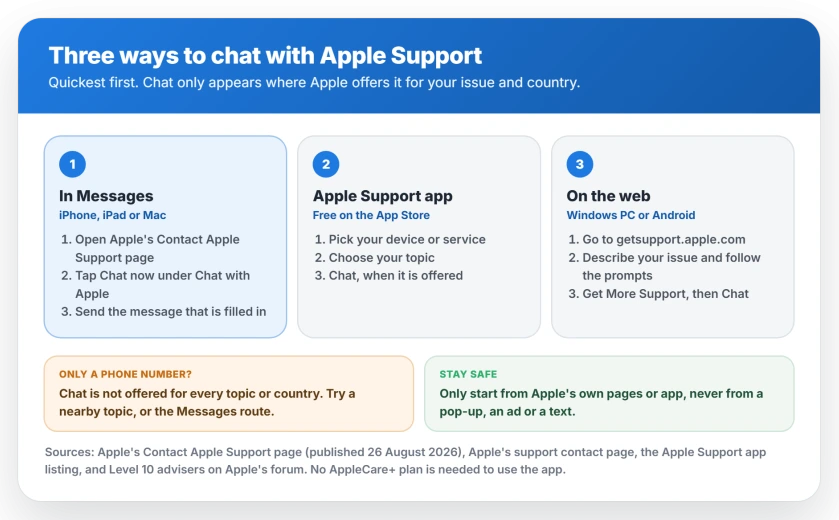
1. Chat in the Messages app
This is the quickest route on an iPhone, iPad or Mac. Apple's contact page has a section called Chat with Apple. Apple describes it plainly: "Get help directly on your device in the Messages app."
Tap Chat now there. Messages opens a conversation with Apple. A first message is already filled in for you. Send it, or type your own question instead.
Because it is a Messages thread, it sits with your other conversations while you wait for a reply. No browser tab needs to stay open.
2. Use the Apple Support app
The second route is Apple's own app, free on the App Store. Apple's contact page for support says it lets you "Ask questions over chat, start a repair, watch videos, and more."
Open the app and pick the device or service you need help with. Then choose your topic. The App Store listing says you can "Chat with us to troubleshoot an issue" there.
You do not need AppleCare either. Apple's listing says: "You are not required to purchase an AppleCare+ plan to use the Apple Support app."
3. Start it on the web
On a Windows PC, an Android phone or someone else's computer, use the web instead. A Level 10 member of Apple's forum gave the route that got the most agreement in a forum thread with 531 people asking the same thing.
Go to getsupport.apple.com, "enter your issue in the search field and work through the prompts." At the end, look for Get More Support.
In their words, that button "should provide Chat and Call options if available for your specific issue."
One owner described the same route from Apple's contact page: pick your problem, "scroll to the bottom and click get more help, then click on chat."
Why the chat button is not there
This is the confusing part, so here it is plainly. Chat is not offered for every issue. It is not offered in every country either.
Apple says as much on its contact page: "If your region is not listed here, Apple doesn't offer live support in your region."
A Level 10 adviser put the chat side the same way: "If Chat support is available in your region, you will see a link to start the direct Chat with Apple."
So if the web route only shows a phone number, it is usually your topic. Try picking a nearby topic instead, or switch to the Messages route. That tip is ours, not Apple's.
The country that matters for chat is where you are. Your Apple Account's own country is a separate setting, and changing that one has seven blockers of its own.
If chat is not offered to you
Call instead. Apple's contact page lists a number for each country. It also warns that "Many of these phone numbers work only when dialed from within their associated country or region."
Or book a repair. The Support app's listing says it can help you "find a nearby store to book a reservation" at the Genius Bar or an authorized repair shop.
Have these ready before you start
This part is ours. It comes from how these chats usually go. Know which device it is and roughly when the problem started.
If it is a Mac, iPhone or iPad, have it with you and charged. The adviser may ask you to try something on it while you chat.
If it is about a purchase or a subscription, have the receipt email open. It speeds things up more than anything else.
The same goes for an accessory claim, such as a bubbling TechWoven case. Apple's warranty says proof of purchase may be required.
Watch out for fake Apple support
Only start a chat from Apple's own pages or app. Apple warns people: "Don't answer suspicious phone calls or messages claiming to be from Apple." Instead, Apple says, contact it "directly through our official support channels."
Ignore any chat link or number from a pop-up, an ad or a text. Start from Apple's contact page instead.
The same goes for email that claims to come from support. Check it against the signs of a scam email before you click anything in it.
An email from no_reply@email.apple.com is not proof either way. Two checks settle whether it is genuine, and neither needs a link in the email.
If you need Apple because an iPhone Upgrade Program switch stalled, the upgrade program page covers what members ran into first.
If you need Apple because your account shows as disabled, the disabled account page shows which message needs which step.
Status: current on 25 September 2026. Apple's Contact Apple Support page, published 26 August 2026, which offers Chat with Apple in the Messages app, and Apple's support contact page, which offers chat in the Apple Support app. Apple says live support is not offered in regions it does not list, and forum advisers say chat appears only when it is available for your issue.
How do I chat with Apple Support?
On an iPhone, iPad or Mac, open Apple's Contact Apple Support page and tap Chat now under Chat with Apple. Apple says this gets you help directly in the Messages app. You can also chat in the Apple Support app, or on the web through getsupport.apple.com and Get More Support.
Why is there no chat option on Apple Support?
Chat depends on your issue and your country. Apple says that if your region is not listed on its contact page, it does not offer live support there. For issues where chat is not offered, you will only see a call option. Trying a related topic sometimes brings chat back.
Can I chat with Apple Support on my iPhone?
Yes. Apple's contact page has a Chat now link that opens the conversation in the Messages app. The Apple Support app, free on the App Store, also offers chat for many topics.
Can I chat with Apple Support from a Windows PC or Android phone?
Use the web route. Go to getsupport.apple.com, describe your issue, work through the prompts and look for Get More Support. Chat appears there when it is available for your issue.
Do I need AppleCare to chat with Apple Support?
No. Apple's App Store listing says you do not need an AppleCare+ plan to use the Apple Support app. The app offers chat for many topics.
Is Apple Support chat real or a scam?
Chat started from Apple's own contact page, the Apple Support app or getsupport.apple.com is Apple's. Apple warns you not to answer suspicious calls or messages claiming to be from Apple. Contact it through its official channels instead.
The Short Version
- Apple offers chat in three places: Messages, the Apple Support app and the web.
- On an Apple device, tap Chat now on Apple's Contact Apple Support page. Messages opens.
- The Apple Support app has chat, repairs and store bookings.
- On the web, start at getsupport.apple.com and look for Get More Support.
- Chat is not offered for every issue, or in every country.
- If only a phone number appears, try a nearby topic or the Messages route.
- Only start a chat from Apple's own pages or app.
Where to Next
On an iPhone, iPad or Mac, try the Messages route first. It is two taps, and the conversation waits for you.
Did chat show up for you, or were you only offered a call? Post your country and topic in the comments. That pattern helps other readers more than any rule I could write.

Isaac Smith is the founder and editor of PC Glance, a website that covers computers, laptops, and technology. He is a tech enthusiast and a computer geek who loves to share his insights and help his readers make smart choices when buying tech gadgets or laptops. He is always curious and updated about the latest tech trends.