
You were in the iPhone Upgrade Program, and now it is gone. The iPhone 18 is out. You are not sure how to upgrade, or what happens to the loan you still pay.
That is worrying with a payment date coming up. I read Apple's announcement and the old program's terms. I also read a MacRumors thread with 14,000 views, where members made the switch this month.
What Apple changed
Apple announced it in July, when it launched a leasing program called Apple Upgrade: "Apple will no longer offer the iPhone Upgrade Program and iPhone Payments in the United States."
Apple Upgrade runs through Klarna, and it is a different kind of deal. Apple's small print is blunt: "This offer is for a consumer lease, not a purchase or loan."
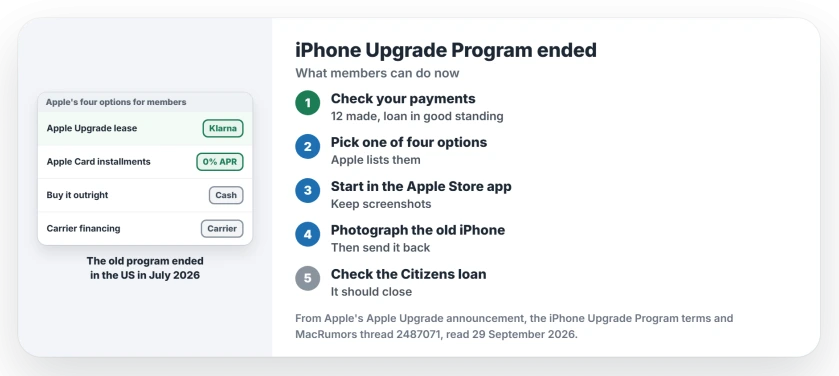
Status: checked 29 September 2026. Apple ended the iPhone Upgrade Program in the US. Members can lease with Apple Upgrade, use Apple Card installments, buy outright or use carrier financing.
1. Check that you can upgrade yet
The old program's terms set the bar. You need to have "paid the equivalent of at least twelve (12) installment payments", with your loan in good standing.
The phone must be in decent shape. The terms say it must "power on and hold a charge", with a working display and no cracks.
One owner found the Apple Store app strict about the count. It said "I need to make one more monthly payment on my IUP ($69.50) to upgrade and move to the new upgrade plan." If you are one short, pay it first.
2. Pick one of the four ways
Apple lists them in one sentence. Eligible members "will have the option of leasing a new device with Apple Upgrade, financing with Apple Card Monthly Installments", or "purchasing the product outright, or choosing carrier financing."
Apple Card Monthly Installments is a 0 percent APR plan, and Apple keeps a list of eligible products.
If you liked the old program, the lease is the closest match. For iPhone, Apple offers 12 and 24 month terms, and it says "All applicants will be subject to a soft credit inquiry that will not impact their credit score."
At the end of a lease, Apple says customers can "upgrade their device to the latest generation", or "purchase it with a one-time payment, or simply return it and exit the program."
To lease, your iPhone needs a plan from AT&T, T-Mobile or Verizon, and prepaid plans are out.
3. Start the switch in the Apple Store app
It went smoothly for some members, as reported by owners in the thread. One wrote: "Pre approved through Klarna, started lease. Today got an email that phone had shipped and trade in kit shipped. No issues."
Others found staff unsure of the new process. One member went back and forth with Apple and wrote: "The majority of Apple employees I spoke with last week were absolutely clueless."
I would start in the app, where the eligibility check runs. Keep screenshots of each step.
4. Send the old iPhone back, then check the old loan
Your iPhone Upgrade Program phone goes back to Apple. The member who got a return box shipped their 17 Pro Max straight away, then added: "Now I pray they close out the iUP loan from Citizens".
Another member asked the right question before anyone sealed a box: "Did you take photos of your 17PM before boxing it up". Photos of the screen and body protect you if a grading dispute comes up.
Then log in to your Citizens loan account after the return is received. Under the old terms, Apple paid off the rest of the loan when you upgraded. The balance should close the same way.
5. If no return box shows up
Some members wait longer for the kit. One member on a new 18 Pro put it in their words: "There is still absolutely nothing indicating we will be receiving an iUP return box".
Keep asking. After pushing Apple for a week, another member reported that "all of a sudden I got notification the trade in box was sent." If you get stuck, our Apple Support chat page shows three ways to reach a person.
New iPhone 18 Pro Max on AT&T?
If your new phone drops to SOS after the switch, our iPhone 18 Pro Max SOS page covers what AT&T owners found.
What happened to the iPhone Upgrade Program?
Apple stopped offering it in the US when Apple Upgrade launched in July 2026. Members move to one of four ways to pay for the next phone.
Is Apple Upgrade a loan?
No. Apple calls it a consumer lease through Klarna. At the end, you upgrade, buy the phone, or return it.
Do I have to send my old iPhone back?
Yes, if you upgrade from the old program. Members who switched this month received a trade-in kit for the phone they were paying off.
The Short Version
- Apple ended the iPhone Upgrade Program in the US.
- You need 12 payments made to upgrade.
- Apple offers four ways to pay for the next phone.
- Apple Upgrade is a Klarna lease, not a loan.
- Start the switch in the Apple Store app.
- Photograph the old phone, then send it back.
- Check that the Citizens loan closes afterwards.
Where to Next
Check the Apple Store app today and see whether it says you are ready to upgrade. If it asks for one more payment, make it first.
If your Citizens loan stays open after your old phone is received, leave a comment with how long it took. I will add what members see here.

Isaac Smith is the founder and editor of PC Glance, a website that covers computers, laptops, and technology. He is a tech enthusiast and a computer geek who loves to share his insights and help his readers make smart choices when buying tech gadgets or laptops. He is always curious and updated about the latest tech trends.