
After updating to watchOS 26.3, a Series 11 owner opened the Sleep app and found Time Asleep stretched across two dates, reading 2026-02-20, 5:59 PM to 2026-02-21, 6:19 PM, where a clean 4:08 AM to 3:08 PM used to sit under a single day.
They asked the obvious thing: is my tracking broken?
It is not. Your sleep data is intact.
watchOS 26.3 changed how the Sleep app labels a night that crosses midnight, and if you fall asleep after midnight, that new label looks alarming even though the numbers behind it are the same.
How to read the new two-day range
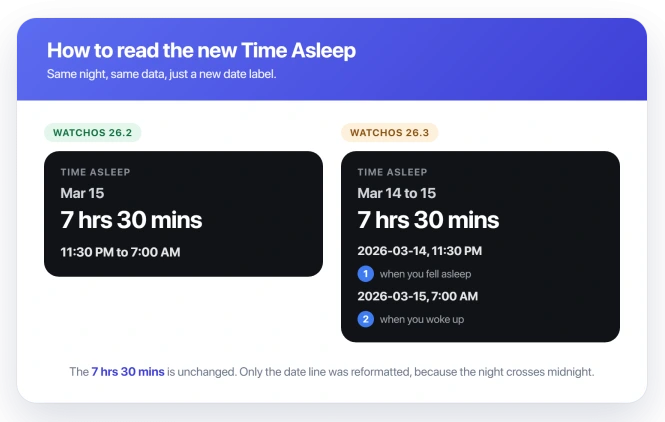
The two dates are one night, not two. The first date and time is when you fell asleep, and the second is when you woke up.
If your night ran from late evening past midnight into the next day, the Watch now writes out both calendar dates instead of squeezing it under one.
The number that actually matters, the duration, has not moved. If it says 7 hrs 50 mins, that is your real time asleep, whatever the dates around it look like.
This is the same layout the Sleep Schedule feature has always used.
watchOS 26.3 made the Sleep Focus card match it, so if you trigger sleep manually with Focus, you are now seeing the schedule-style stamps for the first time.
Make sure the data itself is fine
Two quick checks tell a relabel apart from a real error.
- The duration is the number to trust. It sits under the date line as hours and minutes. If that reads right, only the label changed.
- Your Sleep Score is a separate story. If your score also dropped from the 70s or 80s into the 40s or 50s, that is not this bug. watchOS 26.2 recalibrated the score bands in late 2025, so the same night simply scores differently now.
Apple's overview of the feature is in Track your sleep on Apple Watch, which covers setup and the schedule.
Set a sleep schedule so the dates line up
If you use Sleep Focus by hand with no set bedtime, the Watch has to guess which day a post-midnight session belongs to.
Giving it a fixed schedule takes the guesswork out, and community reports say it settles the display for irregular sleepers.
On your iPhone, open the Health app, tap Browse, tap Sleep, then Your Schedule, then Full Schedule and Options, and set a bedtime and wake time that cover your real hours.
Apple walks through it in Edit sleep schedules in Health.
A schedule that starts before midnight, even if you actually fall asleep later, gives the Watch a single night to attach the sleep to.
Rule out a wrong time zone
If your times are genuinely off, not just spread over two dates, check the clock. On the Watch, open Settings, tap General, tap Date and Time, and turn on Set Automatically.
A stale time zone shifts your sleep times and can make a night look a day out.
This is not what causes the two-day format, so only chase it if the actual hours look wrong.
If you want the single-date look back
No setting brings back the old single-date format, and no watchOS update has restored it either, through the 26.4 beta.
One person got the old display back by unpairing the Watch, pairing it again, and restoring from a backup rather than setting up as new.
It did not work on their first attempt and only stuck on a second try, so treat it as a heavy last resort, not a dependable fix.
A backup restore keeps your sleep history, so you are not trading your data away to try it.
What this is not
- Not lost sleep tracking. If the Watch is not recording sleep at all, or your Deep and REM stages are missing, that is Apple Watch not tracking sleep, a real data problem rather than a label change.
- Not the same as a wrong metric. If a number like distance reads plainly wrong after the update, that is closer to Apple Watch distance being wrong, which has its own fixes.
Status: The two-day range is a watchOS 26.3 relabel, not lost sleep. It writes both dates for a night crossing midnight; the duration is still correct. Read it as one night, or set a schedule.
Why does my Apple Watch sleep show two dates now?
Because watchOS 26.3 started labeling a sleep session with its true start and end dates. A night that begins before midnight and ends the next day genuinely spans two calendar dates, so the Watch now prints both.
It looks new because the Sleep Focus card adopted the date-range layout that Sleep Schedule already used. Your recorded sleep did not change.
Is my sleep data wrong, or just the display?
Almost always just the display.
The dates and the duration are stored separately: the hours asleep come from what the Watch measured overnight, not from subtracting one date stamp from the other, so a mislabeled date cannot shorten your recorded sleep.
If the duration itself is wildly off, like far more hours than you were in bed, that is a different tracking problem, not this relabel.
Can I get the single-date format back?
Not through a setting, and not through an update so far. The only reported way was a full unpair, re-pair, and restore from backup, and even that worked inconsistently for the one person who tried it.
For most people the better move is to read the two-day range correctly and, if you sleep past midnight, set a fixed sleep schedule so the display stays tidy.
The Short Version
- The two-day date range on Time Asleep is a watchOS 26.3 relabel, not lost or corrupted sleep data.
- Read it as one night: the first date and time is when you fell asleep, the second is when you woke up.
- It hits people who fall asleep after midnight hardest, since their sleep sits inside one calendar day and the Watch still stamps it with the evening before.
- Setting a fixed sleep schedule in the Health app can settle the display, and a wrong time zone is worth ruling out if your times are genuinely off.
- Apple has not acknowledged or fixed it through the watchOS 26.4 beta, and only a heavy unpair and restore brought the old look back for one user.
Where to Next
- No sleep recorded at all: Apple Watch not tracking sleep on watchOS 26
- A metric reading wrong: Apple Watch distance is wrong

Isaac Smith is the founder and editor of PC Glance, a website that covers computers, laptops, and technology. He is a tech enthusiast and a computer geek who loves to share his insights and help his readers make smart choices when buying tech gadgets or laptops. He is always curious and updated about the latest tech trends.