
You wore the watch all night, snug on the wrist, charged before bed. This morning the Sleep section is blank, or it shows total hours with a flat Deep and almost no REM.
After watchOS 26 this became a very common pattern, and the fix depends a lot on which of those two things you are seeing.
So sort your problem into one of two buckets first.
Either the watch recorded no sleep at all (empty Sleep, missing nights), or it logged time asleep but the Deep and REM stages collapsed to a few minutes.
Let me check the conditions with you first, because the watch is fussier about this than people realise.
Confirm the watch is actually set to record sleep
This is the single most common reason tracking stops, and a watchOS update or a schedule edit can quietly flip it off.
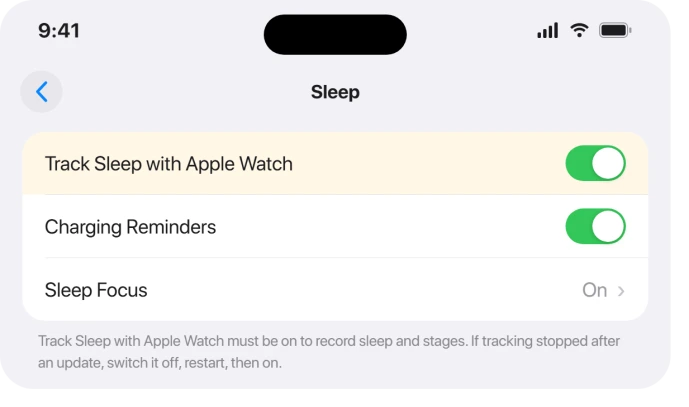
The switch is called Track Sleep with Apple Watch, and it lives in three places that all control the same setting.
Check all three so one stale copy does not override the others. On the watch: Settings > Sleep > Track Sleep with Apple Watch (on the watch this sub-setting sometimes reads Sleep Tracking).
On the phone: Watch app > My Watch > Sleep. And in Health: Health app > Browse > Sleep > Options.
If it was already on, toggle it off, restart, then back on. This is a confirmed re-sync fix. As one Apple Support contributor put it: "Make sure your sleep schedule and tracking is fully enabled. I would also toggle the respective settings OFF and then back ON again."
Check the things that quietly block a clean night
A few wear and battery habits stop tracking before software is even involved, and they explain a lot of blank or partial nights.
Wear it on your wrist, not the charger. Sleep tracking uses wrist motion, so a watch on the nightstand or charging overnight records nothing. Charge during your Wind Down or while you get ready instead.
Fit it snugly. Stages and overnight vitals need continuous skin contact, about one finger's width above the wrist bone.
A loose band gives you a bare "time asleep" line with the Deep and REM detail missing. Tighten it for sleep; you can loosen it during the day.
Charge above 30 percent before bed. Apple is explicit: "If your Apple Watch is charged less than 30 percent before you go to bed, you're prompted to charge it." Below that, or if it dies overnight, you get a blank or partial record.
Turn on Charging Reminders under Settings > Sleep.
The same Sleep settings hold the Sleep Screen switch. If Sleep Focus no longer locks the watch after watchOS 27, the Sleep Screen page shows where to turn it back on.
Turn off Low Power Mode at night. In Low Power Mode the background heart-rate and blood-oxygen reads are switched off, and those feed stage estimation.
So you can end up with rough time asleep and no Deep or REM breakdown. It clears automatically once the battery hits 80 percent.
If you rely on it overnight, fix the watchOS 26 battery drain instead.
Set or repair the Sleep schedule
The watch can auto-detect sleep without a fixed schedule, but a schedule makes it more reliable. It is also needed for Bedtime Consistency and a complete Sleep Score.
A missing, empty, or too-narrow schedule is a frequent reason parts of the night go unrecorded.
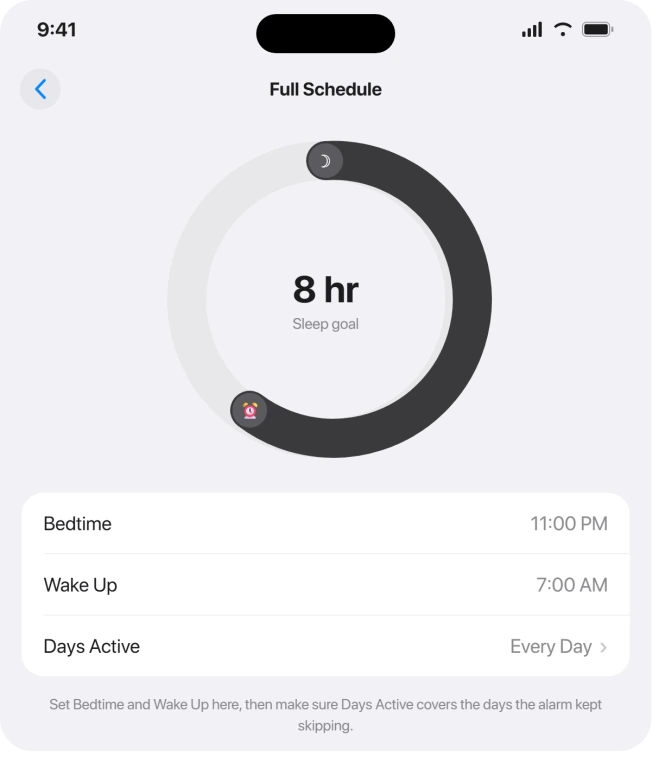
Build or edit it in Health: Health app > Sleep > Full Schedule & Options.
Apple's documented path: "In the Health app, tap Search, then tap Sleep, and tap Full Schedule & Options. Then tap Sleep Schedule at the top of the screen to turn your schedule off or on."
Tap a schedule, then Edit, set Days Active, and drag the curved slider for Bedtime and Wake Up. Make the window realistic.
An overly early Wake Up time can cut off sleep if you doze back off, and a tight window can miss the edges of your night.
One design limit to know: the native Sleep app does not detect naps. Daytime sleep will not appear and will not show stages.
If you nap and want it counted, add it manually under Health > Browse > Sleep > Add Data, or use a third-party app.
When sleep records on the watch but is empty in Health
If the watch shows last night but the iPhone Health app does not, that is a sync or permissions problem, not a tracking failure.
If nothing is syncing at all, work through the Apple Watch not connecting fixes first.
One user described it exactly: "the sleep data did not share to Health on iPhone. Everything else is shared well. Only the sleep data is empty."
Check the data source first: Health app > Browse > Sleep > Data Sources & Access. Confirm your Apple Watch is listed and enabled, sitting at the top.
Sources higher in the list take priority, so if a third-party app outranks the watch, reorder it.
Then restart both devices, and re-toggle Track Sleep with Apple Watch off and on to force the watch and phone to re-store the setting on both sides. This combination resolves most empty-in-Health cases.
The watchOS 26 change behind the missing Deep and REM
watchOS 26 swapped in a new sleep-staging algorithm.
Apple's own technical paper, updated October 2025, notes the staging now "incorporates foundation models developed using data from the Apple Heart and Movement Study," shipped with iOS 26 and watchOS 26.
That timing lines up with a wave of reports starting on the 26.0 release in September 2025. The most consistent complaint is Deep sleep collapsing.
One Series 9 owner: "Now it no longer tracks deep sleep, which was typically 45 minutes a night over the past few years, but is now tracked as 0 to 5 minutes a night."
Others reported near-zero REM despite vivid dreams, and the watch flipping between awake and asleep all night.
The same Series 9 user cross-checked against a Fitbit and saw their usual breakdown, concluding: "The only commonality I can see is the watch and phone software upgrades."
A few version notes so you set expectations correctly. watchOS 26.1 did not touch sleep tracking.
watchOS 26.2 (December 2025) only rescaled the Sleep Score bands and renamed "Excellent" to "Very High"; a 70 that used to read High now needs 81.
That is a label change, not a stage-accuracy fix, even though some headlines framed it as better tracking.
Apple acknowledged the issue only through Support, telling users it was "submitted and escalated for review," with no public statement and no fix timeline.
Through watchOS 26.3, 26.4, and 26.5, no release is documented as fixing the stage accuracy. Treat stage numbers on these builds with some skepticism.
Restart, then re-pair as a last resort
If settings, fit, charge, and schedule all check out and it is still wrong, escalate carefully. Start with the gentle step: restart both devices.
Hold the side button to power off the watch, or force-restart by holding the side button and Digital Crown about 10 seconds until the Apple logo. Restart the iPhone too.
Re-pairing is the heaviest step, and it is also the one confirmed fix in the bundle for a stubborn case.
A Series 11 owner on 26.3 fixed a broken Time Asleep view and a sunken Sleep Score this way: "unpairing and re-pairing the Apple Watch restoring from backup (not setting up as new), the issue is resolved… my Sleep Score returned to normal (90 last night)."
Important data warning before you do this. Apple's unpair and erase steps are blunt: unpairing erases the watch and restores it to factory settings.
The watch is backed up to your iPhone automatically during unpairing, so do not manually erase it first.
Go to Watch app > My Watch > All Watches > (i) > Unpair Apple Watch, then pair again and choose Restore from Backup, not Set Up as New.
When it is your sensor or wear habits, not watchOS
Not every blank night is the algorithm. A genuinely dirty sensor will block heart-rate reads that stages depend on.
One user found the cause was simple: "the underside of the watch was so dirty that the sensors weren't reading." Wipe the back glass and band contact area with a soft, slightly damp cloth and dry it.
Running a third-party sleep app at the same time can clash with the native metrics, because Health picks one primary data source.
Either remove the competing app, or set Apple Watch as the top Sleep source. Do not run both and expect clean native data.
And accept the floor on accuracy. Even when everything is working, stage detection runs around 70 to 75 percent agreement with a clinical sleep study, so some "wrong" stages are expected.
A true hardware fault is rare.
If the Heart Rate app shows no or erratic readings in daytime with good contact, try the heart rate not reading fixes first; if those fail too, that points to service, not settings.
On a Series 12 or Ultra 4, a week of logged sleep also unlocks the new Readiness score. The Readiness page lists what else it needs.
Back up via the iPhone, then contact Apple Support.
The Short Version
- Sort it first: no sleep at all, versus time asleep but flat Deep and REM. The fixes overlap but the priority differs.
- Confirm Track Sleep with Apple Watch is on in all three places (watch Settings, Watch app, Health), and toggle it off and on to re-sync.
- Cover the basics: wear it on the wrist (not charging), fit it snug, charge above 30 percent, turn off Low Power Mode at night.
- Set a realistic Sleep schedule in Health > Sleep > Full Schedule & Options. Naps are not tracked by design.
- Empty in Health but fine on the watch is a sync issue: check Data Sources & Access and restart both devices.
- The collapsed Deep and REM is largely the new watchOS 26 staging algorithm; 26.1 through 26.5 did not fix it, and 26.2 only relabeled the Sleep Score.
- Last resorts: restart both devices, then unpair and re-pair with Restore from Backup (this erases the watch but backs up first).
- Clean the sensor, drop conflicting sleep apps, and remember stage accuracy is an estimate, not a clinic.
Where to Next
Where sleep is tracked but the hours look wrong, the numbers being off has a separate explanation.
More Apple Watch fixes are collected on the Apple Watch problems and fixes hub. For everything else, start at the PCGlance homepage.

Isaac Smith is the founder and editor of PC Glance, a website that covers computers, laptops, and technology. He is a tech enthusiast and a computer geek who loves to share his insights and help his readers make smart choices when buying tech gadgets or laptops. He is always curious and updated about the latest tech trends.