
You are trying to decide whether to turn Background App Refresh off, and every answer you find is either that it destroys your battery or that you should leave it alone.
Neither is much use when what you want to know is what you lose.
So let me give you the trade honestly, including a third setting that sits between on and off and hardly ever gets mentioned.
What it actually does
The switch apps article gives the mechanism: "After you switch to a different app, some apps run for a short period of time before they're set to a suspended state. Apps that are in a suspended state aren't actively in use, open, or taking up system resources. With Background App Refresh, suspended apps can check for updates and new content."
The clearer sentence is on the page Apple wrote for Vision Pro and never wrote for iPhone: "Background App Refresh allows content in apps to stay up to date, even when you're not using them."
That is the whole of what Apple describes. It lets a suspended app wake up briefly and fetch something.
Nothing in Apple's material has it keeping apps running, holding them in memory, or deciding whether an app reloads when you switch back to it.
One thing it definitely does not touch: push notifications. A message or an alert that arrives from a server reaches you whatever this setting says.
Where it is, and why you tap the same row twice
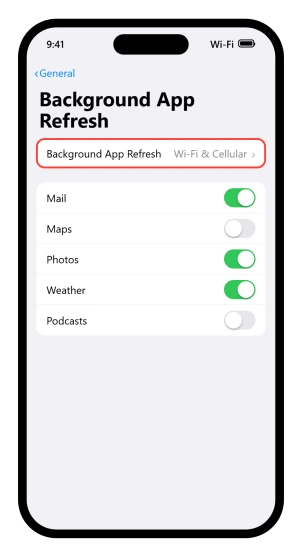
Settings > General > Background App Refresh. Then tap the row called Background App Refresh a second time.
The screen has two levels and only the deeper one holds the master control, which is why people set the per-app switches and wonder why nothing changed.
That deeper screen gives you three options:
- Off
- Wi-Fi
- Wi-Fi & Cellular Data
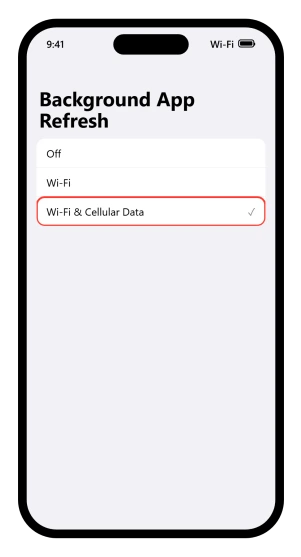
That screen's own screenshot in Apple's article shows the checkmark on Wi-Fi & Cellular Data, and no default is published anywhere, so read it as one example image rather than proof of how your phone left the factory.
Look at which of the three is ticked on yours before you decide anything.
The first screen holds a list of every app with its own switch.
The same per-app switch also appears at Settings > Apps > [the app] > Background App Refresh, which is the route Dexcom sends its own users down, so you can meet one control twice by two paths and take it for two settings.
The middle option
If your reason for reaching for this setting was cellular data rather than battery, Wi-Fi is the answer, and it sits one row below Off on the same screen.
Background refreshing carries on over Wi-Fi and stops entirely on cellular.
If it was battery, the per-app list is the better tool than the master switch. Switch off the apps you open rarely and leave on anything whose job is to reach you.
Leave it on if an app is meant to warn you
A continuous glucose monitor is the clearest case, and its maker is explicit about this setting.
Dexcom's page on signal loss, which covers the G6, G7 and Dexcom ONE, says Background App Refresh "should always be set to on".
It then warns that in Low Power Mode "the background refresh will stop", and tells you to keep Low Power Mode switched off rather than the refreshing.
Read that twice, because nobody has to touch this setting to lose their alerts.
Low Power Mode turns it off on its own, and on the iPhone 17 models Adaptive Power ships switched on and can turn Low Power Mode on by itself once the battery gets low.
The alerts can stop on a phone whose owner never opened Settings.
Low Power Mode is at Settings > Battery > Power Mode on iPhone 15 and later, and Settings > Battery on iPhone 14 and earlier.
The same Dexcom page names two more iPhone settings that silence the same alerts: a Focus, unless the app is on the allowed list, and Screen Time limits, unless the app is set to always allowed.
It also asks people not to swipe the app closed, because a closed app cannot use Bluetooth even with Bluetooth on.
Dexcom is the only maker we found putting this in writing, so treat it as the example rather than the rule.
If an app on your phone exists to tell you something while you are not looking at it, find that maker's own required settings page before you touch this screen.
Four things it does not control
Widgets. The developer documentation on keeping a widget up to date runs to thousands of words and never mentions Background App Refresh once.
What it describes instead is a reload budget: "For a widget the user frequently views, a daily budget typically includes from 40 to 70 refreshes." The inputs listed are how often you look at the widget, when it last reloaded, and whether its app is active.
Our own guide to widgets not updating on iOS 26 starts with this setting and flags in its own status line that the step to the widget is ours rather than Apple's.
Treat it as a reasonable guess, not a documented mechanism.
Apple Mail. Different system.
The battery page sends Mail users to a separate control in the very next bullet, and the Low Power Mode article lists "Email fetch: turned off" and "Background app refresh: turned off" as two distinct items.
Mail's background updating is governed by Fetch New Data, at Settings > Apps > Mail > Mail Accounts > Fetch New Data.
Third-party mail apps like Gmail or Outlook are ordinary apps and do sit under this setting.
Live Activities. They have their own switch and their own update path.
The ActivityKit documentation says they "use a different mechanism to receive updates compared to widgets", arriving either from the app itself or by push from the app maker's server.
Our guide to Live Activities not showing covers what actually governs them.
Location-based reminders. The region monitoring documentation for developers describes a separate path: the system watches for you crossing a boundary and "wakes up your app as needed when conditions change between satisfied and unsatisfied states", and if the app is not running it tries to launch it.
That is a trigger, not a scheduled refresh. Apple does not connect it to the Reminders app in writing, and neither do we.
One trap to name. Apple does write that apps with complications keep refreshing even with the setting off, but that sentence is on an Apple Watch page about the Watch's own setting. It does not transfer to your iPhone.
So if you turned it off hoping to fix one of those four, I am afraid it was never going to help, and you can turn it back on.
What it genuinely costs you
Only one iPhone feature is documented as needing it. To set up automatic downloads for Apple News+, its guide lists "Turn on Background App Refresh." Switch it off and offline reading stops for subscribers, quietly.
Beyond that, it costs you freshness in ordinary third-party apps.
Your bank, your parcel tracker, your smart home app, your third-party mail client: they open on older data and take a moment to catch up.
Apple publishes no list of what is affected, which is why no page can tell you precisely what you are losing.
Downloading an offline map in Apple Maps may be a second case, though no page names Maps, and our guide to offline maps not working treats it as a suspect rather than a documented cause.
On the other side, Apple's battery page is direct about the gain: "To improve battery life, you can turn off the feature that allows apps to refresh in the background."
Our guide to what drains an iPhone battery on iOS 26 tells you to trim it, and our guide to an overheating iPhone calls it the instant relief fix, on the strength of owners who said the phone cooled at once.
Both are fair. This page is the bill for both.
If the switch is grayed out, the phone is managed
The developer documentation records three states for this. Alongside available and denied there is restricted, described as "Background updates are unavailable and the user cannot enable them again."
That is what a managed phone looks like. Parental controls, a school or work profile, or a managed child account can all lock the setting, and no amount of tapping will move it.
Your phone may already be doing this for you
Before you switch anything off, check what your phone is doing on its own.
There is a stated default on the power modes page: "On iPhone 17, iPhone 17 Pro, iPhone 17 Pro Max, and iPhone Air, Adaptive Power is on by default." And Adaptive Power "can lower screen brightness, limit background activity, and make performance adjustments to conserve power throughout the day."
So on those four models, background activity is already being limited, adaptively, without anyone choosing it. Low Power Mode goes further and turns this setting off outright while it is on.
On any other iPhone, neither applies until you switch Low Power Mode on yourself.
Status: written against iOS 26.6. No page in Apple's iPhone User Guide is about this setting, checked against all 988 page titles. Its only iPhone explanation sits under an app switcher article.
Should I turn off Background App Refresh on my iPhone?
Only if you want the battery saving and can live with third-party apps opening on stale data. Consider the middle option instead: setting it to Wi-Fi keeps background refreshing but stops it using cellular data. Do not turn it off if you rely on an app to alert you when you are not looking.
Does Background App Refresh drain battery?
The battery page lists turning it off as a way to improve battery life, without saying how much. On the iPhone 17 models, Adaptive Power is already limiting background activity by default, so the manual switch may buy you less than it once did.
Does turning off Background App Refresh stop widgets updating?
Probably not, though it is the usual advice. The developer documentation on widget refreshes never mentions the setting, and describes a separate daily reload budget instead, sized by how often you actually look at the widget. Treat the connection as an inference rather than something Apple documents.
Will I stop getting notifications?
No. Push notifications arrive from a server and do not travel through this setting. What you lose is content an app would have fetched for itself in the background, so a parcel tracker may show an older status when you open it, but the alert that it moved still reaches you.
Why is Background App Refresh grayed out on my iPhone?
Because the phone is managed. The developer documentation names a restricted state in which background updates are unavailable and the user cannot enable them again. Parental controls, a school or work profile, or a managed child account will all do it.
The Short Version
- It lets suspended apps wake up briefly to fetch new content. That is all Apple describes it doing.
- Push notifications do not run through it, so switching it off does not cost you alerts.
- The route is Settings > General > Background App Refresh, and you tap that row twice to reach the master control.
- There are three options, and the middle one, Wi-Fi, removes the cellular cost without switching refreshing off.
- Widgets, Apple Mail, Live Activities and location reminders run on other mechanisms, so switching this off does not explain those.
- Leave it on for medical and safety apps. Dexcom tells its users to, and warns that Low Power Mode stops it too.
- Your phone may already be limiting this on its own. Adaptive Power is on by default on the iPhone 17 models, and Low Power Mode switches this setting off outright.
Where to Next
My honest advice is to leave it on and turn it off for the two or three apps that abuse it, rather than switching the lot off and losing fresh content everywhere.
The middle setting exists for exactly that, and it is the one most people never find.
If you have turned it off and something specific broke, tell me which app and I will tell you whether that is expected behaviour.

Isaac Smith is the founder and editor of PC Glance, a website that covers computers, laptops, and technology. He is a tech enthusiast and a computer geek who loves to share his insights and help his readers make smart choices when buying tech gadgets or laptops. He is always curious and updated about the latest tech trends.