
Your iPhone is asking for a PUK code you have never heard of, and I can tell you straight away that the phone itself is fine.
A SIM PIN has been entered wrong too many times, so the SIM locked itself, and it now wants an unlock key that only your carrier holds.
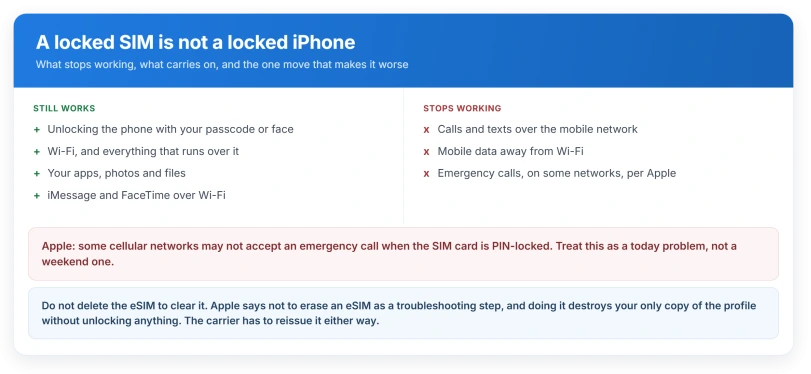
One thing before anything else, because it matters today rather than tomorrow: Apple says a PIN-locked SIM can stop some networks accepting an emergency call.
Why this is worth sorting out today
A locked SIM is easy to treat as an inconvenience you can leave until the weekend. Apple's own guide gives you a reason not to.
Apple, in the iOS 26 user guide on emergency services: "Some cellular networks may not accept an emergency call from iPhone if iPhone isn't activated, if iPhone isn't compatible with or configured to operate on a particular cellular network, or (when applicable) if iPhone doesn't have a SIM card or the SIM card is PIN-locked."
Ours, and worth saying plainly: that is a "may", not a "will", and it is network by network.
But it means a locked SIM is not a purely cosmetic problem, and it is a reason to sort this out today rather than at the weekend.
If somebody in your house depends on that phone reaching help, use another phone for emergencies until the SIM is unlocked.
Never guess. This is Apple's instruction, not our caution
Apple, on using a SIM PIN: "Never try to guess a SIM PIN or Personal Unlocking Key (PUK) code." Its next sentence: "The wrong guess can permanently lock your SIM card or eSIM, and then you would need a new SIM card or eSIM."
Apple repeats it higher up the same page for the PIN on its own: "Don't try to guess your SIM PIN." So this is not a throwaway line.
Apple gives no number. It says "too many times" and names an alert, and that is all.
The figure of ten wrong PUK attempts, which you will meet everywhere, comes from the mobile industry specification rather than from Apple or from any carrier page we opened.
So treat ten as probably right and definitely not Apple's. The instruction that is Apple's is simpler: do not try even once.
What is actually locked, and what still works
Community threads on this are full of people who believe their iPhone itself has died. It has not.
The SIM is locked. The iPhone is not. You can still unlock the phone normally, use Wi-Fi, open your apps and reach anything that does not need the mobile network.
Apple prints one status string for this: "your SIM card or eSIM will automatically lock and you'll see "Locked SIM" in the status bar".
Worth noting if you are searching for the exact words: the screen most owners describe is an "Enter PUK" prompt, and that wording appears on no Apple page we read. Apple only ever writes "Locked SIM".
If your status bar shows SOS or No Service instead and you have never seen a PIN prompt, this is probably not your problem at all, and SOS or No Service on iOS 26 is the page for that.
What changed, and why the instructions may not fit your phone
This is the part that matters most in 2026.
Apple's own article on this was written for plastic SIM cards only. Snapshots from September 2021 and February 2023 do not contain the word eSIM anywhere.
The advice was to take the SIM out and read the carrier's name off it.
By March 2024 Apple had rewritten it, and the current version dated January 2026 says "SIM card or eSIM" throughout, adds a route for finding your carrier without a tray, and branches the settings path for Dual SIM and Dual eSIM.
So Apple did not state in writing that an eSIM could be PIN-locked until somewhere between February 2023 and March 2024, roughly eighteen months after the iPhone 14 shipped without a SIM tray in the United States.
That matters for a practical reason.
Every iPhone 14 and later sold in the US, and the whole iPhone 17 line including the 17e, has no SIM tray at all, so any instruction that starts by taking the card out cannot be followed.
Yes, an eSIM can be destroyed the same way
Apple is unambiguous once you read the current version. The guess warning covers "your SIM card or eSIM", and the recovery is the same: "ask for a new SIM card or eSIM".
Do not try to fix this by deleting the eSIM. It is the obvious move and it is the wrong one.
Apple, on erasing an eSIM: "Don't erase an eSIM as a troubleshooting step unless directed to by your carrier." And on the same page: "If you erase an eSIM, you'll need to contact your carrier to get a new one. Then set up the new eSIM."
Ours, from those two sentences: deleting the eSIM does not clear the lock.
It destroys your only copy of the profile and leaves you calling the carrier anyway, except now you have also lost the line. If you were going to ring them regardless, ring them first.
A SIM the carrier will not accept at all produces a different message on a brand new phone, and our page on why a phone will not finish setting up covers the error that sends you to the carrier rather than to a restore.
Our page on an eSIM stuck on Activating covers the setup side if the new profile then gives you trouble.
How to actually get the code
Apple: "Contact the carrier that gave you the SIM card or eSIM. If you aren't sure which carrier to call and have a device with a physical SIM card, remove your iPhone SIM card or iPad SIM card and check the card for the carrier's name or logo."
For an eSIM there is no card to read, so Apple points you at the screen instead: your carrier is named directly above Turn On This Line in the cellular settings.
Two things worth knowing that Apple does not say. Some carriers let you pull the PUK from your online account rather than phoning, Verizon among them.
And the code is typically eight digits, which is a useful check that somebody has read you the right number.
On the plastic wallet the SIM arrived in: Apple mentions that packaging only in connection with a default PIN, never a PUK.
People do report finding numbers printed there, and several report finding four different numbers and not knowing which is which. Ring the carrier rather than typing one and hoping.
If the prompt disappears before you get the code, open the Phone app and try to place a call. That brings it back.
If you already exhausted the attempts
Apple: "if an alert says, "PUK exhausted," ask for a new SIM card or eSIM".
That is the whole remedy. There is no software fix, no reset, and no app. The line has to be reissued by the carrier, and on an eSIM that means a new profile rather than a piece of plastic in the post.
Where the SIM PIN lives, if you want it off
Apple's route: Settings, Cellular, then SIM PIN on a single-line iPhone. On Dual SIM or Dual eSIM, tap the number you want first, then SIM PIN. Outside the United States the menu reads Mobile rather than Cellular.
That screen is also how a PIN gets switched on in the first place.
If you never set one, a carrier default may have been active from the day the line was set up, which is why "a PIN I never chose" is such a common complaint.
Status: iOS 26.6, checked 15 August 2026. Apple states no number of failed PUK attempts anywhere, and its own SOS troubleshooting article never mentions a locked SIM as a cause.
What does not help
- Guessing, even once. Apple's instruction is not to, and the consequence is a dead SIM or eSIM.
- Deleting and re-adding the eSIM. Apple tells you not to do this except on carrier instruction, and it does not clear the lock.
- Restarting, Airplane Mode, or resetting network settings. None of them touches a SIM PIN counter.
- Apple's own SOS troubleshooting page. It is where a reader with a dead SIM lands, and it walks through Airplane Mode, restarts and carrier settings without mentioning a locked SIM once.
Is my iPhone locked or just my SIM?
Just the SIM, if the prompt is asking for a PUK or a SIM PIN. The phone unlocks normally with your passcode or face, Wi-Fi works, and your apps open. What you lose is the mobile network, which means calls, texts and mobile data.
How many PUK attempts do I get?
Apple does not publish a number, and neither does any carrier page we read. Ten is the figure everyone quotes and it comes from the mobile industry specification rather than from Apple. Since Apple's instruction is never to guess at all, the safest answer is that you should be using zero of them.
Can an eSIM really be locked forever?
Yes. Apple's current wording covers eSIMs in the same sentence as SIM cards, and the remedy is the same: the carrier issues a new one. Older guides say otherwise because Apple's own article said nothing about eSIMs until around 2024.
The Short Version
- The SIM is locked, not the iPhone. The phone still works for everything that does not need the network.
- Apple says a PIN-locked SIM may stop some networks accepting an emergency call. Use another phone for emergencies until it is sorted.
- Never guess. Apple says so twice on one page, and a wrong guess can kill the SIM or eSIM permanently.
- Apple publishes no number of allowed attempts. The ten you see everywhere is from the industry spec, not from Apple.
- An eSIM can be destroyed exactly like a plastic SIM, and Apple only put that in writing around 2024.
- Do not delete the eSIM to fix it. That does not clear the lock and it loses your only copy of the profile.
- The code comes from the carrier. Some let you fetch it from your online account.
Where to Next
Ring your carrier and ask for the PUK. That is the whole answer, and there is no clever way around it.
While you wait, remember the phone itself is fine for everything that does not need the network, so you are not without a device.
If your carrier gives you the code and it is rejected, stop immediately and say so in the comments, because at that point the next attempt matters a great deal.

Isaac Smith is the founder and editor of PC Glance, a website that covers computers, laptops, and technology. He is a tech enthusiast and a computer geek who loves to share his insights and help his readers make smart choices when buying tech gadgets or laptops. He is always curious and updated about the latest tech trends.